Articles & BlogBy Trapper W. Brown9 min read
For anyone who has pasted an "API key" into a setup screen without knowing what it was. By the end you will have made an API request yourself, and you will know how keys leak and how to keep yours out of sight.
Every app on your phone spends its day asking other computers for things. A weather app does not measure the rain. It asks a weather service. A game launcher does not store your friends list. It asks a server.
The asking is done through an API (application programming interface): a set of addresses a program can call to get data from a service or to tell it to do something. A web page is built for a person to read. An API is built for a program to read.
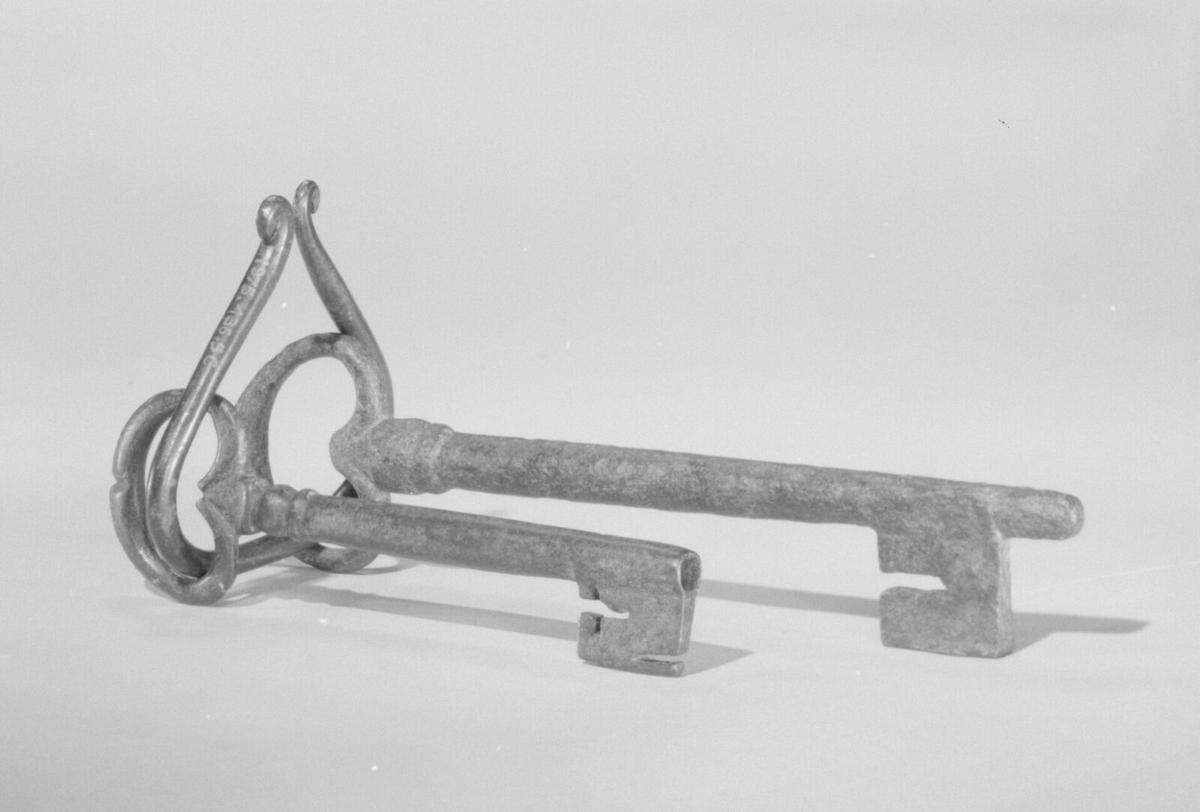 Whoever holds a key can use it, and the lock cannot tell the owner from a stranger. An API key works the same way. Photo by the Metropolitan Museum of Art, CC0, via Wikimedia Commons.
Try one: a request that needs no key
Some APIs answer anyone. GitHub, the code hosting site, has one that returns a single line of design advice. Open a terminal and type:
curl https://api.github.com/zen
This asks GitHub's API for one line of text and prints the answer. curl is a small program for making web requests. In the older Windows PowerShell, type curl.exe so you get the real program and not a PowerShell stand-in with the same name.
Approachable is better than simple.
That is what a run on 12 November 2026 returned. Yours will likely differ, because the line changes from call to call. Now ask for the response headers too:
curl -i https://api.github.com/zen
The -i flag prints the headers, which are the notes a server attaches to its answer, above the text itself.
HTTP/1.1 200 OK
Content-Type: text/plain;charset=utf-8
X-RateLimit-Limit: 60
X-RateLimit-Remaining: 58
The output here is trimmed to four lines. 200 OK means the request worked. The two rate limit lines are the interesting part. GitHub's documentation, read in November 2026, says requests with no sign-in are limited to 60 an hour and are counted against your IP address, while a signed-in user gets 5,000 an hour. So even this friendly endpoint is asking a question: who are you, and how much should I let you do? Keys exist to answer it.
What is an API key?
An API key is a long random string that a service issues to you. Your program sends it with each request, and the service uses it to decide who is asking, what they may do, and whom to bill. You will also see the words token, secret and access token. The risk is the same for all of them.
Most services want the key in a request header. GitHub's documentation shows the header as Authorization: Bearer YOUR-TOKEN. With curl, that looks like this:
curl -H "Authorization: Bearer EXAMPLE-KEY-NOT-REAL-0000" https://api.example.com/v1/orders
The -H flag adds a header to the request, here the one that carries the key. Both the key and the address are fake, so expect no answer.
How is a key different from a password?
| Password | API key | |
|---|---|---|
| Who uses it | A person, typing | A program, with nobody watching |
| Where it lives | In your head or a password manager | In a file or setting the program can read |
| Second factor | Often backed by a code or a passkey | Usually none. The key alone is enough. |
| Reach | Often the whole account | Can be limited to certain data and actions |
| Lifetime | Until you change it | Can be set to expire and be replaced |
GitHub's own advice on its tokens is blunt: "Treat your access tokens like passwords." The second row is where the trouble starts. A key has to sit where software can read it, which also makes it easy to copy somewhere it should never go.
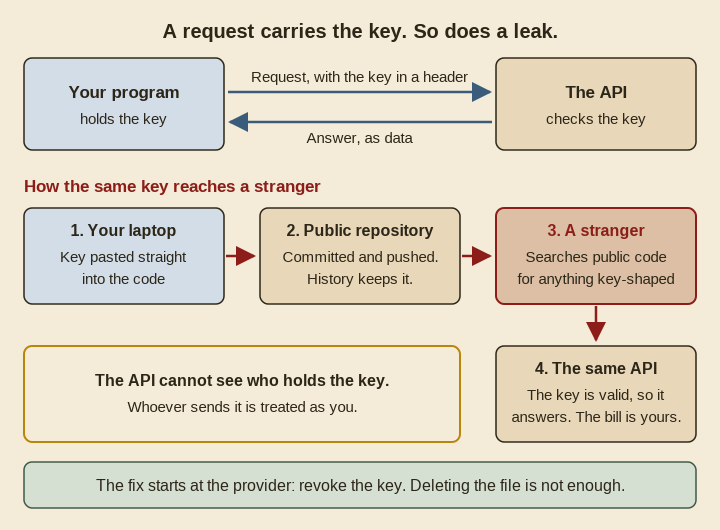 The API checks the key, not the person. A leaked key works for whoever finds it.
How do keys leak?
Three ways cover most leaks.
- Committed to a public repository. A developer pastes the key into the code to get something working, saves the work with Git (the tool that records every version of a project), and pushes it to a public project. The key is now in the project's history, where anyone can read it. Removing it in a later version does not remove it from the history.
- Pasted in chat. Someone asks for help in a forum, a Discord server or a work channel and pastes a whole settings file, or a screenshot of one. Everyone there now has the key, and so do the service's search and logs.
- Baked into an app. A key built into a phone app, a game mod or the script of a web page is handed to every user. Anyone curious can open the package and read it. A key that must stay secret cannot live in software you give to the public.
The first of these has numbers behind it. GitHub wrote in April 2025 that more than 39 million secrets were leaked across its platform in 2024 alone.
What does a leaked key cost?
The service cannot see who is holding the key. Whoever sends it is treated as you. The cost depends on what that key can do.
| Kind of key | What a stranger can do with it |
|---|---|
| Pay-per-use service (cloud servers, AI models, text messages) | Run up usage that is billed to you |
| Data service (a database, file storage, customer records) | Read, copy, change or delete the data |
| Sending service (email, chat bots) | Send spam or phishing under your name |
| Code hosting or deployment | Change your code, or what runs on your servers |
Picture two owners. A hobbyist's chat bot token leaks, and for one evening a stranger posts as the bot in a game community. A small clinic's key for its appointment reminder service leaks, and a stranger can text every patient on the list at the clinic's expense. Same mistake, very different bill.
GitHub's guidance is to consider any leaked secret compromised at once. If one of yours gets out:
- Revoke it at the provider, the service that issued it, and create a new one. GitHub's documentation calls revoking the most important step.
- Put the new key in place and check that your program still works.
- Read the provider's usage and billing pages for activity you did not cause.
- Then tidy the code. Rewriting a project's history is possible, but GitHub warns that it is disruptive and cannot reach copies other people already made. A revoked key is worthless wherever it sits.
Watch out
Deleting the key from the file and saving again does not fix a leak. The old version is still in the history and may already be copied. Revoke first, every time.
The habits that keep keys private
| Habit | What it does |
|---|---|
| Keep keys out of code | The key is read from the environment or a secrets manager when the program starts |
.gitignore | Tells Git to leave the file that holds your keys out of every commit |
| Least privilege | Each key can do only what its one job needs |
| Rotation and expiry | Keys are replaced on a schedule, so a stolen one stops working |
| Secret scanning | A tool checks code for anything shaped like a key |
Environment variables. An environment variable is a named value the operating system hands to a program when it starts. The code says "read the key from the variable named WEATHER_API_KEY", and the key never appears in the code. Many projects keep these values in a small file named .env beside the code for local work. One honest caveat: the OWASP Secrets Management Cheat Sheet prefers a dedicated secrets manager, a service that stores keys encrypted and hands them only to programs allowed to have them, because environment variables can be read by other processes and can end up in logs. For a hobby project an environment variable is still a big step up. A business should use a secrets manager.
.gitignore. GitHub's documentation describes a file named .gitignore, in the top folder of a project, that tells Git which files to ignore when you commit.
.env
That one line in .gitignore tells Git to skip the file named .env. There is a catch: the rule does not apply to a file Git is already tracking. GitHub's documentation gives the command to untrack it:
git rm --cached .env
This tells Git to stop tracking the file. If the file was ever pushed, the key in it has already leaked, so revoke it too.
Least privilege. GitHub recommends its fine-grained tokens, which can be limited to named repositories and specific permissions, over its older classic tokens, which reach every repository you can. Look for the same thing on any service: read-only keys, keys for one project. Use one key per program, so revoking one breaks one thing.
Rotation and expiry. OWASP's advice is to rotate secrets regularly so a stolen one works only for a short time, and to create them with an expiry date where the service allows it. GitHub recommends an expiry on its tokens and removes those unused for a year.
Secret scanning. GitHub's documentation says its secret scanning runs free and automatically on public repositories, and searches the entire history on every branch, along with issues, pull requests and discussions. For keys from partner services, GitHub tells the provider, which may revoke the key. A companion feature, push protection, blocks a push that contains a recognized key before it lands. It is on by default for personal accounts pushing to public repositories. Both catch only the key patterns they know.
Tip
Name every key for where it is used: "discord-bot-home-server", "laptop-testing". When one leaks, you will know which to revoke and what will stop working when you do.
What to remember
- An API lets programs ask services for data. You can call a public one with
curlin ten seconds. - An API key tells the service who is asking. Whoever sends it is treated as you.
- Keys leak through public repositories, chat messages and apps that ship with the key inside.
- A leaked key is compromised the moment it is exposed. Revoke it at the provider first and clean up second.
- Keep keys out of code, list key files in
.gitignore, give each key the least access it needs, and let keys expire.
Run the curl command tonight, then look through one project or settings folder of your own for a key sitting in plain text. If the idea of a project's history is new to you, the next article in this set, Git and GitHub for People Who Do Not Code, explains why a committed secret never really goes away. For the human side of the same problem, read Passwords, Passkeys and MFA: Identity Done Right.