Articles & BlogBy Trapper W. Brown7 min read
Security+ SY0-701, Objective 3.4: Explain why resilience and recovery belong in a security design
What happens at your organization at 2 a.m. when the power fails, a disk dies, or ransomware locks the file server? If the honest answer is "we would figure it out," you do not have a plan. You have a hope.
Security people spend most of their time on keeping secrets and stopping tampering. Availability gets less attention, right up until the day the systems are down and the waiting room is full. Objective 3.4 of the Security+ exam covers the design choices that decide how that day goes: how you keep running through small failures, where you go after a big one, and how you get your data back.
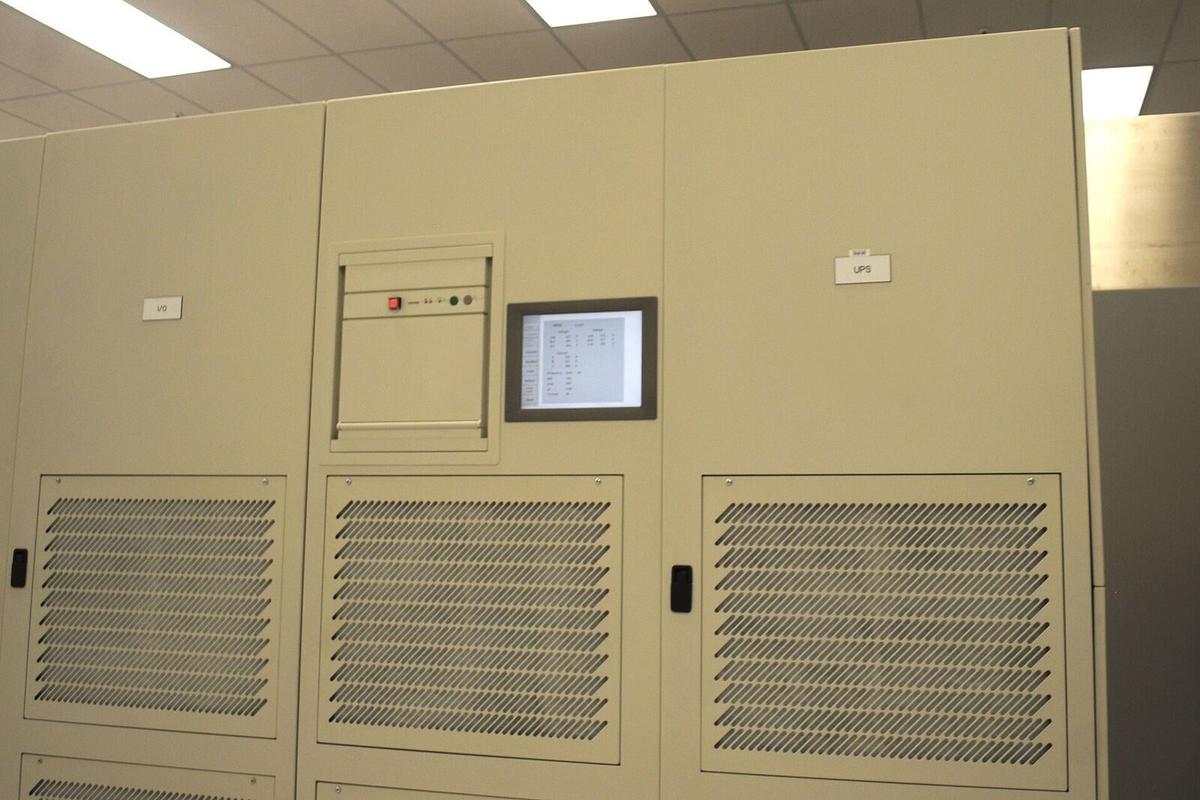 An uninterruptible power supply like this one holds a computer room up on batteries when the outside power drops. Photo by Derrick Coetzee, CC0, via Wikimedia Commons.
Keeping it running: high availability
High availability means a service stays up when one part of it breaks. The exam wants you to tell apart the two usual ways of getting there.
Load balancing spreads incoming requests across several servers that can each do the whole job. The servers do not need to know about each other. If one stops answering, the load balancer stops sending it work.
Clustering joins several servers into one system. The members watch each other and share data, so when one fails, another takes over its work with the same information in hand. That takeover is called failover.
The difference is coordination. A load balancer hands out traffic to independent servers, which suits a website's front end. A cluster keeps shared state, which suits a database, where two copies that disagree would be a disaster.
Where do you go when the building is gone?
High availability handles a failed server. A fire, a flood or a regional outage takes the whole room, and for that you need a second site.
| Site | What is waiting there | Time to be running | Cost |
|---|---|---|---|
| Hot | Equipment, current data, network links, ready to take over | Minutes to hours | Highest |
| Warm | Equipment and links, but data must be restored and systems brought up to date | Hours to days | Middle |
| Cold | Space, power and cooling, and nothing else | Days to weeks | Lowest |
Geographic dispersion means putting sites far enough apart that one storm, one earthquake or one power grid failure cannot hit both. A hot site across the street is still inside the same flood.
A large hospital system that cannot stop treating patients will pay for a hot site. A small clinic usually cannot, and a cloud provider's second region or a cold arrangement with tested backups may be the honest answer.
Tip
Exam questions on sites almost always turn on time and money. "Up within minutes" means hot. "Cheapest option" or "empty space with power" means cold. Anything described as partly equipped is warm.
Do not build on one of anything
Three more design ideas sit in this objective, and they share a theme.
Platform diversity means not running everything on one operating system, one vendor or one hardware model. A single flaw or a single bad update then cannot take down every system at once.
Multi-cloud systems apply the same thinking to cloud providers. If you run in two clouds, an outage or a contract dispute with one does not stop you. The price is complexity, because your staff must know both.
Continuity of operations is the plan for keeping essential work going while systems are down. In a clinic, that is paper charts and a printed phone list. It also names who is in charge when the usual people cannot be reached.
All of this depends on capacity planning, which the exam breaks into three parts:
- People: enough trained staff to run a recovery, including when the one administrator who knows the backup system is on vacation.
- Technology: enough servers, storage, licenses and bandwidth for the backup systems to carry the full load.
- Infrastructure: enough floor space, power and cooling at the other site to hold what you plan to move there.
Test it before you need it
Does your plan work? You only know if you have tried it. The exam lists four kinds of test.
| Test | What you do | What it costs you |
|---|---|---|
| Tabletop exercise | Talk through a scenario around a table, step by step | An afternoon, no risk to systems |
| Simulation | Act out a realistic scenario with the real tools and teams, away from production | More time and planning |
| Parallel processing | Run the recovery system beside the live one and compare the results | Double the work for a while, no downtime |
| Failover | Switch real work over to the backup system or site | Real risk, and the only full proof |
Start with a tabletop. It is cheap, and it finds the embarrassing gaps, like a recovery plan that is stored only on the server it is meant to recover.
Backups: the last line
When everything else fails, you restore. The terms below are all on the exam.
| Term | What it means |
|---|---|
| Onsite and offsite | Onsite copies restore fast but share the building's fate. Offsite copies survive it. Keep both. |
| Frequency | How often you back up, which sets how much work you can lose |
| Encryption | Scrambling the backup so a stolen copy is unreadable |
| Snapshots | A point-in-time picture of a system or virtual machine, quick to take and quick to roll back |
| Replication | Copying every change to a second system as it happens |
| Journaling | Keeping a log of each change, so work done since the last backup can be replayed |
| Recovery | Actually restoring from the backup, and proving you can |
Frequency deserves a number. If the clinic backs up once a night at midnight and the server dies at 4 p.m., sixteen hours of appointments, notes and billing are gone. If that is too much, back up more often or add journaling.
Encryption matters because a backup holds everything. A lost backup drive with no encryption is a data breach, even if nobody ever broke into the network.
Watch out
Replication is not a backup. It copies every change at once, and that includes deletions, corruption and files that ransomware has just encrypted. You need copies from earlier points in time, kept somewhere the attacker cannot reach.
Do backups pay off? In The State of Ransomware 2026, Sophos reported that 66 percent of organizations whose data was encrypted got it back from backups, up from 54 percent the year before. In the same report 48 percent paid the ransom.
| Restored from backups, this report | 66% |
|---|---|
| Restored from backups, year before | 54% |
| Paid the ransom, this report | 48% |
Recovery is still expensive. The same Sophos report put the median recovery cost at $375,000, not counting any ransom, and the mean at $1,700,200. The mean is so much higher because a few very large cases pull it up. Sophos also found that 55 percent were recovered within a week, which means a large share were not. I would plan for the slower case.
Power
Nothing above works without electricity, so the objective ends with two devices.
An uninterruptible power supply (UPS) is a battery that takes over the instant outside power drops. It lasts minutes, which is enough to ride out a flicker, shut systems down cleanly, or wait for something bigger to start.
A generator burns fuel and can run for hours or days, but it takes time to start. That is why you pair them: the UPS covers the gap, and the generator carries the load after that. A generator needs a fuel supply and a regular test under real load, because an engine that has sat untouched for three years may not start on the night you need it.
What to remember
- Load balancing shares work across independent servers. Clustering makes several servers act as one and fail over.
- Hot, warm, cold: faster recovery costs more. Keep sites far enough apart that one event cannot hit both.
- Platform diversity and multi-cloud avoid a single point of failure. Continuity of operations keeps the work going by other means.
- Capacity planning covers people, technology and infrastructure.
- Tests, from safest to most convincing: tabletop, simulation, parallel processing, failover.
- Keep backups onsite and offsite, encrypted, and frequent enough for the loss you can stand. Replication is not a backup.
- A UPS bridges minutes. A generator runs for hours.
Every item on this list costs money on a day when nothing is wrong, which is why it gets cut. Price the outage first, then the protection, and the argument for a tested backup and a second site usually makes itself.