Articles & BlogBy Trapper W. Brown8 min read
For anyone who nods along when people say "encrypted" or "hashed" without being sure of the difference. By the end you will be able to tell encoding, encryption and hashing apart, and check a file's hash yourself.
Three words get used as if they meant the same thing: encoded, encrypted, hashed. They do not. One of them offers no protection at all, one can be undone by whoever holds the right key, and one cannot be undone by anybody. Mixing them up is how passwords end up stored badly and how "secured" data turns out to be readable by anyone who looks.
None of this needs mathematics to understand. You need to know what goes in, what comes out, and who can get back to the start.
 The Enigma machine was symmetric encryption: both ends needed the same settings, and getting those settings to both ends was the hard part. Photo by Nicoleon, CC0, via Wikimedia Commons.
Encoding, encryption, hashing: what is the difference?
| Method | What it is for | Is there a key? | Can it be reversed? |
|---|---|---|---|
| Encoding | Putting data in a form another system can carry | No | Yes, by anyone |
| Encryption | Keeping data secret | Yes | Yes, by whoever holds the key |
| Hashing | Making a fingerprint of data | No | No |
Encoding changes how data is written, not who can read it. Base64 is the one you will meet most. It rewrites any data using only letters, digits and a few symbols, so it can travel through systems built for text. Try it in a Linux or macOS terminal:
printf 'hello world' | base64
This prints the Base64 form of the words "hello world".
aGVsbG8gd29ybGQ=
It looks scrambled. Now reverse it.
printf 'aGVsbG8gd29ybGQ=' | base64 --decode
This turns the Base64 text back into the original, with no key and no password.
hello world
Watch out
Base64 is not encryption. The mistake that hurts beginners is seeing a string like aGVsbG8gd29ybGQ= in a config file or a web request and assuming the secret inside is protected. Anyone can decode it in one command. If there is no key, there is no secret.
Symmetric encryption: one key
Encryption turns readable data, called plaintext, into unreadable data, called ciphertext, using a key. A key is a long random number. Without it, the ciphertext is noise.
In symmetric encryption, the same key locks and unlocks. The standard everyone uses is the Advanced Encryption Standard (AES), published by the US standards body NIST. It comes in three key lengths: 128, 192 and 256 bits. When your phone or laptop encrypts its storage, this is the kind of encryption doing the work.
Symmetric encryption is fast, and nobody is going to guess a 256-bit key. Its weakness is practical. Both sides need the same key, so how do you get it to the other side? If you send it over the same network you are trying to protect, anyone listening has it too. Armies once solved this with couriers and code books. The internet needed something better.
Asymmetric encryption: a key pair
Asymmetric encryption uses two keys that are made together as a matched pair. The public key can be handed to anyone. The private key never leaves its owner. What one key locks, only the other can unlock.
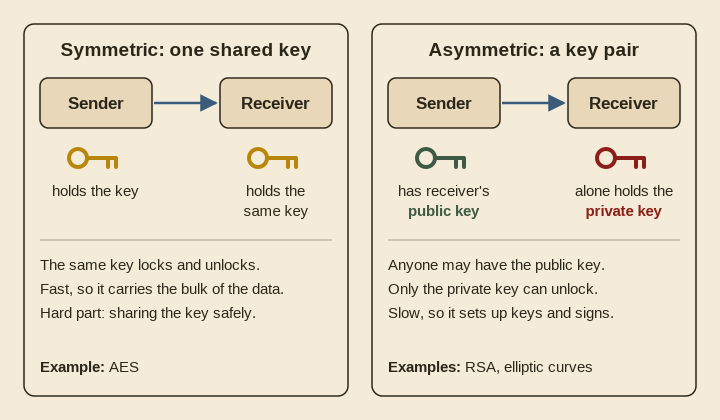 Symmetric encryption shares one key. Asymmetric encryption gives away one key and guards the other.
So if you want to send me a secret, you lock it with my public key, which I have posted for the world to see. Only my private key opens it, and I am the only one who has that. We never had to meet or share anything secret first. The two families you will hear named are RSA and elliptic curve cryptography. Elliptic curves do the same job with much shorter keys.
The catch is speed. Asymmetric encryption is far slower than symmetric, too slow to encrypt a video call or a large download.
That is why real systems use both. When your browser opens an HTTPS site, the two sides use asymmetric methods for a moment, to prove who the server is and to agree on a fresh symmetric key that no eavesdropper can work out. Then they switch to a fast symmetric cipher such as AES for everything that follows. The slow method solves the key sharing problem, and the fast method carries the data.
Hashing: a one way street
A hash function takes any input, of any size, and produces a short fixed-length value called a hash, a digest, or a fingerprint. The one to know is SHA-256, which always produces 256 bits, written as 64 hexadecimal characters (the digits 0 to 9 and the letters a to f).
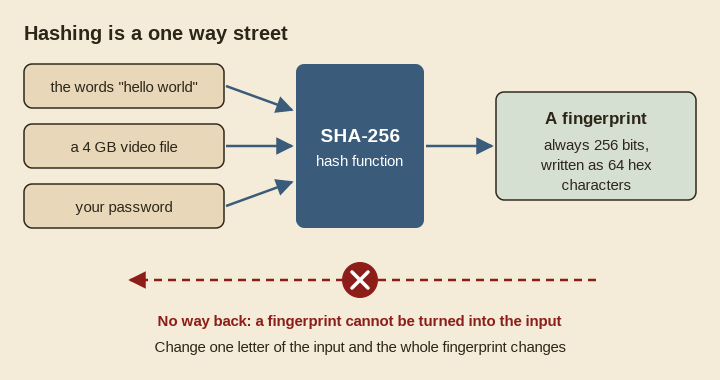 Any input in, a fixed-length fingerprint out, and no road back.
A good hash function has three properties. The same input always gives the same hash. A tiny change in the input gives a completely different hash. And there is no practical way to work backward from the hash to the input, or to find two inputs with the same hash.
See it for yourself. On Linux:
echo "hello world" > hello.txt
sha256sum hello.txt
The first line makes a small file. The second prints its SHA-256 hash.
a948904f2f0f479b8f8197694b30184b0d2ed1c1cd2a1ec0fb85d299a192a447 hello.txt
Type it exactly and you will get exactly that value, on any machine, today or in ten years. Now change the h to a capital H and hash it again:
1894a19c85ba153acbf743ac4e43fc004c891604b26f8c69e1e83ea2afc7c48f hello.txt
One letter changed, and nothing about the two hashes is alike.
On Windows, PowerShell has the same tool built in. SHA-256 is its default.
Set-Content -Path hello.txt -Value "hello world" -Encoding ascii
Get-FileHash hello.txt | Format-List
The first line makes the file. The second prints its hash.
Algorithm : SHA256
Hash      : 572A95FEE9C0F320030789E4883707AFFE12482FBB1EA04B3EA8267C87A890FB
Path      : C:\Users\you\hello.txt
The hash is not the one Linux gave, and that is a lesson in itself. Windows ends a line with two invisible characters where Linux uses one, so the two files differ by a single byte you cannot see. The hash sees it.
What are hashes for?
Checking downloads. Software projects publish the SHA-256 hash of each file they release. After you download, you hash your copy and compare. If the values match, your file is the same as theirs, bit for bit. If they do not, the download was damaged or tampered with, and you should not run it.
Tip
Do not try to compare 64 characters by eye. Paste the published value and your own into a text editor on two lines, one above the other, and any difference shows at once.
Storing passwords. A well-built site never stores your password. It stores a hash of it. When you log in, it hashes what you typed and compares the result. If the database is stolen, the thief gets hashes, not passwords.
Two additions make that hold up. A salt is a random value, different for every user, mixed in before hashing. With salts, two people with the same password get different hashes, and a thief cannot use a ready-made table of hashes for common passwords. The second addition is a slow hash. SHA-256 is built to be fast, which is the wrong quality here, because a fast hash lets an attacker test guesses quickly. Password hashing functions such as Argon2 and bcrypt are slow on purpose and can be tuned to stay slow as computers improve. OWASP's password storage guidance puts Argon2id first.
Digital signatures combine hashing with a key pair. To sign a document, I hash it and then transform the hash with my private key. Anyone can check the result with my public key. If it checks out, two things are proven at once: the document came from the holder of that private key, and not one byte has changed since it was signed. Software updates, the certificates behind HTTPS, and signed email all rest on this.
Where do you already use each one?
| Every day | What is at work |
|---|---|
| Opening an HTTPS website | Asymmetric keys and a signature to prove the server, then symmetric encryption for the pages |
| Unlocking an encrypted phone or laptop | Symmetric encryption of the storage |
| Logging in with a password | A salted, slow hash compared against the stored one |
| Installing a software update | A digital signature checked before anything runs |
| An email attachment in transit | Base64 encoding, so the file survives a system built for text |
| A VPN tunnel | Key pairs to set up, symmetric encryption to carry the traffic |
What to remember
- Encoding changes the form of data. It protects nothing. Base64 is encoding.
- Encryption needs a key and can be reversed by whoever holds it.
- Symmetric encryption uses one shared key and is fast. AES is the standard.
- Asymmetric encryption uses a public and a private key and is slow. RSA and elliptic curves are the families.
- Real systems use asymmetric methods to agree on a key, then symmetric encryption to do the work.
- A hash is a fixed-length fingerprint that cannot be reversed. SHA-256 gives 64 characters.
- Passwords belong in a salted, slow hash such as Argon2 or bcrypt, never in plain SHA-256 and never encrypted or encoded.
Tonight, download something that publishes a SHA-256 value and check it yourself. Then read HTTPS and Certificates: What the Padlock Means, which shows all three ideas working together in the few milliseconds before a web page loads.