Articles & BlogBy Trapper W. Brown9 min read
For anyone running their first Linux system, on a laptop, a virtual machine or a small server. By the end you will be able to install software safely, keep it patched, and tell when a system is too old to trust.
On Windows, installing a program has long meant finding a website, downloading an installer and hoping it is the real one. Then many of those programs ask to be updated one by one.
Linux does it differently, and the difference is one of the best security features it has. One tool installs everything, from one trusted source, and one command updates all of it at once.
 Upkeep is most of the job, whether you look after a room of servers or one laptop. U.S. Air Force photo by Airman 1st Class Eve Daugherty, public domain, via Wikimedia Commons.
Why do Linux users rarely download installers?
Because the distribution has already collected the software for them.
A package is one piece of software wrapped up for installing: the program, its settings, and a list of the other packages it needs. A repository is the distribution's library of packages, built and tested to work together. A package manager is the tool on your machine that fetches packages from the repository, installs them along with whatever they depend on, and later updates them.
| Term | Plain meaning |
|---|---|
| Package | One piece of software, wrapped for installing |
| Repository | The distribution's library of packages |
| Mirror | A copy of the repository on another server, closer to you |
| Package manager | The tool that fetches, installs and updates packages |
| Signature | Proof that a file came from the holder of a key, unchanged |
Debian and Ubuntu use a package manager named apt. Fedora uses one named dnf. The commands differ but the idea is identical.
Two newer formats sit alongside them. A Flatpak is a desktop application packaged to run on many distributions, in a sandbox that limits what it can reach. Flathub is the usual place to get them. A snap is a similar idea from Canonical's snapd project: self-contained, confined, and updated automatically. Both are handy when you want a newer version of a desktop program than your distribution carries. For the system itself, stay with apt or dnf.
How does a package reach you safely?
Repositories are copied to mirror servers all over the world. Debian, for one, says its mirrors are maintained by volunteers, on hundreds of servers. So how do you know a mirror has not tampered with a package? The answer is a digital signature.
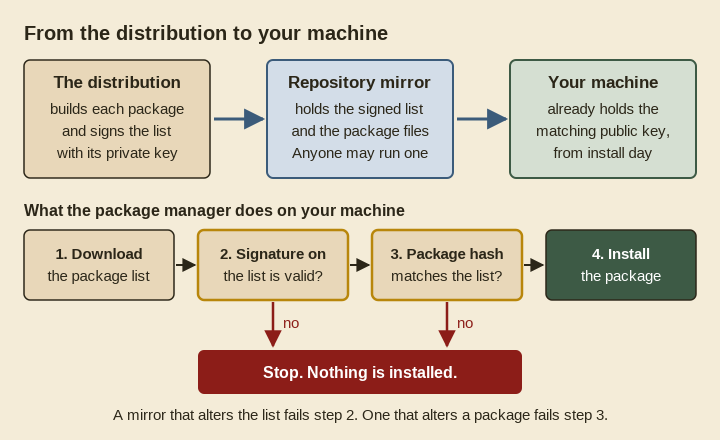 The chain of trust apt follows. The mirror carries the files but cannot forge the signature.
The distribution holds a private key that nobody else has. With apt, it signs the list of packages, and that list contains a hash (a fingerprint) of every package file. Your system was installed with the matching public key. Change one byte of a package on a mirror and its hash no longer matches the signed list. With dnf, the check is a signature on each package, made when the repository's gpgcheck setting is on.
What does signing give you? Proof that the package came from the distribution and was not altered on the way.
What does it not give you? The apt-secure manual page is frank about this. A signature does not mean the software is free of bugs or malicious code. It means you got what the repository's owner published. So every extra repository you add is another owner you are trusting with your whole machine.
Watch out
The mistake that hurts beginners is adding a stranger's repository, or pasting a line that downloads a script and runs it with sudo, because a guide said so. That hands root on your machine to whoever controls that site, today and at every future update. In the same family: never switch off signature checks (--nogpgcheck in dnf, allow-insecure in apt) to make an error go away. The error is the system doing its job.
apt and dnf side by side
| Job | Debian and Ubuntu | Fedora |
|---|---|---|
| Refresh the list of what is available | sudo apt update | Done for you by the commands below |
| See what would be updated | apt list --upgradeable | dnf check-upgrade |
| Install all updates | sudo apt upgrade | sudo dnf upgrade |
| Install a package | sudo apt install htop | sudo dnf install htop |
| Remove a package | sudo apt remove htop | sudo dnf remove htop |
| Search by keyword | apt search monitor | dnf search monitor |
| Show details | apt show htop | dnf info htop |
| Clear out unneeded leftovers | sudo apt autoremove | sudo dnf autoremove |
The trap for apt beginners is in the names. apt update installs nothing.
sudo apt update
Downloads the latest package lists, so your system learns what is new.
Reading package lists... Done
3 packages can be upgraded.
sudo apt upgrade
Installs the newer versions. It shows what it will do and waits for you to press Y.
By its manual, apt upgrade never removes a package that is already installed. When an update needs something removed, apt holds that update back. sudo apt full-upgrade is the version that is allowed to remove packages.
sudo dnf upgrade
Refreshes the lists and installs every available update in one step.
On older Fedora and Red Hat systems the check command is spelled dnf check-update.
Tip
Read the summary before you press Y. The package manager lists what it will install, upgrade and remove. If the "remove" list names something you use, answer N and find out why before going further.
Security updates and reboots
When a flaw is found in a package, the distribution's security team ships a fixed version to the repository. You get it the next time you update, and not before. A fix sitting in a repository protects nobody.
You can have the system fetch security fixes without being asked. On Debian and Ubuntu the tool is unattended-upgrades.
sudo apt install unattended-upgrades
Installs the tool if it is not there already.
sudo dpkg-reconfigure unattended-upgrades
Asks whether to download and install stable updates automatically. Answer yes.
sudo unattended-upgrade --debug --dry-run
Shows what it would install, and changes nothing. Its logs are in /var/log/unattended-upgrades/.
Fedora's equivalent is the dnf automatic plugin, run by a timer named dnf5-automatic.timer and set up in /etc/dnf/automatic.conf. Out of the box it does not apply updates until you set apply_updates to true.
When is a reboot needed? Installing a fix changes the files on disk. A program that is already running keeps using the old code in memory until it restarts. Some services are restarted for you as part of the update. Others keep running the old code until you restart them. The kernel cannot be swapped that way at all, so a kernel update only takes effect after a reboot.
| What was updated | When the fix takes effect |
|---|---|
| A program you start by hand | The next time you start it |
| A service that runs all the time | When the service restarts |
| The kernel | After a reboot |
ls /var/run/reboot-required
On Debian and Ubuntu, this file exists when an update is waiting for a reboot. "No such file" means you are fine.
dnf needs-restarting
On current Fedora, this reports whether core packages such as the kernel were updated since the last boot. Older systems spell it needs-restarting -r.
By default unattended-upgrades will not reboot the machine by itself. On a server, that means an updated kernel can sit unused for months unless someone plans the restart.
Why are end-of-life releases dangerous?
Every release of a distribution has an end date. Debian's releases page describes three years of full support followed by two years of long term support. It lists Debian 13, released on 9 August 2025, with full support to 9 August 2028 and long term support to 30 June 2030.
Once support runs out, a release is at end of life: no more fixes are published. The repository goes quiet. apt upgrade reports that everything is up to date, and it is telling the truth: there is nothing newer to fetch. Meanwhile new flaws keep being found, and attackers know which old systems will never be patched.
This is not rare. After the PHP2Shell flaws of October 2026, Qualys counted the PHP installations it could see among its own customers. In figures updated on 29 October 2026, 156 million had a known version, and 110 million of those (71 percent) ran branches PHP no longer updates.
| End-of-life branches | 110 |
|---|---|
| Supported branches (8.2 to 8.5) | 44 |
Source: Qualys, from its own customers, updated 29 October 2026
One caution in the other direction, noted by both Qualys and PHP: a distribution may ship a fix while keeping its old version number. An old-looking version on a supported release can be fully patched. The distribution's security advisory for the flaw is the place to check, not the version string.
A monthly routine
Automatic updates cover the daily flow. Once a month, spend fifteen minutes doing the rest by hand.
- Run the full update:
sudo apt updatethensudo apt upgrade, orsudo dnf upgrade. - Read the summary. Note anything held back or removed.
- Check whether a reboot is waiting, and reboot at a time that suits you.
- Run
sudo apt autoremoveorsudo dnf autoremoveto clear old packages. - Skim the automatic update log for errors.
- Update Flatpaks with
flatpak update, if you use them. - Look up your release's end-of-life date. If it is under six months away, plan the upgrade now.
- List any extra repositories you added, and remove the ones you no longer need.
What to remember
- Software comes from the distribution's repository through a package manager, not from installers on websites.
- A signature proves a package came from the repository's owner unchanged. It does not prove the owner is trustworthy.
apt updateonly refreshes the list.apt upgradeinstalls.dnf upgradedoes both.- Turn on automatic security updates, and still check in once a month.
- A kernel update is not active until you reboot.
- An end-of-life release gets no fixes, and "up to date" on one means nothing.
Run the routine once this week so the commands are familiar before you need them in a hurry. To see what the hurry looks like, read PHP2Shell: What Happened and Why It Matters, and then How to Read a Security Advisory Without Panicking, which shows how to tell whether a given flaw is your problem.