Articles & BlogBy Trapper W. Brown8 min read
For anyone with an inbox. By the end you will be able to check four parts of an email in under a minute, see where a link really goes without opening it, and know what to do if you already clicked.
Phishing is a message that pretends to come from someone you trust, so that you will hand over a password, a card number or money, or open something harmful. The FBI counts email, text messages and phone calls under the same heading, and its 2025 Internet Crime Complaint Center report puts the losses people reported to phishing and spoofing that year at more than $215 million.
Careful people fall for these, including people who work in security. The messages are written by professionals whose whole job is to catch you on a busy day. So I am not going to ask you to distrust everything. I am going to give you four places to look, and one habit that still works on the day you miss all four.
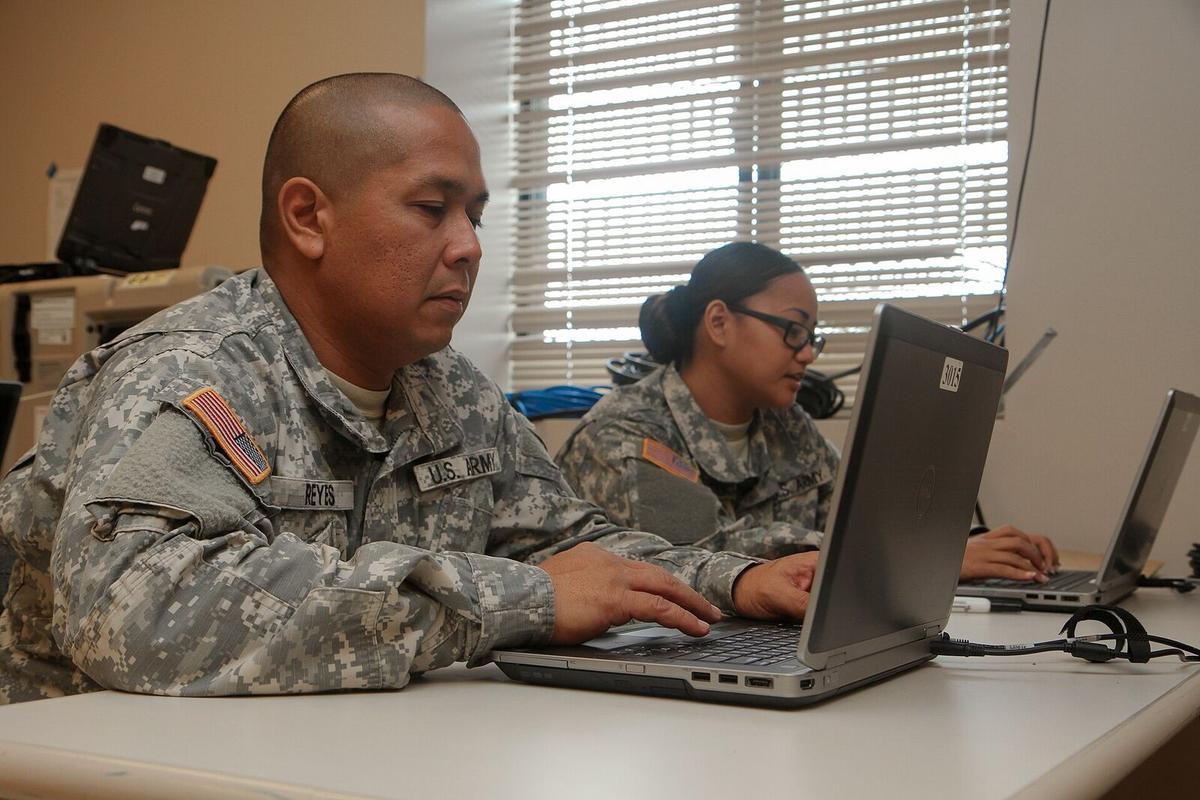 Army Reserve soldiers check their email on shared laptops. Every inbox, at work or at home, gets the same kind of bait. Photo by Staff Sgt. James Kennedy Benjamin, US Army, public domain, via Wikimedia Commons.
Why do these messages work?
They borrow a real name and add a reason to hurry. The Federal Trade Commission (FTC) keeps a list of the usual stories, and it is short: someone noticed suspicious activity or log-in attempts, there is a problem with your account or payment details, you need to confirm some personal information, here is an invoice you do not recognize, click to make a payment, you are owed a government refund, here is a coupon for something free.
Every one of those is ordinary. Real companies do send billing notices and real banks do flag odd activity. That is why judging the story alone will not save you. You have to look at the parts of the message.
One old clue has stopped working. The Cybersecurity and Infrastructure Security Agency (CISA) notes that bad grammar used to be a common sign, but that AI tools now write polished messages. Perfect spelling tells you nothing.
The four places to look
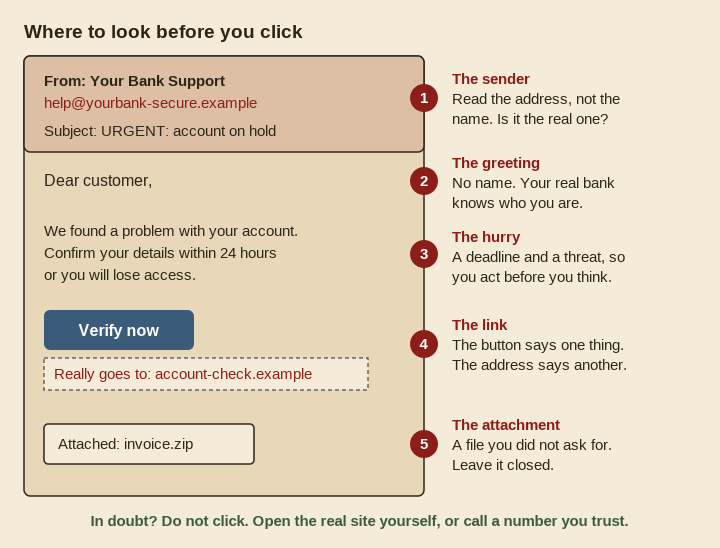 A made-up email with the usual tells marked. The greeting is a fifth, smaller clue.
| Part | What to check | What a fake often shows |
|---|---|---|
| Sender | The address, not the display name | A near miss: an extra word, a swapped letter, an added number |
| Link | Where it goes, not what it says | A different site from the one named in the message |
| Hurry | Whether you are being rushed | A deadline, a threat, or a prize that expires |
| Attachment | Whether you were expecting it | An invoice, a "secure document", a file that wants you to change a setting |
The sender. The name at the top is whatever the sender typed. The address behind it is harder to fake, so criminals register one that looks close. Microsoft's guidance on phishing describes addresses with added numbers or changed letters, and CISA's example is a store name with one vowel swapped. Read the address letter by letter. On a phone you may have to tap the name to see it.
The link. The words on a button or a blue link are only a label. The destination is a separate thing, and the next section shows how to read it.
The hurry. CISA's first warning sign is urgent or emotional language, especially a message that threatens dire consequences if you do not respond at once. Hurry is the tool that makes the other tricks work. When a message makes your pulse jump, treat that feeling as the signal to slow down.
The attachment. Be wary of any file you did not ask for. Microsoft adds a specific warning about a message or attachment that asks you to enable macros (small programs that run inside a document), adjust security settings or install an application. Normal email does not ask for that.
How do you check a link without clicking?
On a computer, rest the mouse pointer on the link without pressing. The real address appears, usually in the bottom corner of the window or in a small box beside the pointer. Microsoft's guidance shows exactly this: a link whose visible text and real destination do not match.
On a phone there is no pointer. Most phones show the address in a preview if you press and hold the link, but a slip of the thumb opens it, so if you are unsure, skip the check and use the habit below.
When you have the address, find the first single slash after the https:// part. The site's real name is the last two words before that slash, joined by a dot. (A few countries use three, as in .co.uk.)
https://yourbank.example.account-check.example/login
This address belongs to account-check.example. The bank's name at the front is decoration that anyone can add.
CISA also lists shortened links from sources you do not trust as a warning sign, because a short link hides the destination completely.
Here is the habit that beats all of this: do not use the link. If the message might be real, CISA says to reach the company through its verified website, found by a search or by typing the address yourself. The FTC says the same about phone numbers: use one you know is real, never the one in the message.
Tip
Save bookmarks for the sign-in pages you use most: your bank, your email, your main shopping account. Then make it a rule that you only ever sign in through a bookmark. A fake email cannot beat a link you never use.
What if you already clicked?
It depends on what happened next. Work down this table and stop at the first row that fits.
| What happened | What to do |
|---|---|
| You are on a work computer | Tell your IT contact now, before anything else (Microsoft) |
| You typed a password | Change it at once, on that account and anywhere else you use it (Microsoft, FTC) |
| You gave a card or bank account number | Call the bank or card company on the number printed on your card and report it (Microsoft) |
| You gave a Social Security number | Go to IdentityTheft.gov for steps based on what you lost (FTC) |
| You opened an attachment, or something installed | Update your security software, run a scan, and remove what it finds (FTC) |
| You only looked at the page | Close it. Watch that account for a few weeks. |
Watch out
The mistake that costs the most is staying quiet because you feel foolish. A password changed in ten minutes is worth far more than one changed next week. Tell the bank, tell IT, tell someone at home. Nobody who works with this for a living will think less of you.
Where do you report it?
Reporting takes a minute and it helps the next person. The FTC gives three routes for readers in the United States:
- Forward a phishing email to the Anti-Phishing Working Group at
reportphishing@apwg.org. - Forward a phishing text to 7726, which spells SPAM on a keypad.
- Report it to the FTC at
ReportFraud.ftc.gov.
Your mail program has its own button too, usually labeled "report phishing" or "report spam", near the sender's name. If you lost money, also file a complaint with the FBI's Internet Crime Complaint Center at www.ic3.gov.
Then delete the message. CISA's advice is not to reply and not to click anything in it, including an "unsubscribe" link.
Six things to do today
The FTC's own list of protections is plain: security software that updates itself, a phone that updates itself, multi-factor authentication (a second step after your password, such as a code), and a backup of your files. This list builds on it.
- Bookmark the real sign-in pages for your bank, your email and one shopping account
- Find the "report phishing" or "report spam" button in your mail program
- Turn on automatic updates on your phone and your computer
- Turn on a second sign-in step for your email account
- Open a real email from a company you use, rest the pointer on a link, and read the address
- Tell one person at home the rule: go to the site yourself
What to remember
- Look at four parts: the sender's address, the link's destination, the hurry, and any attachment.
- The display name and the words on a button are labels. The address is what counts.
- Good spelling proves nothing now.
- The safest check is to skip the link and open the real site yourself.
- If you clicked, act in minutes and tell someone.
- Report it:
reportphishing@apwg.org, 7726 for texts,ReportFraud.ftc.gov.
Most of the damage from a stolen password is prevented by a second sign-in step, so that is the best next thing to set up. Passwords, Passkeys and MFA: Identity Done Right explains the choices. For how the same trick arrives by text and by phone, read Text and Phone Scams: The Fake Bank, the Fake Delivery, the Fake Grandchild.