Articles & BlogBy Trapper W. Brown9 min read
For anyone who uses an AI assistant, and anyone about to connect one to email, files or a browser. By the end you will know what prompt injection is, why it has no clean fix yet, and how to set an assistant up so a successful attack finds little to take.
Phishing works by putting a message in front of a person and hoping they act on it. Prompt injection puts a message in front of an AI assistant with the same hope.
You ask your assistant to summarize a web page, sort your inbox or read a PDF. Somewhere in that content is text that was never meant for you. It is addressed to the machine, and it is written as an order.
 A robotic hand from 1982 at the MIT Museum. A machine does what its wires tell it, whoever is pulling them, and that is the weakness prompt injection uses. Photo by Daderot, CC0, via Wikimedia Commons.
What is prompt injection?
An AI assistant is built on a large language model (LLM), a program that takes text in and produces text out. The text it is given is called the prompt. In a real product the prompt has several parts: the maker's standing instructions, your request, and whatever content the assistant was asked to read. To the model, all of it is text in one long stream.
Prompt injection is the trick of placing instructions in that stream so the model follows them in place of, or on top of, what it was supposed to do. OWASP, the group behind the well-known Top 10 list of web application risks, keeps a separate Top 10 for LLM Applications. Prompt injection is its first entry, LLM01 in the 2025 edition, and OWASP defines it as prompts that alter the model's behavior or output in unintended ways.
The planted text does not have to be visible. OWASP notes that an injection need not be readable by a human at all, as long as the model parses it. In practice that means things like text in the same color as the page background, text in a tiny font, a comment in the page's underlying code, or words tucked into a document's properties. You see a recipe. The assistant sees a recipe and a paragraph telling it what to do next.
Direct versus indirect
OWASP splits the problem in two.
| Direct | Indirect | |
|---|---|---|
| Who writes it | The person typing to the assistant | A third party the user never sees |
| Where it sits | In the chat box | In a web page, email, file or calendar invite |
| Who is harmed | Usually the service, whose rules are talked around | Usually the user who asked the assistant to read it |
| Everyday comparison | Talking your way past the front desk | A forged memo slipped into the inbox |
Direct injection is a user trying to argue a model out of its own rules. Indirect injection is the one this article's title describes, because the victim is an ordinary user who did nothing wrong. The US National Institute of Standards and Technology (NIST) uses the term agent hijacking for a type of indirect prompt injection in which an attacker inserts malicious instructions into data an assistant may read, such as an email, a file or a website, to make it take harmful actions.
The parallel with phishing is close enough to be useful.
| Phishing | Indirect prompt injection | |
|---|---|---|
| Target | A person | An AI assistant working for a person |
| Lure | A message that looks routine | Content that looks routine, with instructions inside |
| What the attacker wants | A click, a password, a payment | An action taken with the user's access |
| What stops it | A pause and a second check | Limits on what the assistant can do without asking |
Why is it hard to fix?
NIST puts the cause plainly: the attack arises when a system lacks a clear separation between trusted internal instructions and untrusted external data.
Older software had this problem and solved it. SQL injection, covered in SQL Injection and Cross-Site Scripting, Shown Safely, was fixed by sending the command and the data to the database in two separate channels. A language model has one channel. The instructions and the web page arrive as the same kind of thing, and the model has to judge which words carry authority. Usually it judges well. An attacker only needs it to be wrong once.
Nobody claims to have closed the gap. OWASP says it is unclear whether fool-proof methods of prevention exist. Vendors say so about their own products: Anthropic wrote in November 2025 that prompt injection is "far from a solved problem" and that no browser agent is immune. In the same post it reported cutting the measured attack success rate against its browser agent to 1.4% on one model, and added that even 1% is a meaningful risk.
NIST's own testing shows why a low number on a standard test is not the end of the matter. In work published in January 2025, a red team wrote new attacks aimed at one specific model, and the success rate of the strongest attack rose from 11% to 81%.
| Strongest baseline attack | 11% |
|---|---|
| Strongest red team attack | 81% |
Source: NIST CAISI, Strengthening AI Agent Hijacking Evaluations, January 2025
A March 2026 NIST post describes a public competition with more than 250,000 attack attempts by over 400 participants against 13 leading models. At least one attack succeeded against every model. Filters and training shift the odds, and they are worth having. They do not make it safe to hand an assistant everything.
What is at risk when an assistant has tools?
A chat-only assistant that gets fooled gives you a wrong or slanted answer. That matters, since a hijacked summary can point you to a scam link, but the damage passes through you.
An agent is an assistant that can take actions through tools, and with tools the picture changes. With email access it can read and send. With file access it can open, change and delete. With a browser it can click and fill in forms on sites where you are already signed in. The scenarios NIST tested were all of this kind: getting an agent to download and run a program, to send a user's files to a stranger, and to email phishing messages to the user's own contacts.
The risk is highest when three things meet: access to private data, exposure to content from strangers, and a way to send information out. Remove any one and the attacker's path is broken.
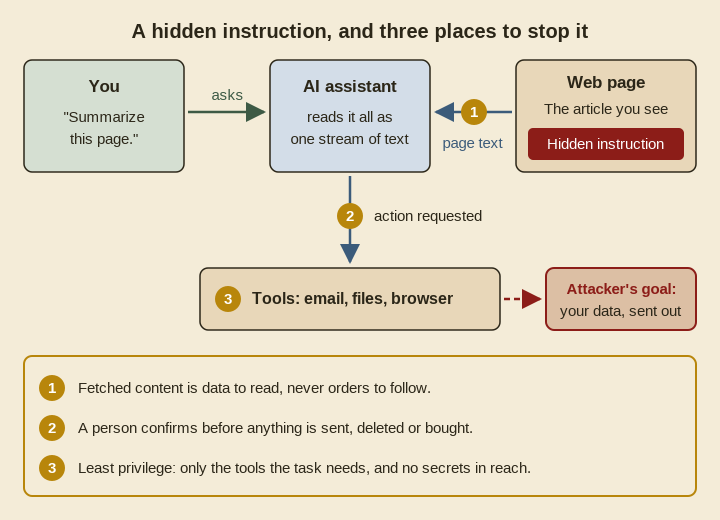 The hidden instruction only pays off if the assistant can act on it. Each guard point breaks the path.
Picture a home user who connects an assistant to their inbox and asks for a summary of unread mail. One message, from a stranger, contains a paragraph addressed to the assistant. If the assistant can only read and summarize, the worst outcome is a strange summary. If it can also send mail and open files without asking, the same message is a real threat. Now picture a clinic's front desk assistant that reads incoming patient email and can also reach the scheduling system. The inbox is open to the whole world, and what sits behind the assistant is far more sensitive.
What do users and builders do?
Nothing here stops injection from being attempted. The aim is to make a successful one cheap. Each row maps to a mitigation in OWASP's LLM01 guidance.
| Guard | If you use an assistant | If you build one |
|---|---|---|
| Least privilege | Connect only the accounts the task needs, read-only where offered | Give the model the narrowest tools and access, enforced in code and not in the prompt |
| Confirm before actions | Leave approval prompts on, and read them | Require human approval for high-risk actions: send, delete, pay, share |
| Treat fetched content as untrusted | Be suspicious when a summary tells you to click, call or pay | Mark external content as separate from instructions, and filter what goes in and out |
| Keep secrets out of reach | Do not paste passwords, keys or ID numbers into a chat | Keep credentials out of prompts and out of files the agent can open |
| Test it | Not your job | Run adversarial tests that treat the model as an untrusted user |
For users, the signs that an assistant was steered look a lot like the signs of phishing. The answer contains a link, phone number or request for a password that has nothing to do with what you asked. The assistant proposes an action you did not request. A summary pushes one product or one urgent step. Treat it the way you would treat a suspicious email: stop, approve nothing, and look at the source yourself.
For builders, the hard rule is that the model's good behavior is not a security control. Decide in ordinary code what the assistant is allowed to do, assume its instructions can be overridden by anything it reads, and design so that the worst case is survivable.
Watch out
Do not switch on "act without asking" for an assistant that both reads content from strangers (web pages, incoming mail) and can send, delete or spend. The confirmation step is the last check between a hidden instruction and a real action. Approving without reading removes it just as surely.
Tip
Give an assistant its own browser profile for web tasks, one with no bank, mail or work account signed in. A hijacked session in an empty profile has nothing to reach.
What to remember
- Prompt injection hides instructions in content an AI assistant reads. It is first on OWASP's 2025 Top 10 for LLM Applications.
- Direct injection comes from the person typing. Indirect injection comes from a page, email or file, and the user is the victim.
- It is hard to fix because a language model receives instructions and data in the same stream of text.
- No vendor or standards body claims it is solved. A competition NIST reported on found a working attack against every model tried.
- The risk grows with what the assistant can touch: private data, outside content, and a way to send things out.
- Limit access, keep confirmations on, treat fetched content as untrusted, and keep secrets where the assistant cannot read them.
Open the settings of any assistant you use and look at what it is connected to and what it may do without asking. Remove one thing it does not need. For the human version of this attack, read Phishing, Vishing, Smishing: How the Message Gets In, and for what a leaked credential costs once something does get out, read APIs and API Keys: Why Leaked Keys Hurt.