Articles & BlogBy Trapper W. Brown8 min read
For a household or a small office with no IT department. By the end you will know what ransomware does, what to do in the first hour, and why one unplugged backup decides how the story ends.
You open the laptop and your files will not open. The names have changed. A note on the screen says they are locked and tells you where to send money to get them back. That is ransomware, and the FBI defines it in one sentence: malicious software that prevents you from accessing your computer files, systems or networks and demands you pay a ransom for their return.
The FBI's 2025 Internet Crime Complaint Center report counts more than 3,600 ransomware complaints that year, with reported losses above $32 million. The report itself says that figure is too low, because it leaves out lost business, time, wages, files and equipment, and because some victims report no amount at all. The real cost of an attack is the week you cannot work and the photographs you cannot get back.
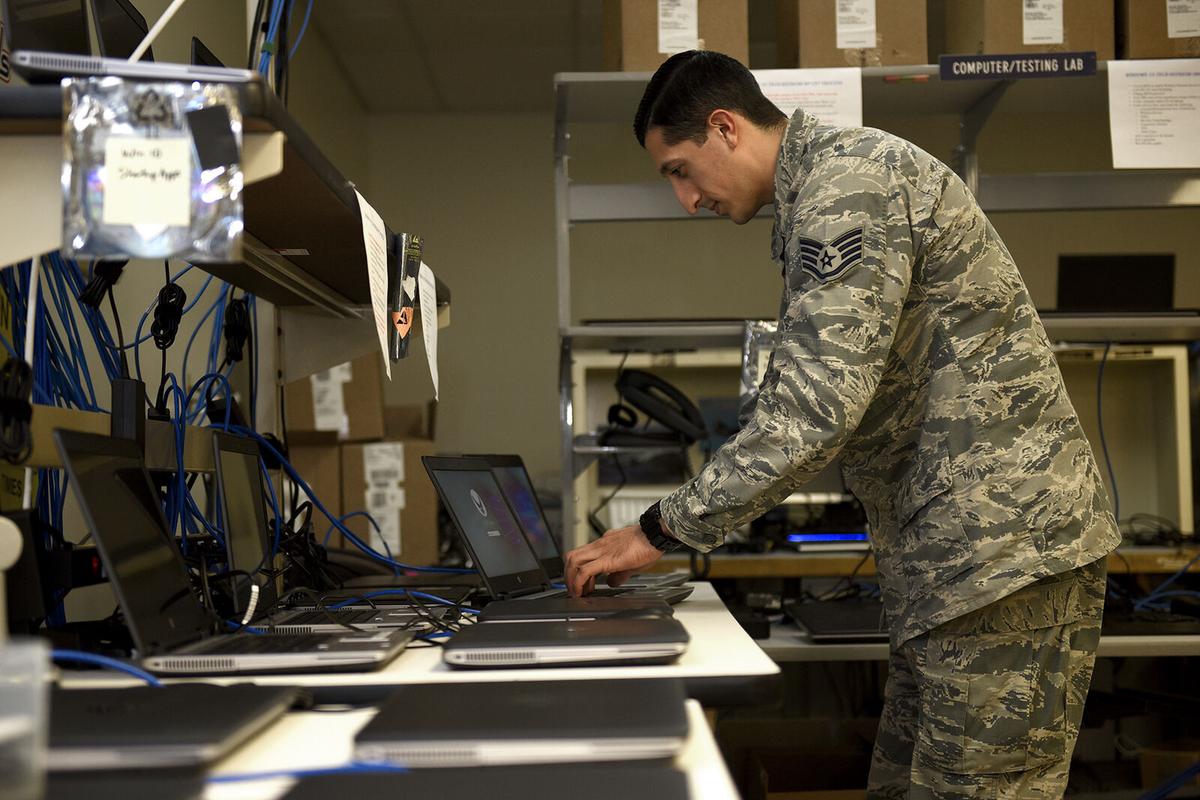 An Air Force technician sets up a bench of laptops from a clean master copy. After ransomware, rebuilding from a known good copy is how machines come back. Photo by Senior Airman Rose Gudex, US Air Force, public domain, via Wikimedia Commons.
How does it get in?
Through ordinary doors. The FBI says you can download ransomware without knowing it by opening an email attachment, clicking an advertisement, following a link, or visiting a website that carries it. The Cybersecurity and Infrastructure Security Agency (CISA) lists more routes in its #StopRansomware Guide of 2023, and they translate into plain terms like this.
| Way in | Plain meaning | What closes it |
|---|---|---|
| Phishing | A message that gets you to open a file or a link | A pause before you open anything you did not expect |
| Stolen passwords | A password that leaked somewhere else, tried on your accounts | A different password everywhere, and a second sign-in step |
| Unpatched software | A program or device with a known flaw that was never updated | Automatic updates |
| Earlier infection | Other bad software already on the machine brings it in later | Security software that updates and scans by itself |
| A trusted outsider | The company that looks after your computers is broken into first | Asking that company how it protects its own access to you |
Nothing on that list needs a genius attacker. Most of it is a missed update or a reused password.
What does it do once it is inside?
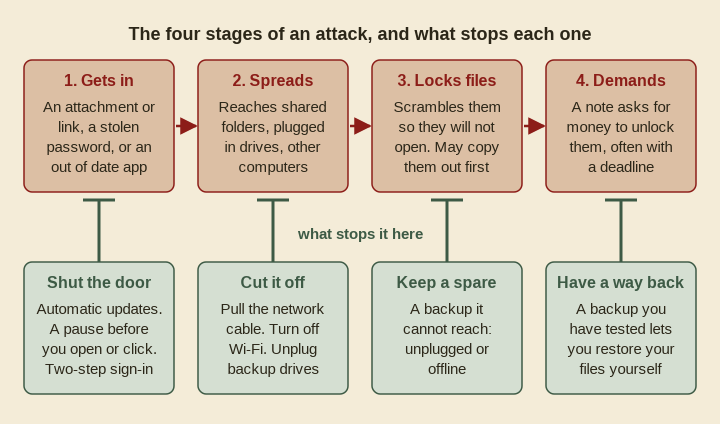 Each stage has its own defense. The later ones still work when the earlier ones fail.
It encrypts. Encryption scrambles a file so that only someone holding the key can read it, and here the attacker holds the key. The FBI notes that it can reach files on the computer itself, on drives plugged into it, and on other computers on the same network. Most people notice nothing until a file will not open or the note appears.
Two more habits of modern ransomware matter to you. First, CISA says attackers now often copy your files out before locking them, then threaten to publish them, so there are two threats in one note. Second, they look for your backups. In CISA's words, many kinds of ransomware try to find and then delete or encrypt any backup they can reach.
What do you do in the first hour?
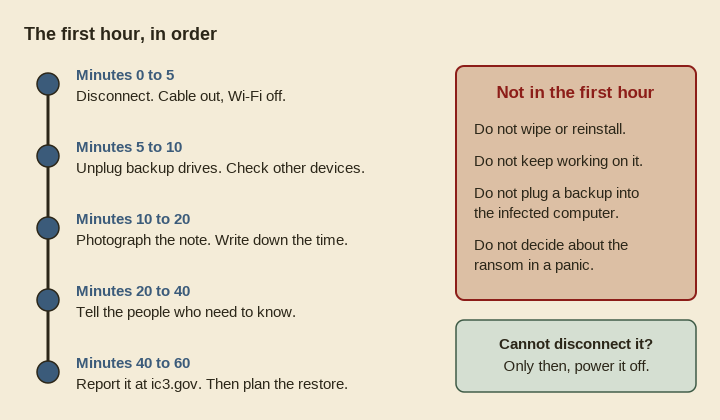 The first hour is about stopping the spread and keeping your options open.
The order comes from CISA's response checklist, cut down to fit a home or a small office. The minutes are a guide.
- Disconnect. CISA's first step is to work out which machines are affected and isolate them at once. Pull the network cable and turn off Wi-Fi on the affected computer. If several are affected, unplug the router.
- Protect what is still clean. Unplug any backup drive. Look at the other computers and shared folders for files that will not open.
- Record it. Photograph the note with your phone. The FBI's complaint form asks for details you will find there: the new ending on the locked file names, any email or web address the attackers give, and the amount they demand.
- Tell people. In an office that means the owner, whoever looks after your computers, and your insurer if you have a cyber policy. At home it means everyone who uses the Wi-Fi.
- Report. CISA says every ransomware incident should be reported to the US government, and that reporting once is enough for the agencies to share it. File with the FBI at
www.ic3.gov, or use the Report Ransomware page atcisa.gov/stopransomware/report-ransomware, which also links to FBI field offices.
| Do | Do not |
|---|---|
| Disconnect from the network first | Switch off, unless you cannot disconnect any other way (CISA) |
| Unplug backup drives | Plug a backup into the infected computer |
| Photograph the note and the file names | Wipe or reinstall in the first hour |
| Use a different, clean device to get help | Keep working on the infected one |
Watch out
The urge to wipe the computer and start again is strong, and in the first hour it is a mistake. Wiping destroys the evidence and the locked files along with it. CISA's checklist says to preserve evidence and to ask federal law enforcement whether a tool to unlock that kind of ransomware already exists. Sometimes one does. Keep the machine disconnected and leave it alone.
Restoring comes later, and on clean ground. CISA's order is to rebuild the machine first, change passwords once it is clean, and only then bring files back from a backup, taking care not to infect the backup on the way.
Should you pay?
That decision belongs to the victim, and I will not make it for you. Here is what the two agencies say.
The FBI's position, from its Internet Crime Complaint Center: "The FBI does not support paying a ransom in response to a ransomware attack. Paying a ransom doesn't guarantee you or your organization will get any data back." It adds that payment encourages attackers to hit more victims.
CISA's ransomware questions page makes the same practical point: some victims pay to recover their files, but there is no guarantee that they will recover them if they do.
Both agencies ask you to report either way. The FBI's form simply asks whether a ransom was paid and how much.
Why do backups decide the outcome?
Because a good backup turns the note into an inconvenience. If a recent copy of your files is sitting somewhere the attacker could not reach, you can rebuild and restore, and the question of paying to unlock them does not arise in the same way.
"Could not reach" is the whole point. The FBI's advice is to make sure backups are not connected to the computers and networks they are backing up. CISA says to keep them offline and to test them regularly. A drive that stays plugged in all week is one more disk for the ransomware to lock.
Tip
Once a month, restore one file from your backup to a different folder and open it. It takes two minutes, and it is the only way to know that the backup works before the day you need it.
Six things to do today
- Turn on automatic updates on every computer, phone and tablet in the house or office
- Make one backup to an external drive, then unplug the drive
- Restore one file from that backup to prove it works
- Turn on a second sign-in step for your email
- Write the people to call (computer support, insurer, bank) and
ic3.govon paper, and keep it by the router - Show everyone where the network cable is and how to turn off Wi-Fi
What to remember
- Ransomware locks your files and demands money. It often copies them first.
- It gets in through messages, stolen passwords and software that was never updated.
- First hour: disconnect, unplug backups, photograph the note, tell people, report.
- Do not wipe, and do not plug a backup into an infected machine.
- The FBI does not support paying and says payment guarantees nothing. The decision is still the victim's.
- A tested backup that is not plugged in decides how this ends.
If you do one thing after reading this, make that backup. Backups That Work: The 3-2-1 Rule shows how to set one up so that a copy is always out of reach. For an office that wants the fuller version of the steps above, read The First Hour: The Incident Response Lifecycle.