Articles & BlogBy Trapper W. Brown9 min read
For new developers, and for defenders who review what developers build. By the end you will be able to explain both attacks, spot the code that allows them, and name the fix for each.
SQL injection and cross-site scripting sound like two subjects. They are one mistake made in two places. A program takes text from a stranger and passes it to something that reads text as instructions. In SQL injection that something is the database. In cross-site scripting it is another visitor's browser.
The fix has the same shape in both: keep what the stranger typed as data, and never let it become part of the command.
 The copyright card catalog at the Library of Congress, a database made of paper. A clerk fetches the one card you ask for. A database does whatever the query says, which is the problem when a visitor can write part of the query. Photo by Michael Holley, public domain, via Wikimedia Commons.
Watch out
Try these ideas only on machines and applications you own or have written permission to test. Probing someone else's website for these flaws without permission is a crime in most places, including under the US Computer Fraud and Abuse Act. Everything in this article can be practiced on your own computer.
What goes wrong when input is treated as code?
A website is a stack of programs passing text to one another. The page sends text to the server. The server builds a query, which is text, and sends it to the database. The server builds a page, which is text, and sends it to a browser. The database and the browser are both interpreters: programs that read text and act on it.
OWASP, the Open Worldwide Application Security Project, describes an injection flaw as one that lets untrusted user input be sent to an interpreter. The interpreter has no idea which words came from the developer and which came from a visitor. It runs what it is given.
SQL injection: the classroom example
SQL (Structured Query Language) is the language programs use to ask a database for records. Here is a toy login check in Python that builds its query the wrong way.
# Never do this
query = "SELECT * FROM users WHERE name = '" + name + "' AND password = '" + password + "'"
This line glues whatever the visitor typed straight into the SQL text.
Suppose someone types alice and, in the password box, the text ' OR '1'='1. The finished query reads:
SELECT * FROM users WHERE name = 'alice' AND password = '' OR '1'='1'
This is what the database receives. The visitor's first quote mark closed the password early, and the rest became part of the command.
The database now reads the condition as "the password is empty, OR 1 equals 1". One always equals one. Run against a throwaway table in memory (Python 3 with its built-in sqlite3 module, November 2026), that query returned alice's row with no password given.
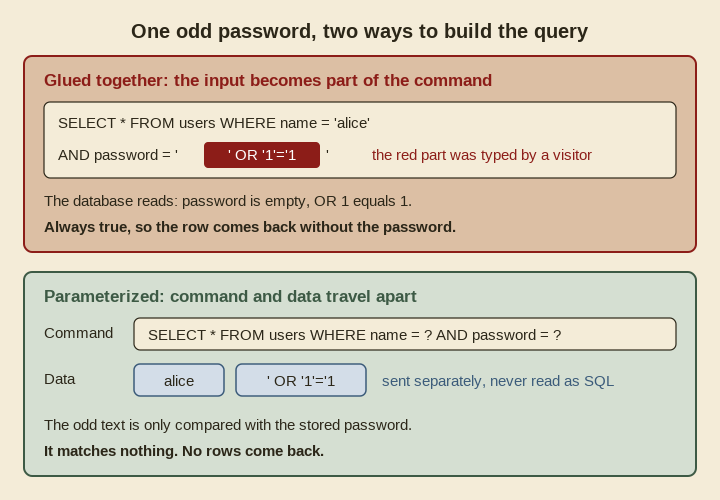 The same input is a command in the first query and plain data in the second.
The fix is a parameterized query, also called a prepared statement.
query = "SELECT * FROM users WHERE name = ? AND password = ?"
rows = con.execute(query, (name, password)).fetchall()
The question marks are placeholders, and the values travel to the database separately, so they can only ever be treated as data.
With the same odd input, this version returned no rows in the same test. The database looked for a user whose password is literally that string of quotes and letters, and found none. Python's documentation gives the same warning and the same remedy.
The OWASP SQL Injection Prevention Cheat Sheet adds three points worth knowing:
- Trying to clean input by escaping quote marks yourself is strongly discouraged. It is easy to get wrong.
- Placeholders stand in for values only. A table or column name chosen by the user must be matched against a fixed list of allowed names.
- The database account the application uses should have the least access it can work with: read-only where it only reads, and never administrator rights. Then a missed bug exposes less.
Cross-site scripting: stored and reflected
A browser runs the JavaScript in any page it loads, and it runs it with that page's access: the visitor's signed-in session and everything on the screen. Cross-site scripting (XSS) is what happens when an attacker gets script of their own into a page that a trusted site serves. I will describe how that happens without a working example, because you do not need one to defend against it.
OWASP sorts XSS by where the hostile text comes from.
| Stored XSS | Reflected XSS | |
|---|---|---|
| Where the script sits | Saved on the site, for example in its database | In a link or form submission, not saved anywhere |
| Typical place | A comment, a profile field, a support ticket | A search box or error message that repeats what you typed |
| Who is hit | Everyone who views that page | The person who follows the crafted link |
| How it arrives | The victim only has to visit | The victim has to be sent the link |
In the stored kind, someone submits a comment that contains script markup where words should be. The site saves it and later places it, unchanged, into the page for every reader. In the reflected kind, the site takes text from the request and repeats it straight back into the page. The attacker builds a link with the script text inside it and has to get a victim to click, which is why reflected XSS so often travels with phishing. A third kind, DOM-based XSS, happens entirely inside the page's own JavaScript in the browser.
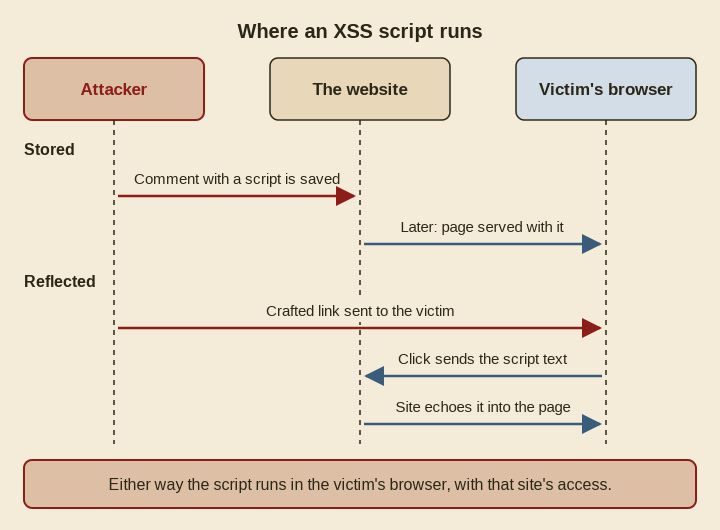 Stored XSS waits on the site. Reflected XSS rides in on a link. Both run in the victim's browser.
Either way, the script runs as if the site had written it. It can act as the signed-in visitor, read what they can read, or redraw the page with a fake sign-in form.
The fixes
| Fix | Works against | What it does |
|---|---|---|
| Parameterized queries | SQL injection | Sends the command and the values separately |
| Output encoding | XSS | Turns characters that mean something in HTML into harmless display text |
| Content Security Policy | XSS, as a second layer | Tells the browser which scripts the page may run |
Output encoding is the main XSS defense. Before placing untrusted text into a page, the server converts the characters a browser would read as markup, so < is sent as < and shows on screen as a plain less-than sign. OWASP's XSS Prevention Cheat Sheet notes that many web frameworks do this by default for every value they render. The bugs live in the "escape hatches", the framework features that insert raw HTML on request. Where users must be allowed some formatting, a maintained HTML sanitizing library strips the dangerous parts.
Content Security Policy (CSP) is a response header. Mozilla's MDN documentation describes it as instructions from a site to the browser that restrict what the page's code may do.
Content-Security-Policy: default-src 'self'
This header tells the browser to load scripts and other resources only from the site's own address. MDN adds that with a rule like this in place, scripts written inline in the page do not run unless the policy specifically allows them, which is exactly what injected script tends to be. A report-only version of the header lets a team see what a policy would block before enforcing it.
OWASP is clear about the order: CSP is an additional layer and should not be the primary defense, and a web application firewall cannot reliably stop every XSS attack.
Tip
If you review code or question vendors without writing code yourself, ask three things. Do all database queries use parameters? Does the page template escape output by default, and where are the exceptions? Is there a Content Security Policy, and is it enforced or only reporting?
Where do these sit in the OWASP Top 10?
The OWASP Top 10 is a ranked list of the most serious kinds of web application risk. In the 2025 edition, Injection is fifth, listed as A05:2025. It is one category that holds both subjects of this article: it covers 37 weakness types (CWEs), including cross-site scripting as CWE-79 and SQL injection as CWE-89.
OWASP's page for the category characterizes the two differently. Cross-site scripting is high in frequency and lower in impact, with more than 30,000 published vulnerabilities (CVEs). SQL injection is lower in frequency and high in impact, with more than 14,000. Its first line of prevention advice matches what you have read here: keep data separate from commands and queries.
How can you practice legally?
Run a deliberately vulnerable application on your own computer and attack that. Two free ones come from OWASP itself.
- OWASP Juice Shop is a fake online store built for security training. OWASP says it contains vulnerabilities from the entire Top Ten. Its instructions run it with Node.js or Docker and have you open it at
http://localhost:3000, an address that exists only on your machine. The project asks people not to attack its public demo site. - OWASP WebGoat is a deliberately insecure teaching application with guided lessons. OWASP warns that your machine is extremely vulnerable while it runs and tells you to disconnect from the internet first.
Put either inside a virtual machine and you have a lab you can break and reset. Kali in a Virtual Machine: A Legal Home Lab shows how to build one. A real website is never a practice target, however small or broken it looks.
What to remember
- Both attacks are text from a stranger being read as instructions: by the database in SQL injection, by a browser in XSS.
- Parameterized queries stop SQL injection by sending the command and the data separately. Do not glue input into SQL.
- Stored XSS waits in the site's own data. Reflected XSS arrives in a crafted link. Both run in the victim's browser.
- Output encoding is the main XSS defense. Content Security Policy is a second layer.
- Both belong to Injection, A05 in the OWASP Top 10 for 2025.
- Practice only on your own lab, with applications built to be attacked.
A good next step is to run Juice Shop in a virtual machine and find its first injection flaw yourself. Then read Web Shells and Remote Code Execution: How a Website Gets Taken Over, which shows what an attacker does after a flaw like these lets them in, and Prompt Injection: The New Phishing, Aimed at the Machine, where the same confusion of data and instructions returns in AI assistants.