Articles & BlogBy Trapper W. Brown7 min read
Security+ SY0-701, Objective 4.8: Explain what to do, and in what order, when an incident happens
It is 9:40 on a Tuesday morning. A nurse calls the help desk and says every file on the shared drive has a strange new name and none of them will open. What do you do in the next sixty minutes?
If you have to think about it, you are already behind. Incident response is a set of steps worked out ahead of time, so that under pressure you follow a plan and do not have to invent one. Objective 4.8 of the Security+ exam covers those steps, how you practice them, and how you handle evidence along the way.
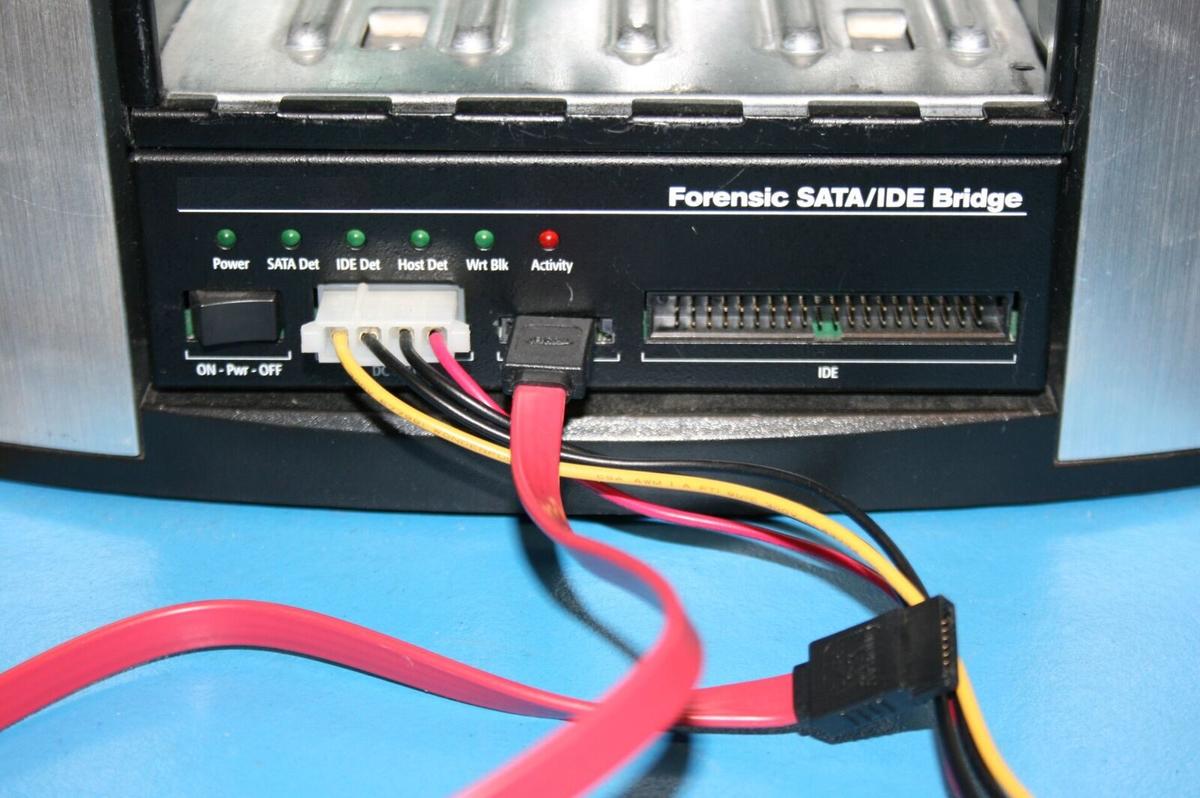 A write blocker like this one lets an examiner copy a drive without changing anything on it. Photo by ErrantX, public domain, via Wikimedia Commons.
Seven steps, in order
The exam lists seven steps. Learn them in order, because the order is what gets tested.
| Step | What you do | In the Tuesday example |
|---|---|---|
| Preparation | Write the plan, name the team, set up tools and contacts before anything happens | The clinic has a one-page plan with phone numbers, kept on paper |
| Detection | Notice that something is wrong | The nurse's call and an alert from the endpoint tool |
| Analysis | Work out what it is, how far it has spread and how bad it is | Ransomware, on two workstations and one file share |
| Containment | Stop it from spreading | Pull the affected machines off the network |
| Eradication | Remove the cause | Delete the malware, close the hole it came through, reset stolen passwords |
| Recovery | Bring systems back and confirm they are clean | Restore files from backup and watch closely |
| Lessons learned | Review what happened and fix the plan | A meeting within two weeks, with written changes |
The steps form a loop. What you learn at the end goes back into preparation, so the next incident starts from a better plan.
Two of the steps are easy to blur. Detection is only noticing: an alert, a phone call, a log entry that looks wrong. Analysis is deciding what the notice means. Most alerts turn out to be nothing, and treating each one as an incident wears a team out. Treating a real one as nothing is worse. Analysis is also where you set a severity, which decides who gets woken up and how fast.
Recovery has a trap of its own. The work does not end when the files are back. Keep a close watch on restored systems for a few weeks, because an attacker who left a second way in will come back to use it.
Tip
Exam questions often describe a scene and ask what comes next. Containment comes before eradication, and eradication comes before recovery. If the incident has just been confirmed, the next move is nearly always to contain it.
The first hour at a small clinic
Here is how the first hour might go at a clinic that has prepared. The times are an example, not a standard.
Minutes 0 to 10, detection. The help desk logs the call and the time. The endpoint tool shows a matching alert on the nurse's workstation. Two signals agree, so this is real.
Minutes 10 to 25, analysis. Which machines show the same signs? Which account was used? Are the backups untouched? The responder finds two workstations and one file share affected, and declares an incident under the plan.
Minutes 25 to 40, containment. The two workstations are cut off from the network but left powered on. The account that was used is disabled. The file share is set to read-only.
Minutes 40 to 60, evidence and notification. The responder captures memory from the workstations, saves the logs, and starts a written timeline. The plan says who gets called: the practice manager, the outside IT firm, the attorney and the insurer.
| Detection | 10 min |
|---|---|
| Analysis | 15 min |
| Containment | 15 min |
| Evidence and notification | 20 min |
Source: Worked example in this article
Eradication and recovery are not in that hour, and they should not be. They take days. The first hour is for stopping the spread and keeping the facts.
Watch out
A common mistake is to wipe and rebuild the infected machine straight away. It feels like progress, but it destroys the evidence that would tell you how the attacker got in, and a hole you never found is still open after the rebuild.
A large hospital system runs the same seven steps with more people. It has a staffed security operations center, an on-call forensics team and legal counsel in the building. The clinic has one IT contractor and a phone list. The order of the steps does not change.
Practice before the real thing
A plan nobody has rehearsed is a document. Two things turn it into a skill.
Training makes sure each person knows their part. Staff need to know how to report something odd and who to call. Responders need hands-on time with their tools before the day they depend on them.
Testing checks the plan itself. The exam names two kinds.
| Test | How it works | What it is good for |
|---|---|---|
| Tabletop exercise | The team sits down and talks through a scenario step by step | Finding gaps in the plan, cheaply and with no risk |
| Simulation | The team acts out a realistic incident with real tools, such as a mock phishing wave or a staged infection on a test machine | Finding out whether people can actually do what the plan says |
Which scenarios should you practice? Use the ones most likely to happen. The Verizon Data Breach Investigations Report, 2026 edition, found ransomware present in 48 percent of breaches, up from 44 percent the year before. The human element was present in 62 percent, and a third party was involved in 48 percent.
| Human element | 62% |
|---|---|
| Third party involved | 48% |
| Ransomware | 48% |
Source: Verizon Data Breach Investigations Report, 2026 edition
So I would start a tabletop program with three scenarios: ransomware, a staff member who was tricked, and a vendor that was breached.
Finding the cause, and hunting for more
Two activities reach beyond the incident in front of you.
Root cause analysis asks why the incident was possible, and keeps asking until it reaches something you can fix. The files were encrypted because malware ran. The malware ran because a user opened an attachment. It did so much damage because that user had rights to the whole share. The surface answer is "a user clicked." The root cause is closer to "every account can write to every folder." Fix only the surface and you will be back.
Threat hunting is searching for attackers who are already inside, without waiting for an alert. A hunter starts with a guess, such as "if this group got in here, they may have used the same stolen password elsewhere," and then goes through logs and systems for proof. The clues from one incident, such as file names and network addresses, make good starting points for a hunt across everything else.
Evidence that holds up
Sooner or later someone will ask what happened and how you know: an insurer, a regulator, a court. Digital forensics is how you answer. Six terms are on the exam.
| Term | What it means |
|---|---|
| Legal hold | An order to keep all data related to a matter. Normal deletion stops until it is lifted. |
| Chain of custody | A written record of who held each piece of evidence, when, and why, with no gaps |
| Acquisition | Collecting the evidence, usually by making an exact copy of a drive or of memory |
| Preservation | Protecting the evidence from change, so the copy still matches the original later |
| Reporting | Writing up what was found, how, and with what tools, so another examiner could repeat it |
| E-discovery | Finding and handing over electronic records that a legal case requires |
Acquisition has an order. Collect what disappears fastest first: memory before disk, disk before backups. That is why the clinic left its machines powered on. Turning one off erases its memory, and with it the running malware and sometimes the encryption key.
Preservation is why examiners work on copies. They connect the original drive through a write blocker, make an image, and compute a hash of both. If the hashes match, the copy is exact, and the original goes into storage with its chain of custody form.
A legal hold can arrive well after the incident. Once it does, the automatic 90-day deletion of mailboxes and logs has to stop for anything it covers, and someone has to be responsible for making sure that it did.
What to remember
- Seven steps: preparation, detection, analysis, containment, eradication, recovery, lessons learned.
- Contain before you eradicate. Eradicate before you recover.
- The first hour is for stopping the spread and saving evidence.
- A tabletop is a discussion. A simulation is hands-on.
- Root cause analysis looks for the reason behind the reason. Threat hunting looks for attackers before an alert fires.
- Collect the most short-lived evidence first, work on copies, and record every handoff in the chain of custody.
On the day itself, the plan matters less than the practice behind it. A team that has walked through the steps twice, even at a table over coffee, will know who calls whom and what not to touch.