Articles & BlogBy Trapper W. Brown8 min read
For anyone who has seen a VPN advert and wondered what the product does. By the end you will know what a VPN hides, who it hides it from, and whether you need one.
VPN adverts promise a lot: privacy, security, anonymity, protection from hackers. Some of that is true in a narrow sense, and some of it is not true at all. The technology underneath is simple and useful, and once you can picture it, you can judge the claims yourself.
A virtual private network (VPN) is an encrypted tunnel between your device and another network. Everything your device sends goes into the tunnel, comes out at the far end, and carries on from there as if you were sitting at that far end.
 Traffic in a tunnel is hidden from the hillside, but it still comes out somewhere, and whoever runs the tunnel sees every car. Photo by Wilfredor, CC0, via Wikimedia Commons.
What is the tunnel, exactly?
Your device runs a small program called a VPN client. The client takes each packet of data you send (a packet is one small chunk of network traffic), encrypts the whole thing, and wraps it inside a new packet addressed to a VPN server. The server unwraps it, decrypts it, and sends the original on its way. Replies come back by the same route in reverse.
Two things follow from that. Anyone between you and the VPN server sees only scrambled packets going to one address. And anyone beyond the VPN server sees your traffic arriving from the server's address, not from yours.
Two very different uses
The same technology is sold for two jobs that have little to do with each other.
| Question | Reaching a private network | A commercial privacy VPN |
|---|---|---|
| Far end of the tunnel | Your workplace, or your own home | A server owned by a VPN company |
| What you gain | Access to things that are not on the public internet | A different address, and privacy from the local network |
| Who runs the server | Your employer, or you | A company you pay |
| Who you must trust | Your employer, or yourself | That company |
The first kind is the original. A hospital lets its staff reach the records system from home, and nobody else can reach it at all. You can build a small version yourself: a VPN server at home lets you get to your own files, cameras or game server from anywhere, without opening any of them to the internet.
The second kind is what the adverts sell. There is no private network at the far end, only an exit onto the ordinary internet from somewhere else.
Who sees what?
This is the question that decides whether a VPN helps you. Take one request, to a website over HTTPS, and follow it both ways.
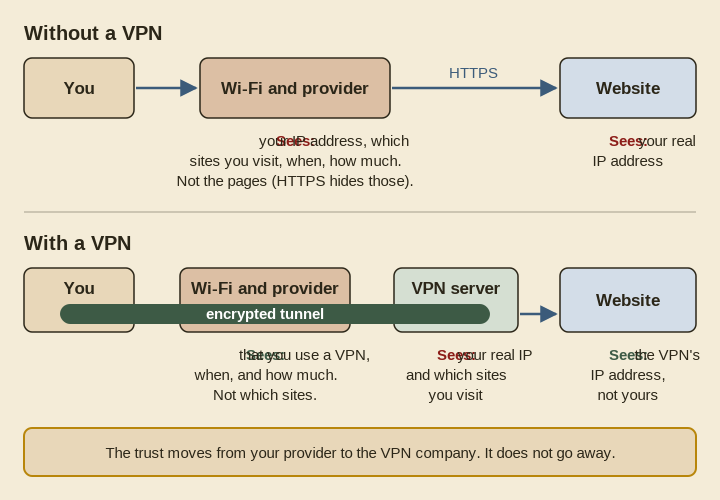 A VPN does not remove the party who can see where you go. It replaces one with another.
| Who | Without a VPN | With a VPN |
|---|---|---|
| The Wi-Fi owner and your internet provider | Your address, the names of the sites you visit, when, and how much data | That you are connected to a VPN server, when, and how much data |
| The VPN provider | Nothing, there is none | Your real address, the names of the sites you visit, when, and how much data |
| The website | Your real IP address | The VPN server's IP address |
| Anyone, of the page contents | Nothing, if the site uses HTTPS | Nothing, if the site uses HTTPS |
Look at the second row. Everything your internet provider used to see, the VPN provider now sees instead. You have not removed the watcher. You have chosen a different one. That is a good trade if you trust the VPN company more than the network you are on, and a bad trade if you do not.
Look at the last row too. HTTPS already hides the contents of pages, with or without a VPN. A VPN hides which sites you talk to, not what you say to them.
What does a VPN not do?
- It does not make you anonymous. The VPN provider knows your real address and usually your payment details. Sites also recognize you by cookies and by the make-up of your browser, and neither changes when your address does.
- Sites still know you when you log in. Sign in to your email or a shop through a VPN and that company knows exactly who you are. The address you arrived from is a detail.
- It does not stop malware. A bad download arrives through the tunnel as easily as a good one. The tunnel protects traffic in transit and has no opinion on what the traffic is.
- It does not stop phishing. A fake login page works the same through a VPN. If you type your password into it, the tunnel delivers it safely to the criminal.
Watch out
The mistake that hurts beginners is feeling protected. A VPN changes who can see where your traffic goes. It does not make a risky click safe, and it is not a replacement for updates, good passwords or thinking before you log in.
When does one help, and how do you choose?
A VPN earns its place in three situations:
- Untrusted Wi-Fi. In a hotel, airport or cafe, the tunnel keeps the network's owner, and anyone else on it, from seeing which sites you use or meddling with your connection.
- Reaching home or work. This is the original use, and still the best one.
- Hiding your browsing from the local network. That might be a shared house, a campus or your internet provider.
If you decide to pay for one, you are choosing whom to trust with the list of everywhere you go. I would not start with a ranking site, since the site may earn a commission on each sign-up. I would ask these questions instead:
- Who owns the company, and in which country? If you cannot find out, stop there.
- How does it make money? A free VPN has to pay for its servers somehow.
- Has an outside firm audited it, and is the report public and recent?
- What does its policy say it logs, in plain words?
- Does it use an open, well-studied protocol, or a secret one of its own?
- Does the client have a kill switch, which blocks all traffic if the tunnel drops, and does it send your DNS lookups through the tunnel too?
- Does it promise things no VPN can deliver, such as "total anonymity"? Treat that as a mark against it.
Tip
The most useful VPN for many people costs nothing: one into your own home. Some home routers can act as a VPN server, so check the admin page of yours. You become the provider, and the only party you have to trust is yourself.
WireGuard and OpenVPN
A VPN protocol is the set of rules the client and server use to build the tunnel. Two open ones cover most of what you will meet.
| Point | WireGuard | OpenVPN |
|---|---|---|
| What its makers say | A simple, fast and modern VPN | An open-source VPN program, tightly tied to the OpenSSL library |
| Carried over | UDP only | UDP by default, TCP as an option |
| Port | None fixed, 51820 in its own examples | 1194 by default |
| Encryption | One fixed modern set, with no menu to choose from | Negotiated with TLS, the same family that protects HTTPS |
| Good to know | Built into the Linux kernel, with apps for Windows, macOS, iOS and Android | The TCP option can get through networks that block UDP |
WireGuard identifies each side by a key pair, the same idea a web server's certificate rests on. Setting it up starts with making your own.
wg genkey | tee privatekey | wg pubkey > publickey
This creates a private key, saves it to a file named privatekey, works out the matching public key and saves that to publickey. You keep the first one secret and give the second to the other end.
The heart of a laptop's configuration for a tunnel to a home server is only a few lines.
[Interface]
PrivateKey = (the laptop's private key)

[Peer]
PublicKey = (the home server's public key)
Endpoint = 203.0.113.10:51820
AllowedIPs = 192.168.1.0/24
Endpoint is where the home server can be reached from the internet. AllowedIPs says which destinations go into the tunnel: here only the home network, 192.168.1.x, while the rest of your traffic travels as usual. WireGuard's own documentation covers the remaining lines and the server's side.
What to remember
- A VPN is an encrypted tunnel from your device to a server somewhere else.
- Reaching a private network and buying a privacy service are two different uses of the same tool.
- With a VPN, the local network and your provider see only that you use one. The VPN provider sees what they used to see.
- A website sees the VPN's address until you log in. Then it knows who you are.
- No VPN stops malware or phishing, and none makes you anonymous.
- It helps most on Wi-Fi you do not trust and for reaching your own network.
- Pick a provider by ownership, audits and logging policy, and prefer open protocols such as WireGuard and OpenVPN.
A good first project is a tunnel into your own home, because it teaches the idea with nobody else to trust. Before you build one, read Firewalls, NAT and Port Forwarding, which explains how the outside world reaches a machine behind your router in the first place.