Articles & BlogBy Trapper W. Brown8 min read
For site owners and people starting out in defense. By the end you will know how a website gets taken over, what a web shell is, and which few settings make one much harder to plant.
Most website break-ins do not look like the movies. Nobody guesses a password in a dramatic countdown. A piece of software has a flaw, or an upload form is too trusting, and a stranger ends up able to run commands on the server. From there the site belongs to them until somebody notices.
This article explains that path at the level a defender needs, and then spends most of its time on how to block it. It contains no attack code, because you do not need any to defend a site.
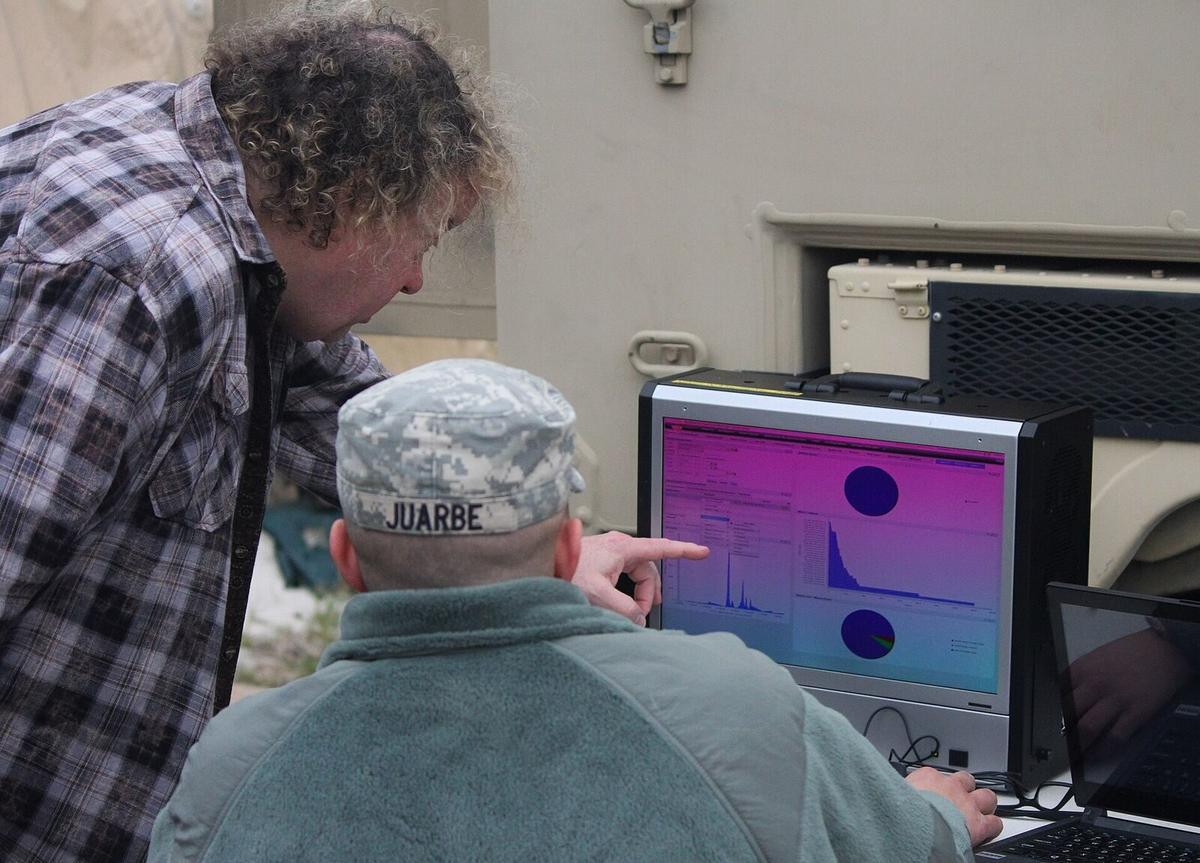 Finding an intruder usually comes down to someone looking closely at what the server has been doing. Photo by Staff Sgt. Ashley M. Cohen, U.S. Army, public domain, via Wikimedia Commons.
Watch out
Run the checks in this article only on servers you own or have written permission to test. Probing or accessing someone else's site without permission is a crime in most places, including under the US Computer Fraud and Abuse Act. And if you find a web shell, do not open it in a browser to see what it does. You may trigger it.
What does remote code execution mean?
A web server is supposed to do a narrow job: take a request for a page and send the page back. Remote code execution, usually shortened to RCE, is any flaw that lets an outsider make the server run commands the outsider chose. "Remote" means over the network, with no need to be near the machine.
RCE is the most serious class of flaw because it removes the boundary between visitor and operator. Whatever the server software is allowed to do, the attacker can now do: read files, change pages, connect to the database.
What is a web shell, and why leave one?
A flaw can be patched tomorrow. An attacker who has found a way in wants a way back that does not depend on the flaw. That is the purpose of a web shell.
A web shell is a small file placed on the server, written in whatever language the site already runs, such as PHP. When the attacker requests that file with a browser or a script, it carries out the commands sent with the request and returns the output. In effect it is a hidden admin page that only the attacker knows the address of.
Three things make web shells hard to spot. They are small, often a single file among thousands. Their traffic looks like ordinary web requests on the ordinary web port. And they are usually given dull names and tucked into folders nobody reads, such as an image upload folder.
How do attackers get in?
There are three common routes.
| Way in | What goes wrong | Main defense |
|---|---|---|
| An unpatched flaw | The site's language, content system or a plugin has a known RCE flaw and the update was never applied | Patching |
| A weak upload form | A form meant for pictures accepts a script file, and the server will run it | Upload checks and a no-execute upload folder |
| Stolen credentials | The attacker logs in to the admin panel, the hosting account or the file transfer account as a real user and uploads the file | Unique passwords and multi-factor authentication |
The first route was in the news in October 2026, when two RCE flaws in PHP itself, nicknamed PHP2Shell, were fixed. The security firms Aikido and Qualys both listed web shells among the things site owners should check for afterward.
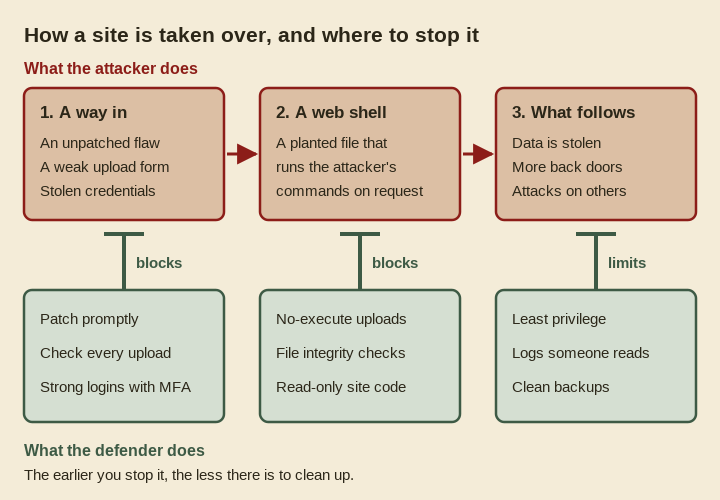 Each stage of a takeover has its own defenses, and the earliest ones save the most work.
What happens after the shell is in place?
The first commands are usually questions. Which account am I running as? What else is on this machine? Then the attacker goes after value:
- Configuration files. A site's config file holds the database password. With it the attacker can copy customer records without touching the web pages.
- More back doors. A second and third shell in other folders, or a new admin user, so that removing one does not lock them out.
- Your reputation. The server can be made to send spam, host fake login pages, or join attacks on other sites, all from your address.
- The next machine. If the server can reach other systems, it becomes the starting point for reaching them.
Which defenses stop it?
Patch. It closes the most common way in. Turn on automatic security updates for the operating system and the content system where you can.
Watch for files that should not be there. File integrity monitoring means recording what your files look like when you know they are clean, and checking later for changes. Two quick checks need no extra software.
find /var/www/html -type f -name "*.php" -mtime -7
This lists every PHP file under the site folder that changed in the last 7 days. If you did not update anything that week, the list should be empty.
find /var/www/html/wp-content/uploads -type f -name "*.php"
This lists PHP files inside a WordPress upload folder. On most sites it prints nothing, or only empty placeholder files named index.php. Anything else deserves a close look.
For a fuller check, record a fingerprint (a hash) of each file, then compare.
find /var/www/html -type f -name "*.php" -exec sha256sum {} + > /root/site-baseline.txt
This saves a SHA-256 fingerprint of every PHP file to a baseline file outside the site folder.
sha256sum --quiet -c /root/site-baseline.txt
This rechecks every file against the baseline and prints only the ones that differ.
/var/www/html/wp-includes/load.php: FAILED
sha256sum: WARNING: 1 computed checksum did NOT match
The baseline check does not notice brand new files, which is why you run the find commands too. Dedicated tools such as AIDE do both on a schedule. On WordPress, the command wp core verify-checksums compares the core files against the official copies.
Tip
Take a fresh baseline right after every update you make on purpose. Then any later mismatch is a change you did not make, which is the only kind worth an alarm.
Make upload folders no-execute. A folder that receives files from visitors should store them and nothing more. Tell the web server to refuse to run scripts from it. On nginx:
location ~* ^/wp-content/uploads/.*\.php$ {
    deny all;
}
This refuses any request for a PHP file inside the upload folder. Put it above the block that hands .php files to PHP, because nginx uses the first matching pattern of this kind. With this in place, a script that slips through an upload form is a dead file.
Give the web server account as little as possible. This is least privilege: an account gets only the access its job requires.
ps -eo user,comm | grep -E "nginx|apache2|httpd|php-fpm"
This shows which account each web server and PHP process runs as.
root     nginx
www-data nginx
root     php-fpm8.3
www-data php-fpm8.3
One starter process owned by root with workers under a limited account such as www-data is normal. The workers handle visitors, and they should never be root. Go a step further and make the site's code read-only to that account, with write access only to the upload and cache folders. A shell that cannot write files or read outside the site is far less useful.
Read the logs. The web server's access log records every request. A web shell in use leaves a pattern like this:
203.0.113.50 - - [02/Nov/2026:03:14:07 +0000] "POST /wp-content/uploads/2026/10/thumb-cache.php HTTP/1.1" 200 312
This is one request: an outside address sending data (POST) to a PHP file in an upload folder, and getting a success code (200) back. Legitimate visitors do not do that.
| Sign | Where you see it |
|---|---|
| POST requests to a script in an upload or image folder | Web server access log |
| The same odd file requested repeatedly from one address | Web server access log |
The web server starting a shell, wget or curl | Process list or audit log |
| Unexpected outbound connections from the server | Firewall or network log |
| A new admin user nobody created | The site's user list |
What should you do if you find one?
The instinct is to delete the file and move on. Resist it. One shell found usually means others not found, and deleting it destroys the evidence of how the attacker got in.
| Step | What to do | Why |
|---|---|---|
| Isolate | Take the site offline or block it at the firewall | Stops the attacker from using the shell while you work |
| Preserve | Copy the suspect file, the logs and, if you can, a snapshot of the disk. Note file dates. | The dates and logs show when and how it started |
| Rebuild | Restore from a backup made before the earliest sign of trouble, on a clean system, and patch it before it goes back online | You cannot be sure you found every back door on the old one |
| Rotate | Change every password, key and token the server held: database, admin, hosting, API keys | The attacker could read all of them |
Then close the way in. If you rebuild without fixing the flaw, the upload form or the stolen password, you will be doing this again next month.
What to remember
- Remote code execution lets an outsider run commands on your server. A web shell is the file left behind to keep that access.
- The usual ways in are an unpatched flaw, a weak upload form and stolen credentials.
- Patching, upload checks and multi-factor authentication block the way in.
- No-execute upload folders and file integrity checks stop or expose the shell.
- Least privilege and logs limit what a shell can do and how long it lasts.
- If you find one: isolate, preserve, rebuild from a clean backup, rotate credentials. Do not just delete it.
Tonight, run the two find commands on your own server and see what comes back. Rebuilding depends on having a backup that predates the break-in, so "Backups That Work: The 3-2-1 Rule" is the next thing to read. "Linux Files, Users and Permissions" explains the ownership settings behind least privilege.