Articles & BlogBy Trapper W. Brown8 min read
For anyone who has heard the word Linux and nodded along. By the end you will know what it is, which version to pick, and how to try it tonight without risking your computer.
You have probably used Linux today without knowing it. If you own an Android phone, it is in your pocket. If you play on a dedicated game server, it may well be under that too.
So what is it? Linux is the core of an operating system that anyone may copy, study and change. That one sentence holds three ideas worth pulling apart: what an operating system is, what the "core" means, and why the freedom to copy it matters.
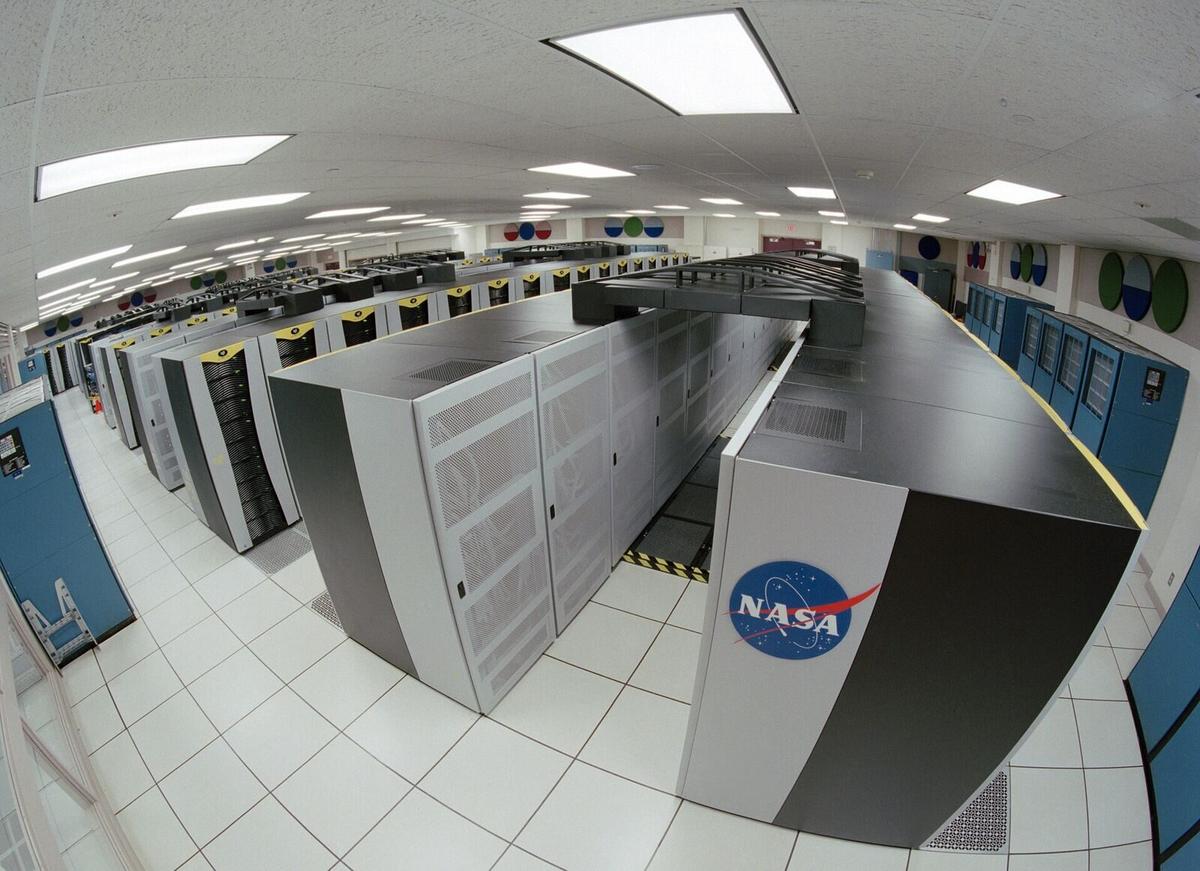 A supercomputer hall at NASA's Ames Research Center. A machine this size and the phone in your pocket both need an operating system. Photo by Trower, NASA, public domain, via Wikimedia Commons.
What does an operating system do?
A computer is a pile of parts: a processor, memory, a disk, a network card, a screen. Programs want to use those parts, and they all want them at once. The operating system is the software that sits between the two and keeps order.
The part doing the hardest work is the kernel. It decides which program gets the processor next, hands out memory, reads and writes files, and speaks to every device. Programs never touch hardware directly. They ask the kernel.
Linux, strictly speaking, is only that kernel. Everything you see and type into is stacked on top of it.
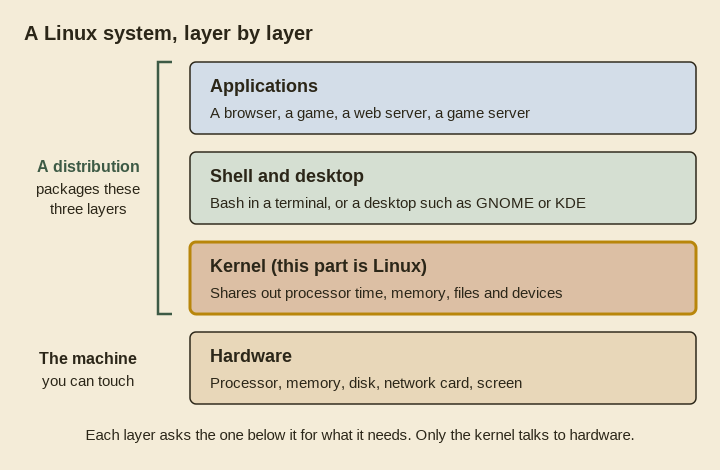 Linux is the kernel layer. A distribution bundles it with everything above it.
| Term | Plain meaning |
|---|---|
| Operating system | The software that runs the machine and lets programs share it |
| Kernel | The core that controls the processor, memory, files and devices |
| Shell | A program that reads the commands you type and runs them. Bash is the common one. |
| Desktop | The windows, menus and icons, for people who prefer a mouse |
| Distribution | A kernel plus all the other software, packaged so you can install it |
Where did Linux come from?
On 25 August 1991, Linus Torvalds posted a message from the University of Helsinki to a discussion group about Minix, a small teaching system. He said he was building a free operating system for 386 PCs, and that it was "just a hobby, won't be big and professional like gnu."
The release notes for version 0.01 are still on kernel.org, and they are humble reading. It ran on one kind of PC, it needed Minix to get started, and it came with a Finnish keyboard layout wired in. Version 0.02 was announced on 5 October 1991.
Two things turned a hobby into what you use today. First, Torvalds wrote the kernel but not the tools around it. The GNU project had already written a compiler, a shell and many small utilities, and the two fit together. Second came the license. The first release forbade charging a fee for copies. The notes for version 0.12 announced a move to the GNU General Public License (GPL), which lets anyone share and sell copies as long as the source code stays open. The kernel is still under version 2 of that license.
Kernel.org sums up the result in a line: a clone of the Unix operating system, written from scratch by Torvalds with help from programmers across the internet.
What is a distribution?
Nobody installs a bare kernel. You install a distribution (a "distro"): the kernel, a shell, a desktop if you want one, and a package manager, which is the tool that installs and updates everything else. Different groups make different choices, which is why there are so many.
Most of them fall into a few families.
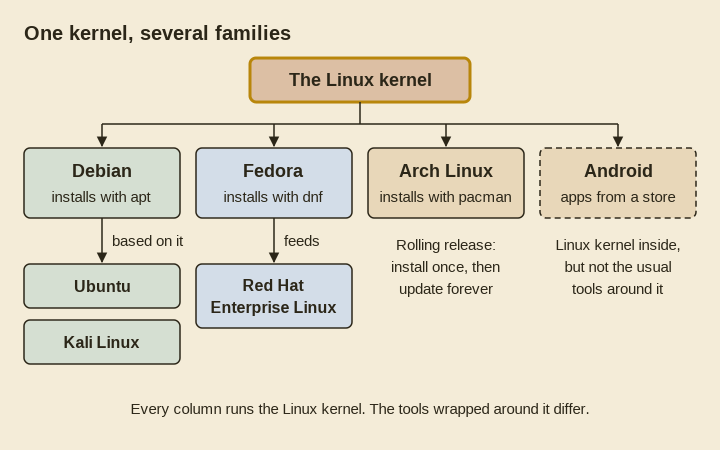 The main families. Pick a family and you have mostly picked a package manager.
| Family | Members you will meet | Installs software with | Known for |
|---|---|---|---|
| Debian | Debian, Ubuntu, Kali Linux | apt | Stability, and a huge base of guides |
| Red Hat | Fedora, Red Hat Enterprise Linux | dnf | Fedora moves fast, the enterprise version moves slowly |
| Arch | Arch Linux | pacman | Always current, and you build it up yourself |
Debian was founded by Ian Murdock on 16 August 1993 and is still built by volunteers. Its own site lists Ubuntu among the distributions based on it. Fedora is the community project that Red Hat sponsors, and Red Hat describes it as the upstream of its paid product, Red Hat Enterprise Linux. "Upstream" means changes land there first. Arch describes itself as a rolling release: you install it once and it updates forever, with no big version jumps.
Two names sit a little apart. Android is built on a Linux kernel, but almost nothing else about it matches a desktop distribution, so skills from one do not carry to the other. Kali Linux is a Debian-based distribution loaded with security testing tools. Its own documentation says it is aimed at experienced penetration testers and assumes you already know Linux. It is a toolbox for later, and a poor first install.
For a first distribution I would pick Ubuntu or Fedora. Both install in a few clicks, and almost any question you can think of has been answered online already.
Where does Linux run?
In far more places than the desktop.
- Servers. Websites, databases and cloud services. This is where Linux skills pay.
- Phones. Google's documentation says the Android kernel is based on a long-term Linux kernel.
- Routers. OpenWrt, a popular replacement firmware for home routers, describes itself as a Linux operating system for embedded devices.
- Game servers. Factorio, for one, offers a "headless" build for Linux servers: no graphics, no sound, only the game world.
- The Steam Deck. Valve calls SteamOS its Linux-based operating system and ships it on the Deck. A compatibility layer named Proton lets Windows games run on it.
What does open source mean in practice?
The Open Source Initiative keeps a ten-point definition, and it opens by saying that open source is more than access to the source code. The points that matter to you are simple. Anyone may give the software away. The source must be available. Anyone may change it and share the changed version.
In practice that gives you four things. Linux costs nothing. You can read exactly what it does, or rely on the many people who do. No single company can take it away or end it. And when you dislike a choice, someone has usually built a distribution that chose differently.
It does not make Linux safe by magic. Open code gets bugs like any other code. What you get is a fast, public process for fixing them, which only helps if you install the fixes.
Three safe ways to try it tonight
None of these replaces Windows or macOS. That step can wait until you are sure.
| Way | What you need | What it changes on your computer |
|---|---|---|
| Live USB | A spare USB stick you can wipe | Nothing, if you choose "Try" and not "Install" |
| Virtual machine | Free software such as VirtualBox, and spare memory | One large file, which you can delete |
| WSL | Windows 10 (version 2004 or later) or Windows 11 | Adds a Windows feature and a Linux command line |
A live USB holds a whole Linux system that boots from the stick. Debian's site describes a live image as one that can boot without modifying any files on the hard drive. You restart, choose the stick, look around, then pull it out and your computer is as it was.
A virtual machine (VM) is a pretend computer running in a window. VirtualBox calls your real system the host and the one in the window the guest. You download a distribution's installer file, point the VM at it, and install Linux inside.
WSL, the Windows Subsystem for Linux, is the quickest of the three. Open PowerShell as administrator and type:
wsl --install
This turns on the feature and installs Ubuntu, which is Microsoft's default. Restart when it finishes.
wsl --list --online
This lists the other distributions you can install the same way.
Tip
In a virtual machine, take a snapshot before you experiment. A snapshot saves the machine's exact state, so when you break something you roll back in seconds and try again. Breaking it is how you learn.
Watch out
The installer on a live USB can erase your whole disk if you pick the wrong option. If you only want to look, choose "Try" and never click through "Install" or "Erase disk" on a computer whose files you care about. Back up first anyway.
What to remember
- Linux is a kernel: the core that shares the hardware among programs.
- A distribution is that kernel plus a shell, tools and a package manager, ready to install.
- It began as one person's hobby in 1991 and grew because the license let everyone build on it.
- Debian and Ubuntu use
apt. Fedora and Red Hat usednf. Arch usespacman. - Android has a Linux kernel but is its own world. Kali is a specialist toolbox for later.
- A live USB, a virtual machine and WSL all let you try Linux without giving anything up.
Pick one of the three tonight and get as far as a blinking cursor. When you are there, the next article in this set, The Linux Command Line: The Commands That Do Most of the Work, starts from that cursor.