Articles & BlogBy Trapper W. Brown9 min read
For anyone who has been told to "open a port" and wondered what that does. By the end you will be able to forward one port safely, check your own firewall, and know why some connections cannot be forwarded at all.
A stranger on the other side of the world cannot connect to your laptop right now. You did nothing to arrange that. Something between you and the internet is turning those connections away all day without telling you.
That something is a firewall, helped by a side effect of how your router shares one address. The two get confused all the time. This article separates them, then walks through hosting a game for friends.
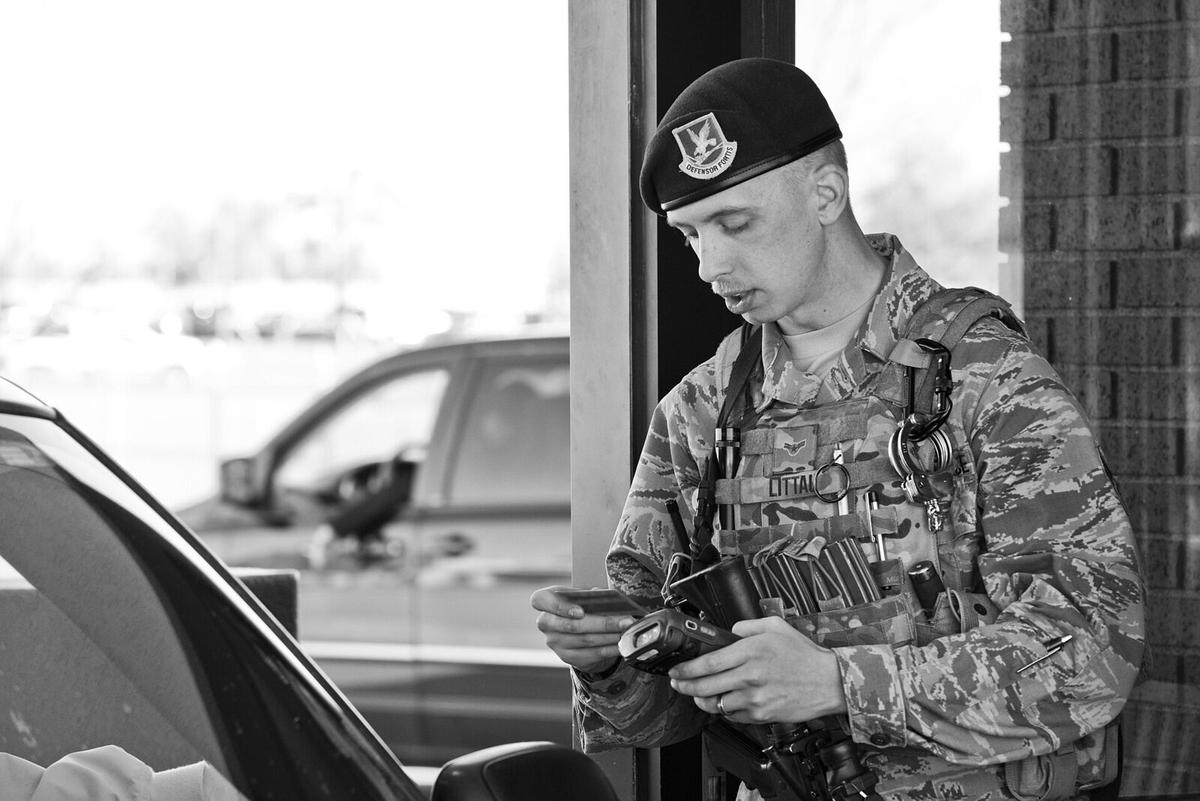 A firewall does at the network's edge what a gate guard does at a base: check each arrival against the rules before letting it through. Photo by Airman 1st Class Justin Armstrong, U.S. Air Force, public domain, via Wikimedia Commons.
What does a firewall do?
A firewall looks at each piece of network traffic and decides whether to let it pass. It decides by rule: where the traffic came from, where it is going, and which port it is aimed at. (A port is the number that says which program on a computer the traffic is for. "IP Addresses, Ports and Your Home Router" in this set covers it.)
The most useful rule a firewall can have is the last one on the list: anything not specifically allowed is refused. That is default deny. For traffic coming in from the internet, it is the setting you want, and it is how home routers and modern operating systems ship.
But if everything inbound is refused, how does a web page ever reach you? You asked for it, and the firewall remembers that you asked.
When your laptop opens a connection to a website, the firewall writes a line in a table: this inside address and port is talking to that outside address and port. When a reply arrives, the firewall checks the table. If the reply matches a conversation you started, it goes through. If nothing in the table matches, nobody inside asked for it, and it is dropped.
This is stateful inspection. The table is the state. Entries are removed when a conversation ends or goes quiet.
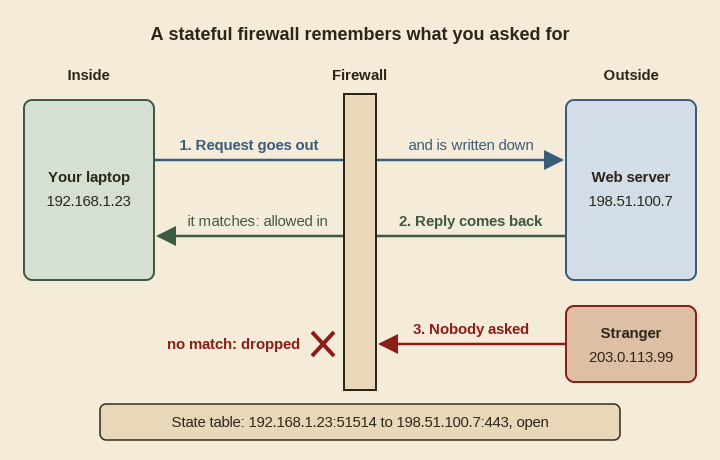 Replies to conversations you started come back in. Everything else from outside is dropped.
The result is a one-way door. You can reach out to anything. Nothing can reach in unless you started it or you made a rule that says otherwise.
NAT is not a firewall
Your router also does Network Address Translation, or NAT. Your devices have private addresses that only work inside the house, such as 192.168.1.23. The router has one public address from your internet provider. On the way out, the router replaces the private address with the public one and records which device the conversation belongs to. On the way back, it uses that record to deliver the reply.
NAT blocks unsolicited inbound traffic too, but by accident. A packet arrives at your public address, the router finds no record of which inside device it is for, and has nowhere to send it. That looks like protection, and people treat it as protection. It was built to save addresses.
| Firewall | NAT | |
|---|---|---|
| Purpose | Decide what traffic is allowed | Let many devices share one public address |
| Blocks inbound by | A rule that says deny | Having no record of where to deliver it |
| Can filter outbound traffic | Yes | No |
| Works with IPv6 | Yes | Usually not used: every device can have a public address |
The last row matters most. On IPv6 your devices may have addresses the whole internet can reach, and NAT is not in the way. The only thing keeping strangers out is the router's firewall. Leave it on.
What a port forward opens
A port forward is a standing rule on your router: traffic arriving at my public address on this port goes to this inside machine. It is a deliberate hole in both the NAT and the firewall, and it is the only way an outsider can start a conversation with something in your house.
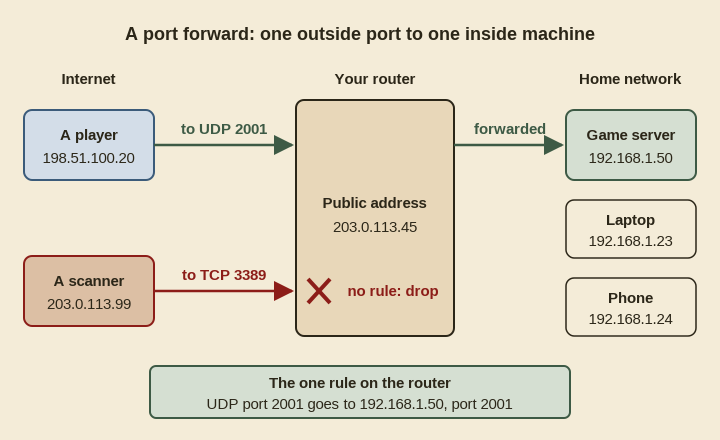 One outside port leads to one inside machine. Every other port and every other device stays closed.
The rule does not know who your friends are. Once the port is open, it is open to everyone on the internet, and automated scanners find open ports quickly. What stands between them and your network is the program listening on that port. If that program has a flaw, the forward is how the flaw gets reached.
Routers offer several ways to open things, and they are not equally risky.
| Method | What it opens | Risk |
|---|---|---|
| Forward one port to one machine | One program on one device | Lowest. This is the one to use. |
| Forward a range of ports | Whatever listens on any of them, now or later | Higher. You are opening doors you have not checked. |
| "DMZ host" setting | Every port, all sent to one machine | High. That machine is effectively on the open internet. |
| UPnP | Whatever any program inside asks for | Unknown, because you did not choose it |
UPnP (Universal Plug and Play) deserves a word. It lets a program on your network ask the router to forward a port for it, with no password and no prompt. That is why a console can host a match without you touching the router. The same convenience is available to any program in your house, including malware and the cheap camera you plugged in last year. If you do not need it, turn it off.
Watch out
The mistake that hurts beginners is giving up on finding the right port and putting the machine in the router's "DMZ" or forwarding a huge range to make the game work. That exposes every service on that computer to the whole internet. Forward the one port the documentation names, and nothing else.
The firewall on the machine itself
Each computer also has its own host firewall, which guards it against other devices on the same network too.
On Windows it is Windows Firewall (many screens still call it Windows Defender Firewall). Microsoft's documentation says its default is to block all incoming traffic unless it was solicited or matches a rule, and to allow outgoing traffic. Choose the public network profile on hotel and coffee shop Wi-Fi, which applies the stricter rules.
On Ubuntu and many other Linux systems the simple tool is ufw, the Uncomplicated Firewall. Its manual says it is installed disabled, with a default incoming policy of deny.
| Command | What it does |
|---|---|
sudo ufw status verbose | Shows whether the firewall is on, the default policies and the rules |
sudo ufw default deny incoming | Refuses inbound traffic that no rule allows |
sudo ufw default allow outgoing | Lets the machine start any outbound connection |
sudo ufw allow 2001/udp | Allows inbound traffic to UDP port 2001 |
sudo ufw limit ssh/tcp | Allows SSH, but refuses an address that tries 6 or more connections in 30 seconds |
sudo ufw status numbered | Lists the rules with numbers |
sudo ufw delete allow 2001/udp | Removes that rule |
sudo ufw enable | Turns the firewall on now and at every boot |
If you manage the machine over SSH, add the SSH rule before you run enable, or you will lock yourself out.
A worked example: hosting a game server at home
Say you want to run a dedicated server for a few friends on a spare Linux PC. The game's documentation says it listens on UDP port 2001. (That number is an example. Use the one your game's own documentation gives.)
Step 1: give the server a fixed inside address. In the router, reserve an address for it, say 192.168.1.50, so the forward does not point at the wrong device after a restart.
Step 2: open the host firewall for that one port.
sudo ufw allow 2001/udp
This lets inbound UDP traffic on port 2001 reach the game and leaves every other port refused.
Step 3: add one forward on the router. UDP 2001 on the outside to 192.168.1.50, port 2001.
Step 4: check it.
sudo ufw status verbose
This prints the firewall's state so you can confirm you got what you meant:
Status: active
Default: deny (incoming), allow (outgoing), disabled (routed)

To                         Action      From
--                         ------      ----
2001/udp                   ALLOW IN    Anywhere
Step 5: keep that machine patched. That means the operating system and the game server both. The open port leads straight to the game server program, so its updates are now security updates.
Step 6: keep nothing personal on it. A spare PC or a virtual machine is better than the computer with your tax returns.
Step 7: close it when you are done. Delete the forward on the router and run sudo ufw delete allow 2001/udp.
Tip
Before you spend an evening on port forwarding, look at the WAN or Internet address on your router's status page. If it starts with 10, 192.168, 172.16 through 172.31, or 100.64 through 100.127, forwarding on your router alone will not work, for the reason below.
When you cannot forward at all
Sometimes you set everything up correctly and nobody can connect. There are two usual causes.
Double NAT means there are two routers in a row, each translating. A common case is your own router plugged into a modem from the provider that is also a router. A forward on yours is not enough, because the outer one still has no rule. You fix it by putting the provider's box in bridge mode, or by forwarding on both.
CGNAT, carrier-grade NAT, means your provider does the same trick one level up: many customers share one public address. A block of addresses, 100.64.0.0/10, is set aside in RFC 6598 for exactly this, so a WAN address in that range is the sign. You cannot forward through equipment you do not control. Your choices are to ask the provider for a public address (some offer one, sometimes for a fee), to use IPv6 if you and your friends all have it, or to rent a small server elsewhere and host there.
What to remember
- A firewall decides what traffic may pass. Default deny for inbound is the setting you want.
- NAT shares one address among many devices. It blocks inbound traffic only as a side effect.
- A port forward opens one door to the whole internet, and the program behind it is the lock.
- Forward one port to one machine. Avoid ranges, the DMZ setting and UPnP you did not ask for.
- Patch the machine behind the forward, and delete the forward when you are finished.
- A private or
100.64.0.0/10WAN address means double NAT or CGNAT, and your own router cannot fix that alone.
Look at your router's port forwarding and UPnP pages tonight and see what is already open. To check the result from the network's side, "Nmap: Seeing What Is on Your Own Network" in this set shows how to scan your own machines.