Articles & BlogBy Trapper W. Brown9 min read
For anyone who has seen a headline about a "critical vulnerability" and wondered whether it was their problem. By the end you will be able to read an advisory line by line and decide what to do.
A security advisory is a short notice from a software maker that says: we found a flaw, here is how bad it is, here is which versions have it, and here is the fix. The headline about it is written to be alarming. The advisory itself is written to be used.
This article reads one real example from start to finish: the advisory PHP published in October 2026 for the two flaws known as PHP2Shell.
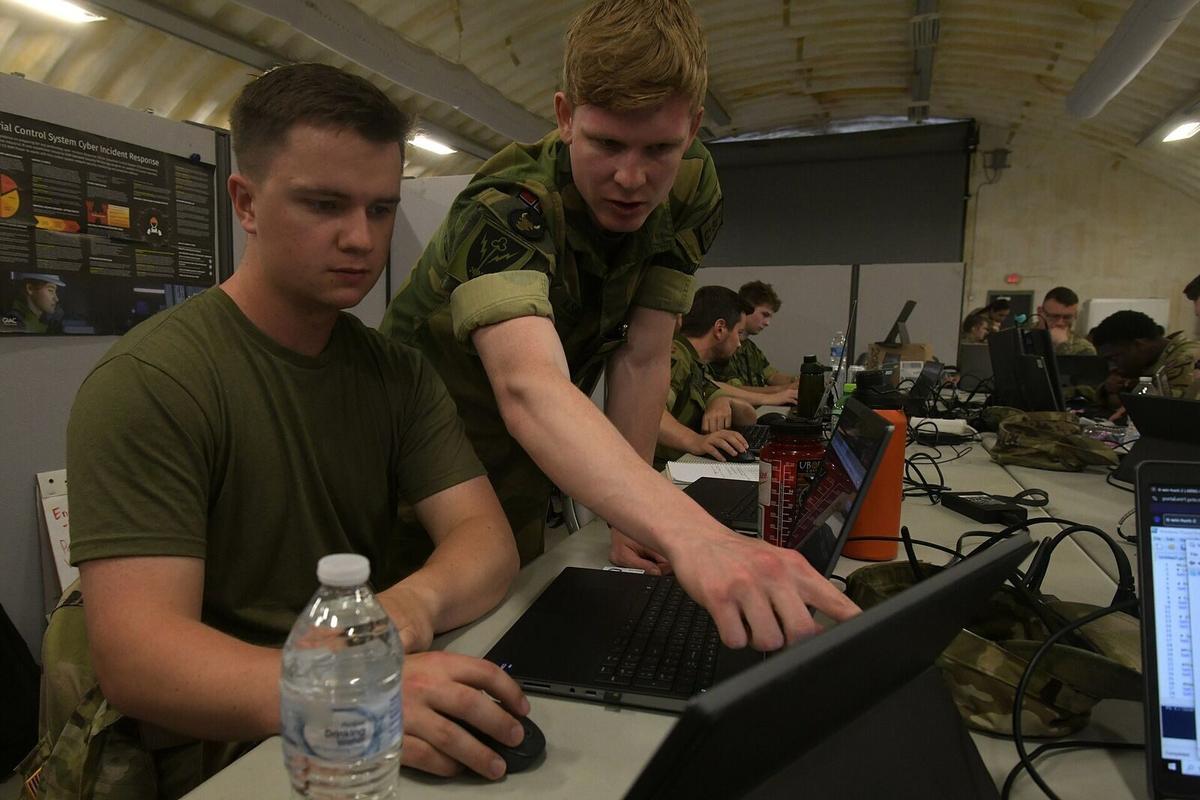 Reading an advisory is a skill, and it goes faster with a second pair of eyes. Photo by Sgt. 1st Class Jon Soucy, U.S. Army, public domain, via Wikimedia Commons.
What does the CVE number tell you?
CVE stands for Common Vulnerabilities and Exposures. It is a public list that gives each known flaw an ID in the form CVE, the year, and a number. PHP2Shell is two entries: CVE-2026-109618 and CVE-2026-109619.
The number tells you nothing about severity. Its job is to be a name that everyone shares. A nickname like PHP2Shell is good for headlines, but your hosting company, your Linux distribution and your scanner will all file the flaw under the CVE number. That makes it the thing to search for.
How do you read the score?
Most advisories carry a score from the Common Vulnerability Scoring System (CVSS). It runs from 0 to 10.
| CVSS score | Rating |
|---|---|
| 0.1 to 3.9 | Low |
| 4.0 to 6.9 | Medium |
| 7.0 to 8.9 | High |
| 9.0 to 10.0 | Critical |
Both PHP2Shell flaws are scored 9.2 on CVSS version 4.0, so they are critical. Note the version beside the score: a 3.1 number and a 4.0 number are not measured the same way.
The score is a summary. The useful part is the string of letters next to it, called the vector, which shows how the score was reached. Here is the one for PHP2Shell:
AV:N/AC:H/AT:P/PR:N/UI:N/VC:H/VI:H/VA:H
Each piece between slashes is one question and its answer, written as a short code, a colon, and a value.
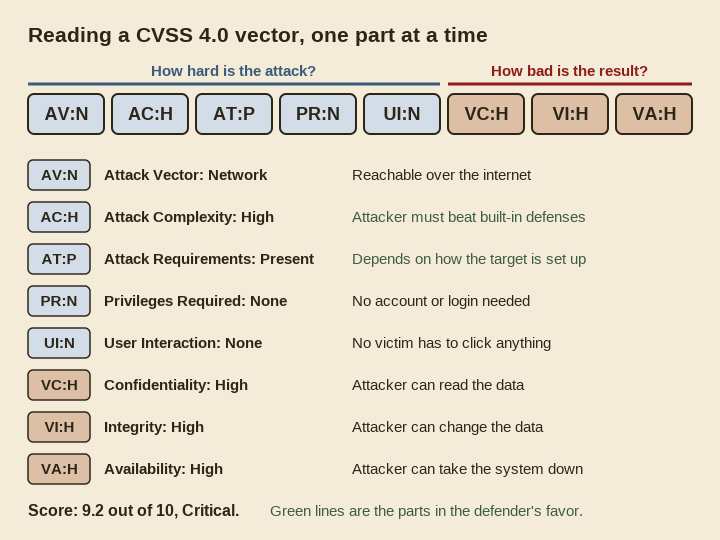 The PHP2Shell vector, one part at a time.
Read it in two halves. The first five parts say how hard the attack is. The last three say how bad the result is for the vulnerable system: can the attacker read its data, change its data, or knock it offline. A complete version 4.0 vector also starts with the label CVSS:4.0 and has three more parts, SC, SI and SA, which rate harm to other systems beyond the vulnerable one.
Now look at what this vector says. Network, no privileges and no user interaction is the worst combination there is: a stranger on the internet, with no account, needing nobody to click. All three impacts are high. Two parts pull the other way. Attack complexity is high, and attack requirements are present, which means success depends on conditions on the target. Qualys put the same point in a sentence: "Exploitability varies by configuration and application behavior". Those two parts are the good news in an otherwise bad vector.
I read the vector before I read anything else. PR:N with UI:N and AV:N means act today. A vector that says AV:L (the attacker must already be on the machine) or UI:A (a user must actively do something) usually buys you time.
Which versions are affected, and which are fixed?
This section decides whether the advisory is about you at all. It lists the versions that have the flaw and the first version of each branch that does not.
| Branch | Fixed version | Affected |
|---|---|---|
| PHP 8.5 | 8.5.12 | Every earlier 8.5 release |
| PHP 8.4 | 8.4.27 | Every earlier 8.4 release |
| PHP 8.3 | 8.3.36 | Every earlier 8.3 release |
| PHP 8.2 | 8.2.35 | Every earlier 8.2 release |
| PHP 8.1, 8.0, 7.4 | None. Minimal source patches only, no official builds. | All releases |
Pay attention to what is missing from the fixed column. PHP no longer updates 8.1 and older. When your version is absent because it is too old, the advisory is telling you that you have two jobs: this flaw, and getting onto a supported version.
To compare, find out what you run.
php -v
This prints the installed PHP version. Comparing it with the table is not the whole answer.
Watch out
The version number alone can mislead you in both directions. Linux distributions such as Debian, Ubuntu and Red Hat often backport a fix: they apply the repair to the older version they already ship and keep the old version number. A server showing an "affected" number may be patched, and you cannot confirm it by the number. Check the distribution's own advisory for the CVE.
Distributions publish a page per CVE. For Debian it is https://security-tracker.debian.org/tracker/ followed by the CVE number. Ubuntu uses https://ubuntu.com/security/ and Red Hat uses https://access.redhat.com/security/cve/ in the same way. You can also ask the package itself.
apt changelog php8.3 | grep CVE-2026-109618
On Debian or Ubuntu, this searches the installed package's list of changes for the CVE number. A matching line means the package says it includes the fix, and no output means it does not mention it. Change php8.3 to the PHP package your system uses.
rpm -q --changelog php | grep CVE-2026-109618
This does the same on Red Hat, Fedora and their relatives.
What does "exploited in the wild" mean?
It means attackers are using the flaw against real systems, as opposed to a researcher showing it in a lab. It is the single most important line in an advisory, because it moves the question from "could this happen" to "this is happening."
For PHP2Shell, watchTowr reported exploitation in its honeypots (decoy servers set out to attract attacks) from 21 October 2026, the day of the fix. You will also see the phrase "proof of concept," meaning published code that demonstrates the flaw. Its existence shortens the time you have. Never download or run one to "test" your own server. Qualys warned during PHP2Shell of look-alike exploit code that was itself malicious.
The US agency CISA keeps a list of flaws it has confirmed are being exploited, the Known Exploited Vulnerabilities (KEV) catalog. Version 2026.11.10 of the catalog held 1,779 entries. Entries are added all the time, and checking for yourself takes a minute.
- Open
https://www.cisa.gov/known-exploited-vulnerabilities-catalog. - Type the CVE number into the catalog's search box.
- If there is an entry, read its date added, its due date and its required action.
Or do it from a terminal.
curl -s https://www.cisa.gov/sites/default/files/feeds/known_exploited_vulnerabilities.json | grep -c "CVE-2026-109618"
This downloads the catalog as a data file and counts the lines that mention the CVE.
3
That was the result on 11 November 2026. The number counts lines of text, not entries, so do not read anything into its size. A result of 0 means the CVE is not listed, and anything higher means it is.
So here is the real answer for the running example. In catalog version 2026.11.10, both CVE-2026-109618 and CVE-2026-109619 are listed. Each was added on 26 October 2026 with a due date of 29 October 2026.
Date added is the day CISA put the flaw in the catalog, which means it had evidence of real attacks by then. It is not the day the attacks began. Due date is the deadline CISA gives US federal agencies to apply the fix or stop using the product. It binds only those agencies, but everyone else can borrow it as a measure of urgency.
Tip
Read the vendor's own advisory first and the news coverage second. For PHP2Shell that is php.net. The affected versions, the fixed versions and the official workaround come from the vendor.
What is the difference between a workaround and a fix?
A fix removes the flaw, usually through an update. A workaround, also called a mitigation, leaves the flaw in place and makes it harder to reach. You use a workaround to buy time until you can apply the fix.
PHP's advisory offered workarounds: turn off the upload progress feature with session.upload_progress.enabled=0, and cap the size of incoming requests. It was direct about their limits: "There are no complete mitigations, updating is the only safe choice."
Read workaround sections for the fine print. PHP said to make the change in php.ini, the FPM pool or the server configuration, and not to rely on ini_set() or a .user.ini file. It also said that hiding error messages does not help.
The five questions
Every advisory, whatever the product, can be worked through with the same five questions.
| Question | Where to look | PHP2Shell answer |
|---|---|---|
| Does it affect me? | Affected versions, then your own inventory | Yes if you run PHP on a web server below the fixed versions |
| Is it reachable? | The vector, plus where your system sits | AV:N, so any PHP site open to the internet |
| Is it being exploited? | The advisory, the KEV catalog, security firms | Yes. Attempts from the day of release, and both in CISA's catalog since 26 October 2026. |
| Is there a fix? | Fixed versions | Yes for 8.2 to 8.5. Source patches only for 7.4 to 8.1. |
| What do I do until then? | Workarounds | Turn off upload progress, cap request sizes, watch the logs |
The first question removes most advisories from your list, which is why a plain list of the software you run, with versions, is worth keeping.
The second question is the one beginners skip. A critical flaw in a service that only answers on your home network is a smaller problem than a medium one on a server the whole internet can reach.
What to remember
- The CVE number is the name to search for. It says nothing about severity.
- The CVSS score is a summary. The vector explains it, and
AV:NwithPR:NandUI:Nis the combination that means hurry. - Note the CVSS version. A 4.0 score and a 3.1 score are not the same scale.
- A backported fix keeps the old version number, so confirm against your distribution's page for the CVE.
- "Exploited in the wild" outranks the score. Check CISA's catalog yourself, and read the date added and the due date.
- A workaround buys time. Only the fix closes the flaw.
- Ask the five questions in order: affected, reachable, exploited, fixed, and what until then.
The next time a headline says "critical," find the vendor's advisory and read it with those five questions beside you. For the full story of the example used here, read "PHP2Shell: What Happened and Why It Matters". To get comfortable applying fixes on your own machine, "Installing Software and Keeping Linux Patched" is the natural next step.