Articles & BlogBy Trapper W. Brown12 min read
For anyone who has jabbed at a phone with a gloved finger, watched a raindrop open an app by itself, or wondered why the card reader at the store needs a firm press and the phone does not.
A touchscreen has one job: report where a finger is. There are several ways to do it, and the two you meet most often work on completely different principles. One feels a push. The other never feels anything. It measures a small electrical disturbance that your body makes by being near it.
Knowing which is which tells you why a winter glove defeats a phone and not a payment terminal, why two fingers can zoom a map, and why a wet screen types nonsense. This article goes through both designs, the grid inside a phone screen, and the arithmetic that turns a blur of readings into one sharp point.
 Phone or lobby kiosk, the screen has to answer the same question: where is the finger? Photo by Wes Wright, U.S. Air Force, public domain, via Wikimedia Commons.
What are the two main kinds?
A 2021 review of touchscreen technology in the peer-reviewed journal Sensors, by Hyoungsik Nam and colleagues at Kyung Hee University, sorts touchscreens into four families: resistive, capacitive, acoustic wave and optical. The first two are the ones in your pocket and at the checkout.
| Resistive | Capacitive | |
|---|---|---|
| What it detects | Two layers pushed into contact | A change in an electric field |
| Needs force | Yes | No, a light touch is enough |
| Works with | Anything: a pen cap, a glove, a fingernail | A finger or a stylus made for it |
| Several fingers at once | Not in the ordinary design | Yes |
| Bothered by water and dirt | Hardly at all | Yes |
| Where the review says you find it | Toys, office electronics, card payment machines | Smartphones, tablets, notebook computers |
How does a resistive screen find a press?
The review calls the resistive design the oldest touchscreen technology. It is two sheets, each coated on one side with a conductive film and held slightly apart. At least one sheet is flexible. Press down and the two films touch at that spot.
Finding the spot uses a trick called a voltage divider. Put a voltage across one film, from its left edge to its right edge, and the voltage at any point along the way is in proportion to how far along it is. The other film acts as a probe: where the two touch, it picks up the voltage at that point.
For example, put 5 volts across the film. If the probe reads 1.5 volts, the press is 30 percent of the way across, because 1.5 divided by 5 is 0.3. Then the roles swap, the voltage is laid top to bottom, and the same step gives the vertical position. The review notes that these screens estimate the horizontal and vertical positions one after the other.
The idea was patented early. George Hurst and James Parks filed a patent for an "electrical sensor of plane coordinates" in May 1970, granted in May 1972 and assigned to the University of Kentucky Research Foundation. It describes two sheets of conducting material whose lines of equal voltage run at right angles to each other, and a probe that picks off a signal from each.
The review lists the strengths as working with any object, low cost, low power and indifference to contamination. The drawbacks are that the ordinary design reads only one touch, the surface wears and scratches, the extra layers cost clarity, and it needs a firm press.
Why is a finger part of the circuit?
A capacitive screen relies on capacitance, which is the ability of two conductors separated by an insulator to hold electric charge. Georgia State University's HyperPhysics reference gives the formula for the simplest case, two flat plates:
Capacitance = dielectric constant × a fixed constant × plate area ÷ distance between plates.
The dielectric constant describes the insulating material in the gap (1 for empty space, higher for everything else). The fixed constant is one of nature's numbers, listed by the National Institute of Standards and Technology as about 8.854 trillionths of a farad per meter. The formula says three things worth remembering: a bigger plate holds more, a smaller gap holds more, and the material in the gap matters.
Your body conducts electricity. Bring a fingertip close to a conductor under glass and you have made a capacitor: finger, glass, conductor. The electronics notice that the amount of charge the conductor can hold has changed.
Engineers at CERN, the European particle physics laboratory, used exactly this in the early 1970s. According to an account in the CERN Courier co-written by the engineer who designed it, Bent Stumpe, he proposed a capacitive touch screen in a handwritten note dated 11 March 1972. The design was a set of capacitors etched into a film of copper on a sheet of glass, where a nearby flat conductor "such as the surface of a finger" would raise the capacitance by a noticeable amount. The first glass prototype had nine touch buttons. When CERN's Super Proton Synchrotron started up in 1976, its control room was fully equipped with touch screens.
How does the grid find a fingertip?
Nine buttons is a keypad. A phone needs to locate a finger anywhere, so the capacitors became a grid. The review describes the modern design, called projected capacitive: two patterned conductive layers, separated and crossed over each other like the lines on graph paper. Wherever a row passes over a column, the pair forms a tiny capacitor.
An article in Information Display, the magazine of the Society for Information Display, by Gary Barrett and Ryomei Omote, says the lines are made of indium tin oxide (ITO), a conductive coating, laid down on glass in rows as fine as 50 millionths of a meter in one design. A cover glass goes on top, typically 0.55, 0.75 or 1.1 millimeters thick on mobile devices.
The scanning goes like this, per the review:
- A chip sends a pulse down one row.
- Every column measures how much charge came across from that row. The amount depends on the capacitance at that one crossing.
- The chip moves to the next row and repeats, line by line, until it has a number for every crossing.
A finger near a crossing draws off part of the electric field between the row and the column, so less charge gets across. The chip looks for the crossings where the number has dropped.
How big is the job? One touch sensor in the research the review covers produced a grid of 15 by 27 readings. That is 405 crossings, read through only 42 wires, because 15 plus 27 is 42. A Milwaukee School of Engineering lecture on these screens gives the usual rate as 20 to 200 full scans a second, and two of the research chips compared in the review run at 120. At 120 scans a second, a 405 crossing grid produces 48,600 readings every second.
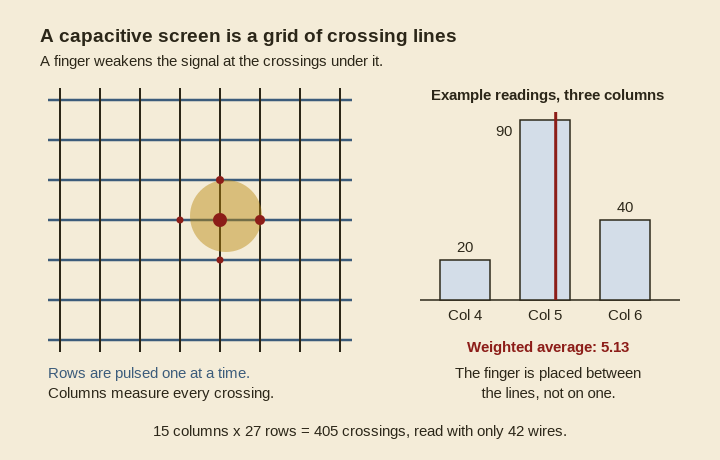 The chip reads every crossing, then averages the neighbors to place the finger more finely than the grid itself.
How can a coarse grid be so precise?
A grid of a few dozen lines is coarse, yet you can hit a link in small print. The answer is that a fingertip disturbs several crossings at once, by different amounts. Barrett and Omote explain that the readings from several intersections are combined to work out the exact location, and that the resolution is usually 1,024 by 1,024 positions.
Here is the arithmetic with made-up readings. Suppose the signal drops by 20 units on column 4, by 90 on column 5 and by 40 on column 6. Take the weighted average of the column numbers:
- 4 × 20 is 80, 5 × 90 is 450, and 6 × 40 is 240. Together: 770.
- The readings add up to 150.
- 770 divided by 150 is 5.13.
The finger is centered at column 5.13: just right of column 5, pulled that way because column 6 saw more than column 4. If the lines are 5 millimeters apart (an example spacing), that is 25.7 millimeters from the edge, located to a fraction of a millimeter by a grid with 5 millimeter gaps.
How does it tell two fingers from one?
This is where the method of measuring matters. There are two ways to read the same grid.
The simple way, called self-capacitance, measures each whole line against ground: which columns have a finger somewhere on them, and which rows. One finger is no problem. Two fingers light up two columns and two rows, and two columns cross two rows at four places. The review spells out the result: the screen reports the two correct locations "along with two additional ghost locations."
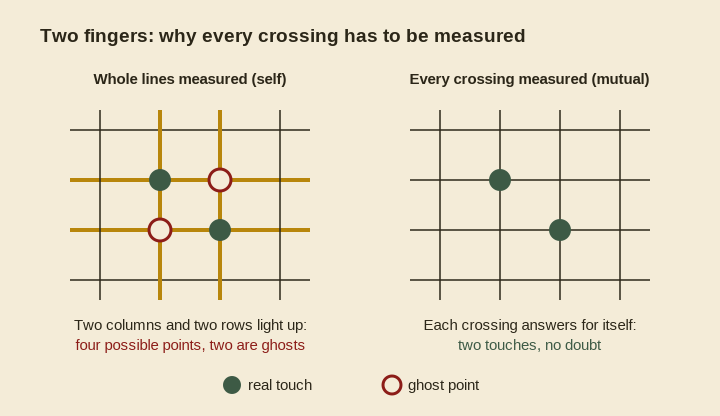 Measuring whole lines leaves two possible answers for two fingers. Measuring each crossing leaves one.
The thorough way, called mutual capacitance, is the row by row scan described above. Every crossing is measured by itself, so each touch shows up exactly where it is. The review says this design supports multi-touch with no limit on the number of fingers, and that it has been the mainstream in consumer electronics since 2007.
Why do gloves and water drops confuse it?
Go back to the formula: more distance, less capacitance.
For example, treat a fingertip as a plate of 1 square centimeter resting on a 0.75 millimeter cover glass, and take 7 for the dielectric constant of glass (HyperPhysics lists glass as 5 to 10). The formula gives about 8.3 trillionths of a farad. Now add a 1 millimeter glove with a dielectric constant of 3, in the range the same table gives for common plastics. The finger is further away, behind a poorer material, and the result falls to about 2.0 trillionths of a farad. Roughly three quarters of the signal is gone. This is a simplified model, since a real finger is not a flat plate, but the direction is right. A thick glove pushes the signal below the level the chip counts as a touch.
Three details from Barrett and Omote fill this in. The sensitivity is set by the electronics, and it can be turned up until a hand merely near the screen registers. These screens can respond through cotton or surgical gloves. And a thinner cover with a higher dielectric constant performs better, which fits the formula: anything that adds distance between finger and grid costs signal.
Water is the opposite problem: too much signal where there is no finger. HyperPhysics lists the dielectric constant of water as 80.4, against 1.00059 for air. A drop sitting on the glass changes the field beneath it, and the review by Nam and colleagues lists water and dust among the things a capacitive panel can register as touches.
The same reasoning covers the plastic pen that works on a card reader and not on a phone. Barrett and Omote note that a projected capacitive screen is not pressure sensitive and will not react to anything other than a finger or a specially designed probe.
What do people get wrong?
"The screen feels my finger press." A phone screen measures capacitance. Barrett and Omote state plainly that these screens are not pressure sensitive.
"It senses the warmth of my skin." Nothing in the mechanism described above measures temperature. What counts is a conductor close to the lines.
"Multi-touch was invented for the smartphone." Bill Buxton, a researcher who has kept a public history of the field since 2007, traces it much further back. He credits E. A. Johnson of the Royal Radar Establishment with describing a workable touch screen mechanism in 1965. He dates the first multi-touch system he knows of to 1982, by Nimish Mehta at the University of Toronto, followed by a multi-touch screen at Bell Labs in 1984 and a multi-touch tablet from his own Toronto group, published in 1985.
"A touchscreen is a kind of display." The touch sensor is its own layer of lines and its own chip. The review notes that newer designs, called in-cell, merge the touch electronics into the display, but the two jobs are still separate: one shows the picture and one finds the finger.
What to remember
- A resistive screen is two conductive sheets pushed together. It reads position from a voltage, works with any object, and handles one touch.
- A capacitive screen measures the change a nearby finger makes in an electric field. It needs no force.
- A phone screen is a grid of crossing lines. Rows are pulsed one at a time and every crossing is measured, many times a second.
- Averaging the readings from neighboring crossings places the finger far more finely than the spacing of the lines.
- Measuring every crossing separately (mutual capacitance) is what makes several fingers work without ghost points.
- Gloves add distance and cut the signal. Water adds signal where there is no finger.
So when a drop of rain opens your email, the screen is not broken. It measures, and the drop gave it something to measure.
Sources (9)
- Nam and others, "Review of Capacitive Touchscreen Technologies: Overview, Research Trends, and Machine Learning Approaches", Sensors 21(14), July 2021
- Barrett and Omote, "Projected Capacitive Touch Screens", published in Information Display, Society for Information Display
- CERN Courier, Stumpe and Sutton, "The first capacitative touch screens at CERN", 31 March 2010
- U.S. Patent 3,662,105, Hurst and Parks, "Electrical Sensor of Plane Coordinates", granted 9 May 1972
- Bill Buxton, "Multi-Touch Systems that I Have Known and Loved", updated 10 December 2025
- Milwaukee School of Engineering, ELE 4142 lecture notes, "Touch Screens: Capacitive", updated 29 February 2024
- Georgia State University, HyperPhysics, "Parallel Plate Capacitor"
- Georgia State University, HyperPhysics, "Dielectric Constants"
- NIST, "CODATA Value: vacuum electric permittivity", 2022 values