Articles & BlogBy Trapper W. Brown10 min read
Meshtastic is an open source project that turns small, inexpensive radios into a text messaging network that needs no cell tower, no Wi-Fi and no monthly bill. You pair a radio about the size of a deck of cards with your phone, type a message in an app, and the radio sends it over the air. If the person you want is too far away, other people's radios pass the message along. That passing along is what makes it a mesh.
Why should you care? Because the phone network is the first thing to clog in a regional emergency and the first thing to vanish at the end of a mountain road. A mesh gives a family, a hiking group or a neighborhood a slow, simple channel of their own. It will not replace your phone. It can carry "we are OK, meet at the school" when nothing else will, and in the United States you do not need a license to use it.
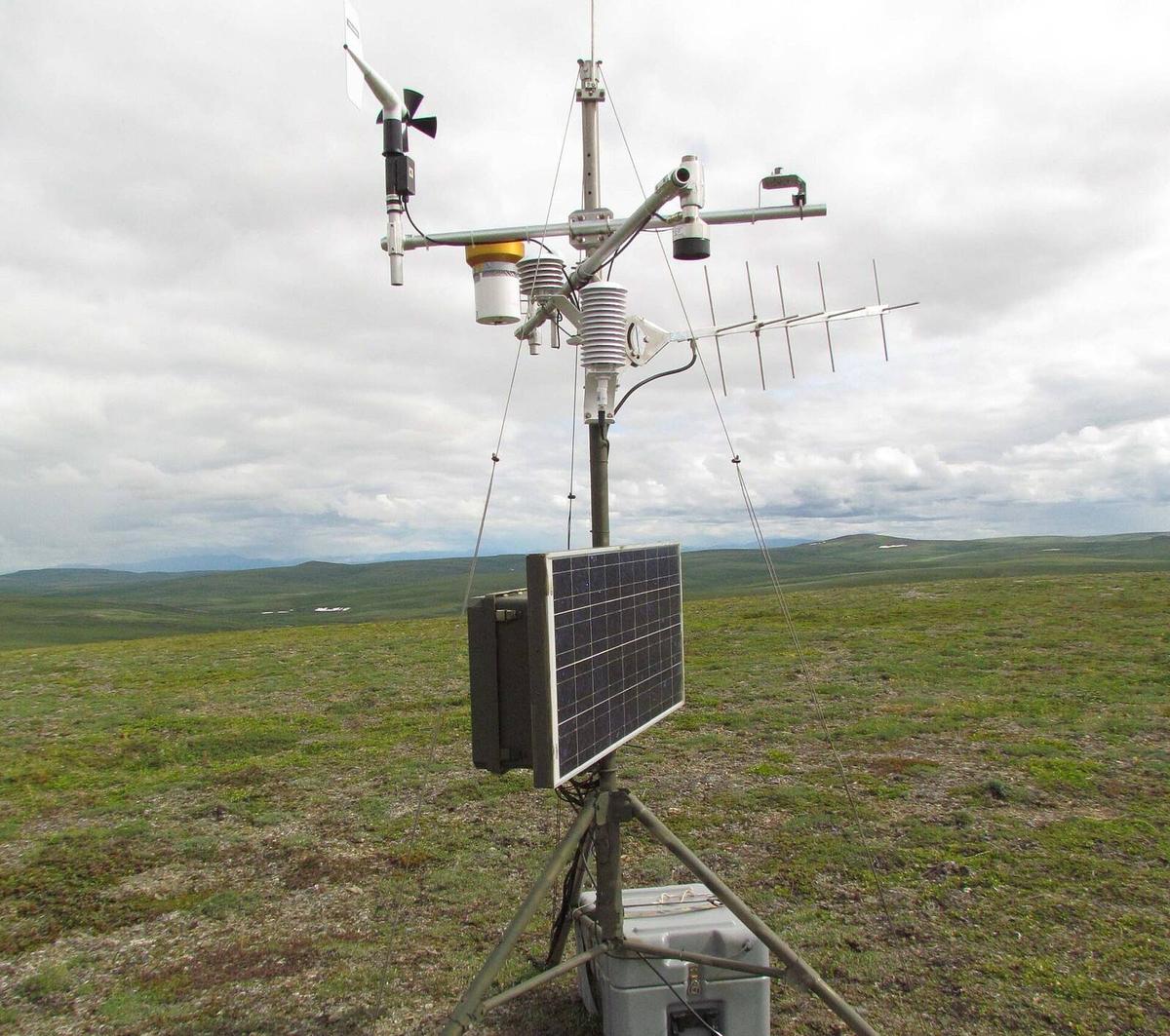 A solar panel, a battery box, a mast and an antenna in a high open place: this weather station is not a mesh node, but a mesh relay is built from the same recipe. Photo by the National Park Service, public domain, via Wikimedia Commons.
What is a mesh network?
In a normal phone network, every handset talks to a tower, and the towers are wired together. Take away the tower and two phones a block apart cannot reach each other.
In a mesh, every radio is called a node, and each node both sends its own messages and relays other people's. There is no center. Meshtastic's documentation says the radios "are designed to rebroadcast messages they receive, forming a mesh network." A message hops from node to node until it reaches the person it was meant for or runs out of hops.
The project uses a method it calls managed flooding. A node that hears a new message waits a moment before repeating it. If it hears another node repeat the message first, it stays quiet. Nodes that received the message weakly, which usually means they are farther away, get to go first, so each hop covers as much ground as possible. Every message carries a hop limit. The default is 3 and the most the software allows is 7. On the default setting the documentation's advice is short: "Really, 3 is fine."
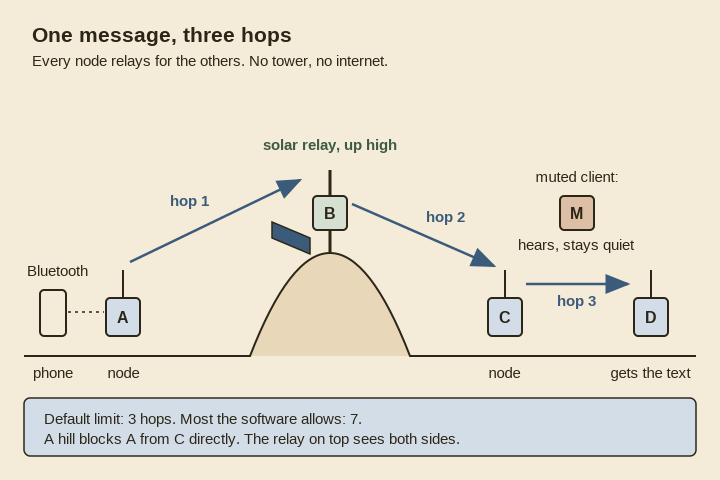 A message crosses the valley in three hops, with a hilltop relay doing most of the work.
What is LoRa, in plain words?
LoRa is the radio technique underneath, and the project describes it as a long-range radio protocol. It trades speed for distance: the transmitter spreads a very small amount of data over a comparatively long burst, so a receiver can pick the signal out even when it is extremely faint. The result is low power, long reach and a very low data rate.
How low? Meshtastic's default setting, called Long Fast, has a theoretical top speed of 1.07 kilobits per second. A home internet line at 100 megabits per second is about 93,000 times faster. A single Meshtastic packet holds at most 239 bytes, which is a couple of sentences. At that speed a 200-character message takes about a second and a half of airtime, before any relaying. This is a network for short texts, and everything about using it well follows from that.
In the US these radios use the 902 to 928 MHz band. FCC rules for unlicensed devices (47 CFR 15.247) allow digitally modulated transmitters there at up to 1 watt, with an antenna gain of up to 6 dBi (a measure of how much an antenna focuses its signal) before power must be reduced. Two conditions come with unlicensed operation: the device may not cause harmful interference, and it must accept whatever interference it receives (47 CFR 15.5). That is the whole deal. No exam, no fee, no call sign. Licensed two-way radio is a different subject, covered in "Setting Up a Civilian Handheld Radio Such as a Baofeng."
What can it do, and what can it not?
| It can | It cannot |
|---|---|
| Send short text messages to a group or to one person | Carry voice calls |
| Share a GPS position, if you turn that on | Send photos, video or large files |
| Report small sensor readings such as battery level or temperature | Promise that a message arrives |
| Work with no phone signal and no internet | Call 911 |
The delivery point deserves a closer look. When you send to a group, your radio listens for any neighbor repeating the message and treats that as proof it got out. If it hears nothing, it tries again, up to three sends in total. A direct message asks the far end for a real acknowledgment and is tried up to five times. After that the app tells you it failed. So you often know when a message did not make it, which is useful, but nothing forces it through.
How far does it reach?
The honest answer is "it depends on what is in the way." These signals travel in nearly straight lines. Three things decide range, in this order: line of sight, antenna and height.
The project keeps a list of range records. The current ground record is 331 kilometers (205 miles), set between two mountaintops on a European frequency with a slower setting than the default. The best listed with the US default setting is 254 kilometers (158 miles). Those numbers show what the radio can do with nothing but air in the path. They are not what you will see across town. Between two people at street level, with houses and trees in the way, expect a small fraction of that. I think the right way to plan is to test your own routes and write down what worked.
Height changes everything. A node on a roof, a water tower or a ridge can hear a whole valley. That is why communities put relay nodes up high, often in a weatherproof box with a small solar panel and a battery, where they run unattended.
What are node roles, and why do bad settings hurt everyone?
Because the radio channel is slow, airtime is the scarce resource. Every unnecessary transmission is time nobody else can use. The software even stretches its own routine broadcasts when more than 40 nodes are online, to keep a busy mesh from choking.
Each node has a role that tells it how to behave. The ones a newcomer meets:
| Role | What it does | Who should use it |
|---|---|---|
| Client | Sends, receives and relays when useful | Almost everyone |
| Client Mute | Sends and receives, never relays | A second or third radio in the same house |
| Client Base | A home station that always relays for your own favorite nodes | A rooftop node serving your indoor radios |
| Router | Always relays every packet once | Well-placed relay sites only |
The trouble starts when someone sets a radio on a kitchen shelf to Router because it sounds helpful. A normal client stays quiet if it hears a neighbor relay first. A router transmits regardless. A poorly placed one adds airtime and uses up a hop without carrying the message anywhere new. One such node can make a neighborhood mesh worse for everyone on it. The same goes for turning the hop limit up to 7 "to be safe." As a rule of thumb, leave your radio on Client, leave hops on 3, and ask the local group before you set up anything meant to be infrastructure.
How private is it?
Start with the default. A new radio comes set to a public channel whose encryption key is published. In the project's words, anyone with the key "can read every message on the channel." Treat the default channel like a town square.
For private talk you create your own channel with a random key and share it with your group in person. Meshtastic encrypts channel messages with AES, the same cipher explained in this site's "Encryption and Hashing in Plain Terms" and "Block Ciphers and Stream Ciphers: Two Ways to Scramble Data." Direct messages between two people use a pair of keys for each node, the public and private key idea covered in "Symmetric and Asymmetric Encryption: One Key or Two."
The documentation is frank about limits, and the list is worth knowing:
- The packet header is never encrypted, because relays need it. An observer can see that a node is transmitting, and how often, without reading a word.
- There is no forward secrecy. If a channel key leaks next year, traffic someone recorded this year can be read.
- The basic channel mode does not prove a message was not altered, and the sender of an unsigned channel message is "a claim, not a proof." Newer firmware adds an optional mode that detects tampering, the same job described in "Galois/Counter Mode: Encryption That Notices Tampering."
- Do not load private channel keys onto unattended relay nodes. Someone who takes the box takes the key.
Location needs its own thought. Position sharing is set per channel, with a precision you choose. At 13 bits, for example, the reported position is good to about 2.9 kilometers (1.8 miles). A setting of 0 never sends it. On a public channel, I would share coarse position or none. A dot on a public map that shows where your family sleeps is a poor trade for convenience.
One more door to know about: a feature called MQTT can bridge a mesh to the internet through a node that has a connection. It is off by default. The project's public server passes along only imprecise positions. If your goal is a network that works with the internet down, you do not need it.
What is a first setup like?
At a high level, and without naming a product:
- Pick a board. The project supports several families of small circuit boards. Some are bare boards for tinkerers, and some come finished in a case with a battery and a screen. Judge them on battery life, whether the antenna can be swapped, and whether there is GPS if you want location.
- Attach the antenna before anything else. The documentation's warning is blunt: "Never power on the radio without attaching an antenna as doing so could damage the radio chip!"
- Install the firmware if the board did not come with it. Use a USB cable that carries data. A charge-only cable will not work.
- Connect with the Android app, the Apple app, or the web client, usually over Bluetooth.
- Set the region to US. The radio will not transmit until you do, and the region sets the legal frequencies.
- Leave the role on Client and the hop limit on 3.
- Make a private channel for your group and share it in person.
- Walk around and test. Note where messages stop getting through.
Take two cases. A couple who hike want to stay in touch when they split up on a trail: two pocket nodes and one private channel is the entire project, and an afternoon is enough. (The radio is no substitute for the basics in "Lost or Stranded Outdoors: The Priorities That Keep You Alive.") A neighborhood of 30 homes that wants a check-in channel needs more: one or two nodes mounted high, an agreed channel, a written note on who maintains the relay, and a practice night. The radios are the cheap part. The agreement is the work.
What other open projects exist?
Meshtastic is the best known, and it has neighbors. MeshCore describes itself as "a secure, decentralised mesh radio platform powered by LoRa." It separates phone-connected companion nodes from dedicated repeaters placed up high. Reticulum is a broader toolkit that calls itself "the cryptography-based networking stack for building local and wide-area networks with readily available hardware," and its site says forward secrecy is on by default. These systems do not talk to each other, so a group has to pick one. Many towns and regions also run community meshes with their own channel settings. Find the local group before you buy, because the best radio is the one your neighbors can hear.
What to remember
- A mesh has no center. Each node relays for the others, three hops by default.
- LoRa is slow on purpose: about 1 kilobit per second on the default setting. It is for short texts, positions and small sensor readings.
- In the US it runs in the 902 to 928 MHz band under FCC Part 15, with no license.
- Line of sight, antenna and height decide range. Records over 200 kilometers exist, and a city block can still stop you.
- The default channel is public. Make a private channel, and remember that even then the encryption has stated limits.
- Leave your node on Client unless your local group asks otherwise.
A mesh is one tool. Where it fits among phones, weather radio and meeting places is the subject of "A Family Emergency Communications Plan for When Phones Fail," which is the next piece to read.