Articles & BlogBy Trapper W. Brown8 min read
For anyone who has seen Kali Linux in a video and wondered what it really is. By the end you will know what it carries, whether you need it, and how to learn with it without breaking the law.
Kali Linux has a reputation it did not ask for. In films and video thumbnails it is the black screen with the dragon, the thing hackers use. People install it expecting powers.
What they get is a Linux distribution, which is a packaged version of the Linux operating system, with a few hundred security testing tools already installed and set up. It is a toolbox. It will not teach you the trade, in the same way that owning a stethoscope does not make you a doctor.
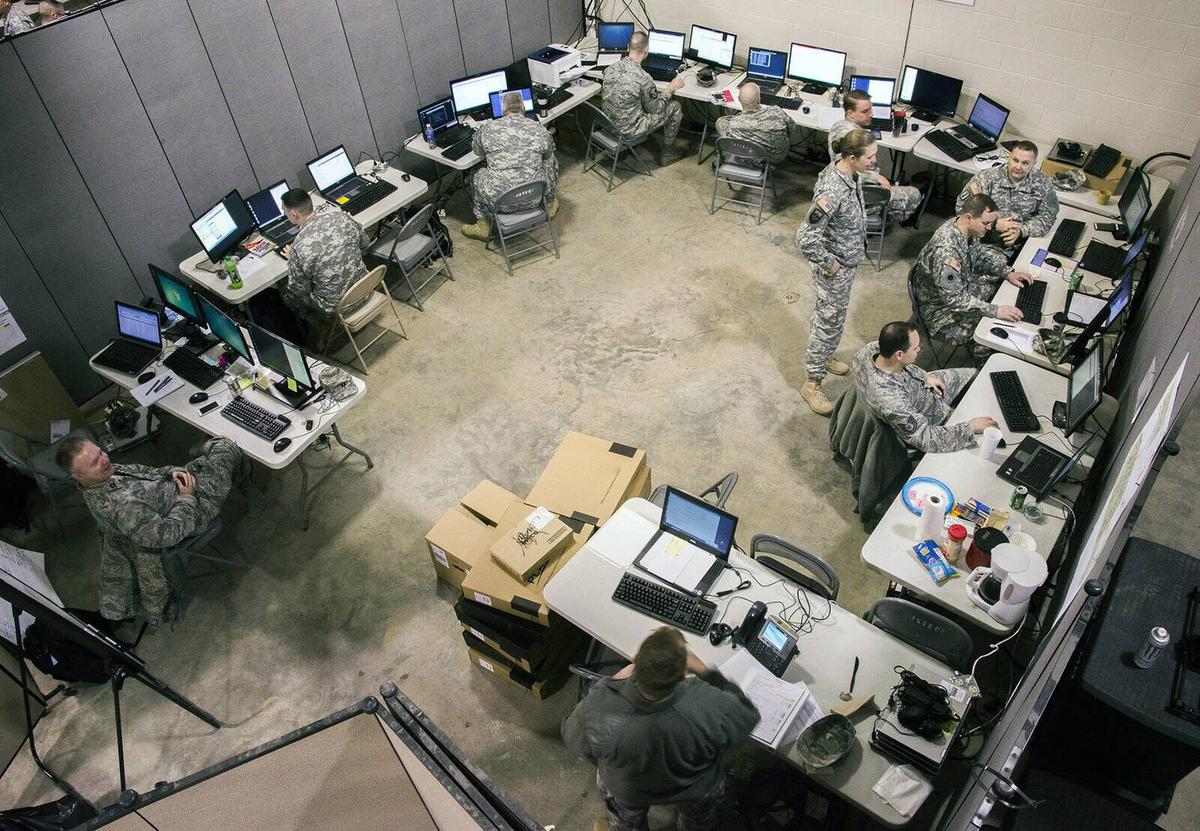 Security testing in real life is a team at folding tables with a plan and a deadline. Photo by Staff Sgt. George Davis, Ohio National Guard, public domain, via Wikimedia Commons.
Watch out
Every tool in Kali is for systems you own or have written permission to test. Scanning or accessing someone else's computers without permission is a crime in most places, including under the US Computer Fraud and Abuse Act. Kali's own documentation adds that not understanding what you were doing will not work as an excuse.
Where did Kali come from?
Kali's own history page traces it back to 2004 and a project named Whoppix, a security toolkit you could boot from a CD. That line led to BackTrack in 2006, the toolkit the same developers ran for the next seven years. Kali Linux 1.0 replaced BackTrack on 13 March 2013, built on Debian, one of the oldest Linux distributions.
It was released by Offensive Security, a security training company (the Kali site now calls it OffSec). A small team still maintains it as one of OffSec's community projects. It is free to download and its source code is open. Since January 2016 Kali has been a rolling release: there are no big numbered upgrades, and updates arrive continuously.
How is it different from an everyday Linux?
Ubuntu, Fedora and Linux Mint are built so you can browse, write, play and install whatever you like. Kali is built for one job, and its makers changed the usual defaults to suit that job.
| Everyday distribution | Kali Linux | |
|---|---|---|
| Built for | General use | Penetration testing and security auditing |
| Installed software | Browser, office suite, media player | Several hundred security tools |
| Network services | Often start when installed | Disabled by default, so the tester's own machine stays quiet |
| Kernel | Standard | Patched for wireless injection, which Wi-Fi testing tools need |
| Extra software sources | Common and well supported | Discouraged. Kali's documentation warns they can break the system. |
Kali's documentation is blunt about the result. It does not recommend Kali to people who are new to Linux, and it advises against using it as a general desktop for gaming, web design or development. Its example is Steam, which it describes as an install that tends to fail.
What is in the toolbox?
The Kali menu sorts tools by the job they do. Here are seven of those groups, with a few well-known names in each. All of them are also defenders' tools: the same scanner that shows a tester a weak spot shows the owner what to fix.
| Job | Examples | What they are for |
|---|---|---|
| Information gathering | Nmap, theHarvester | Nmap finds which machines are up and which ports are open. theHarvester collects what public sources reveal about an organization, such as email addresses and subdomains. |
| Vulnerability analysis | Nikto, GVM (OpenVAS), Lynis | Nikto checks a web server for known problems. GVM scans whole networks against a list of known flaws. Lynis audits a Unix system's own settings. |
| Web application testing | Burp Suite, ZAP, sqlmap | Burp Suite and ZAP sit between a browser and a website so a tester can inspect and change each request. sqlmap checks whether a site's database queries can be tampered with. |
| Password auditing | John the Ripper, Hashcat, Hydra | John and Hashcat test stored password hashes against guesses to find weak ones. Hydra tests whether network logins accept weak passwords. |
| Wireless | Aircrack-ng, Kismet | Aircrack-ng audits the strength of Wi-Fi security. Kismet detects and records the wireless networks and devices in range. |
| Forensics | Autopsy, The Sleuth Kit, binwalk | Autopsy and The Sleuth Kit examine a copy of a disk for evidence. binwalk looks inside firmware files. |
| Reporting | Dradis, Faraday, EyeWitness | Dradis and Faraday gather findings from many tools and testers into one report. EyeWitness takes screenshots of websites for the record. |
Notice the last row. A distribution with a whole menu for writing reports was built for people with a client.
Tip
You do not need Kali to try most of these. Nmap and Wireshark install on Windows, macOS and any Linux. If one tool is all you want, install that tool. Reach for Kali when you want the whole bench in one place.
Who should use it, and who should not?
Kali fits three kinds of people: working penetration testers, students preparing for security certifications, and learners who want a ready-made lab machine and are willing to learn Linux along the way.
It does not fit as your daily computer. The defaults that make it a good testing platform make it an awkward desktop, and a machine loaded with attack tools is a poor place for your banking and your email.
It also does not make anyone a hacker. The tools automate steps. They do not tell you what a result means, which finding matters, or what to do next. That comes from knowing how networks, operating systems and web applications work, and you can learn all of that on any computer. I would learn Linux on an ordinary distribution first and come to Kali second.
What do penetration testers do with it?
A penetration test is a paid, agreed attempt to break into an organization's systems so the weaknesses can be fixed before a criminal finds them. Kali is the workbench. The work follows a pattern.
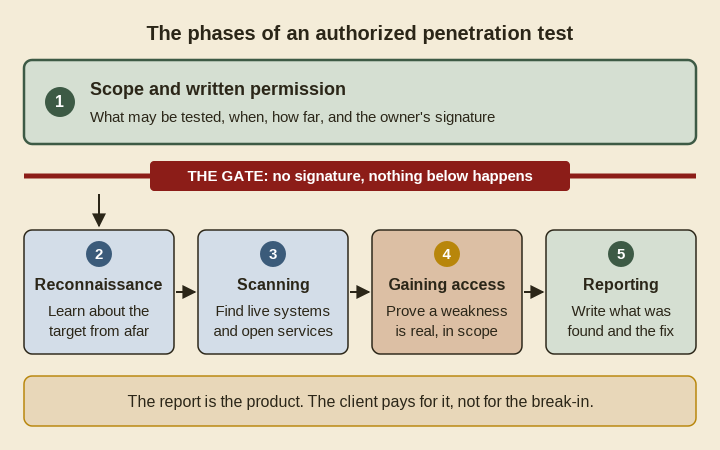 Permission is not one phase among five. It is the gate in front of the other four.
Scope and permission come first, in writing: which systems, which hours, which techniques are off limits, and who signed. Reconnaissance is learning about the target from public information. Scanning finds the live machines and the services they offer. Gaining access means showing that a weakness is real, carefully and only inside the agreed scope. Reporting turns all of it into something the client can act on: what was found, how serious it is, and how to fix it.
Take a small clinic that hires a tester for one week. Two days go to recon and scanning, perhaps one to carefully confirming three findings, and the rest to writing. The clinic never sees the tools. It sees a document that says the patient portal accepts weak passwords, the backup server is missing two years of patches, and here is the order to fix them in. The report is the product.
Where is the legal line, and how do you learn on the right side of it?
The line is permission. The same scan is a service when the owner signed for it and a crime when they did not. "I was only looking" and "I was learning" are not defenses. Your school's network, your employer's network and your neighbor's Wi-Fi all belong to someone else.
That leaves plenty of room to practice:
- A home lab. Run Kali as a virtual machine, which is a computer simulated inside your own, next to a second virtual machine that is built to be attacked. Nothing leaves your PC.
- Intentionally vulnerable targets. Metasploitable 2 from Rapid7 is a Linux machine full of deliberate flaws. OWASP Juice Shop is a deliberately insecure online store. Kali even offers Juice Shop and a similar practice site, DVWA, as installable lab packages.
- Capture the flag events. A CTF is a contest where organizers set up systems for you to break into legally and hide a "flag" in each to prove you did. Carnegie Mellon University's picoCTF, now part of its free CyLab Security Academy, is aimed at beginners.
- Wargames. OverTheWire's Bandit game teaches Linux basics one level at a time, over SSH.
What to remember
- Kali is a Debian-based Linux distribution for security testing, first released in 2013 as the successor to BackTrack.
- It is a toolbox of several hundred tools sorted by job. The skill is yours to bring.
- It is not a daily desktop, and its own makers say it is a poor first Linux.
- Every tool has a defensive use. Owners run the same scans to find what to fix.
- Permission in writing is the gate. Without it, the tools are illegal to point at anything you do not own.
- A real test ends in a report, and the report is what the client pays for.
- Learn in a home lab, on targets built for it, and in CTF events.
If you want to try Kali safely, the next article to read is "Kali in a Virtual Machine: A Legal Home Lab". If Linux itself is new to you, begin with "What Is Linux?" and work up from there.