Articles & BlogBy Trapper W. Brown7 min read
The faint "Activate Windows" text in the corner of the screen means this copy of Windows has not been activated. It is a licensing notice, and it is not a sign of damage. Error 0xC004F074 is narrower: the PC tried to activate through an organization's own activation server and could not reach one.
 Activation comes down to holding the right key: a digital license or a 25-character product key. Photo by Katy Belcher, CC0, via Wikimedia Commons.
What does this message mean?
Microsoft's support pages do not describe the watermark itself, so this article works from what they do cover: activation, and the page in Settings that reports it.
Microsoft describes activation as the process that pairs a product key or a digital license with the hardware of one device. It helps verify that a copy of Windows is genuine and has not been used on more devices than the license terms allow. Microsoft names two things that can activate Windows:
- A digital license needs no key typed in. It is tied to the device's hardware and can be linked to your Microsoft account.
- A product key is a 25-character code, written as five groups of five.
Microsoft is blunt about it: without one of the two, the device cannot be activated.
To see where you stand on Windows 11, select Start, then Settings, then System, then Activation. On Windows 10 the path is Start, then Settings, then Update & Security, then Activation. The page shows one of these:
| Activation status | What Microsoft says it means |
|---|---|
| Windows is activated | Activated. No Microsoft account is linked |
| Windows is activated with a digital license | Activated. Your Microsoft account is not linked to the license |
| Windows is activated with a digital license linked to your Microsoft account | Activated and linked. Nothing more to do |
| Windows is not activated | Not activated. An error message explains why, and you might need to buy Windows |
Error 0xC004F074 has its own entry on Microsoft Learn: no Key Management Service could be contacted. A Key Management Service, or KMS, is an activation server that an organization runs for its own PCs. Microsoft says the server must sit on the organization's local network, and that a PC activated this way must check in again at least once every 180 days.
What usually causes it?
For the watermark, Microsoft's pages describe these cases:
- Windows was installed and never activated, or no valid license was found for it.
- A major part was replaced. Microsoft names the motherboard (the main circuit board): after that change, Windows may no longer find a license that matches the device.
- The edition installed is not the edition the license covers, such as Windows 11 Pro installed over a license for Windows 11 Home.
- The product key cannot be used. Microsoft notes a key belongs to a single device, and a key used on several is marked as not valid.
For 0xC004F074, Microsoft's page for home users gives two causes. A product key for the Enterprise edition of Windows was entered on Windows Home or Pro. Or a work device is trying to activate while it is away from the workplace network. Microsoft's pages for administrators list causes on the organization's side: the service on the server has stopped, the network blocks the connection, the address record for the server is wrong or old, or the clocks on the PC and the server are too far apart.
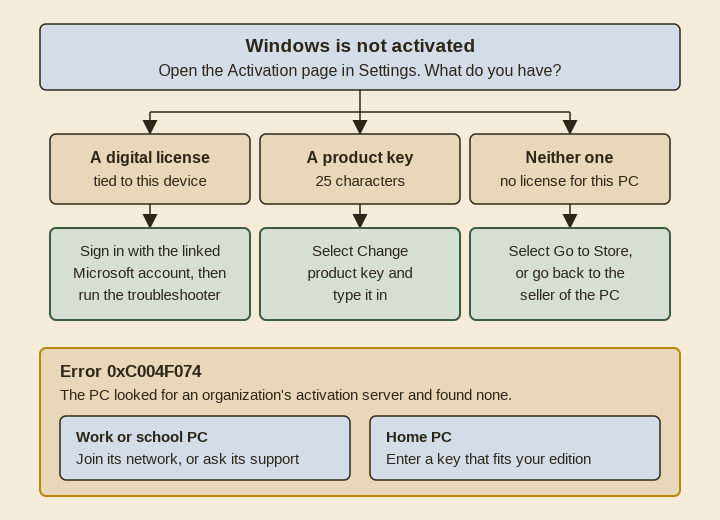 Every genuine route starts on the Activation page and ends with a license or a key.
What to try, in order
- Read the Activation page. Open it with the path above and note the status and any error code.
- Check the internet connection and updates. Microsoft says activation needs an internet connection, and its error page tells you to confirm the device is up to date first.
- Run the Activation troubleshooter. On Windows 11, select Start, then Settings, then System, then Activation, then Troubleshoot. On Windows 10, Activation sits under Update & Security. You must be signed in as an administrator. The Troubleshoot option appears only while Windows is not activated.
- If you have a digital license, sign in with the Microsoft account linked to it. In the troubleshooter, select Activate Windows, then Activate.
- If you changed hardware, select I changed hardware on this device recently in the troubleshooter, then Next. Sign in with the linked Microsoft account, tick This is the device I'm using right now, and select Activate. This works only if the account was linked before the change.
- If you have a product key, select Change product key on the Activation page and type the 25 characters. Microsoft lists where a key lives: on the device packaging, on the Certificate of Authenticity label attached to the PC, or in the confirmation email from the retailer. For a refurbished PC, Microsoft says the refurbisher must provide the key, not Microsoft.
- If you have neither, select Go to Store on the Activation page. It opens the Microsoft Store app, where you can buy a digital license.
Watch out
If the troubleshooter finds a license for a different edition, Microsoft's fix can be a clean installation of the matching edition. A clean installation can remove your files and apps. Back up your files first. "Backing Up Your Computer and Reimaging It: The Deep Guide" explains how.
For error 0xC004F074, the route depends on whose PC it is:
- A work or school PC. Connect to the organization's network and try again. If the error stays, Microsoft's advice is to contact the organization's support person. The fix is on their server or network.
- A home PC. Microsoft's page says you might see this code after an Enterprise key was entered on Windows Home or Pro. Its fix is to enter a key that matches your edition, using Change product key. If you have no such key, go back to the seller, or use step 7.
Microsoft documents command-line tools for activation on its pages for administrators. Those pages are linked under Sources, and none of their commands are printed here.
Tools, scripts and "activators" that promise free activation are unlicensed and unsafe to run. Microsoft's own error list includes a code for activation that fails after third-party software changed system files.
When to stop and get help
Stop and contact Microsoft support when the troubleshooter cannot fix the problem or the error code is not on Microsoft's list. The troubleshooter page and the error page both say so, and both link to Microsoft's support contact.
Stop and go back to the seller when a PC arrived with a key that will not activate. Microsoft's guidance for a key that turns out to be invalid is to contact the reseller, or the device maker for a new PC. Its "How to Tell" site is where to report software you think is counterfeit.
Stop if the PC belongs to an employer or a school. Its activation is managed by someone else on purpose. If the PC holds work or irreplaceable files and the steps have not helped, stop and take it to a repair professional.
What to remember
- The watermark means Windows is not activated. It is a licensing notice and says nothing about damage.
- Activation takes a digital license or a 25-character product key. Microsoft says a device cannot be activated without one of them.
- Start on the Activation page in Settings and run the troubleshooter from there.
- Link your Microsoft account to the license before you replace hardware.
- Error 0xC004F074 points to an organization's activation server. On a work PC, connect to the work network or ask its support person. On a home PC, it suggests a key that does not match the edition.
I think the watermark is best read as a prompt to check one page in Settings. The answer there is a sign-in, a key you already own, or a purchase from Microsoft's own store. "Locking Down a Windows or Mac Computer" covers the administrator account the troubleshooter asks for.
Sources (9)
- Microsoft Support, "Activate Windows"
- Microsoft Support, "Get help with Windows activation errors"
- Microsoft Support, "Using the Windows Activation troubleshooter"
- Microsoft Support, "Reactivating Windows after a hardware change"
- Microsoft Support, "Find your Windows product key"
- Microsoft Learn, "Error 0xC004F074 when you try to activate Windows", updated 12 February 2026
- Microsoft Learn, "Troubleshoot Windows activation error codes", updated 12 February 2026
- Microsoft Learn, "Key Management Services (KMS) activation planning"
- Microsoft, "How to Tell"