Articles & BlogBy Trapper W. Brown13 min read
For anyone who has seen a long address full of colons in their network settings and wondered what it is. By the end you will be able to read an IPv6 address, check whether your own connection has one, and explain why the internet is moving to it.
The internet runs on two addressing systems at once. The older one, IPv4, ran short of addresses years ago and has been kept going with workarounds. The newer one, IPv6, has more addresses than anyone can use, and large public measurements now find close to half of users on it.
The article "IP Addresses, Ports and Your Home Router" in this set explains what an address, a private range, DHCP, NAT and a port are. This one picks up from there.
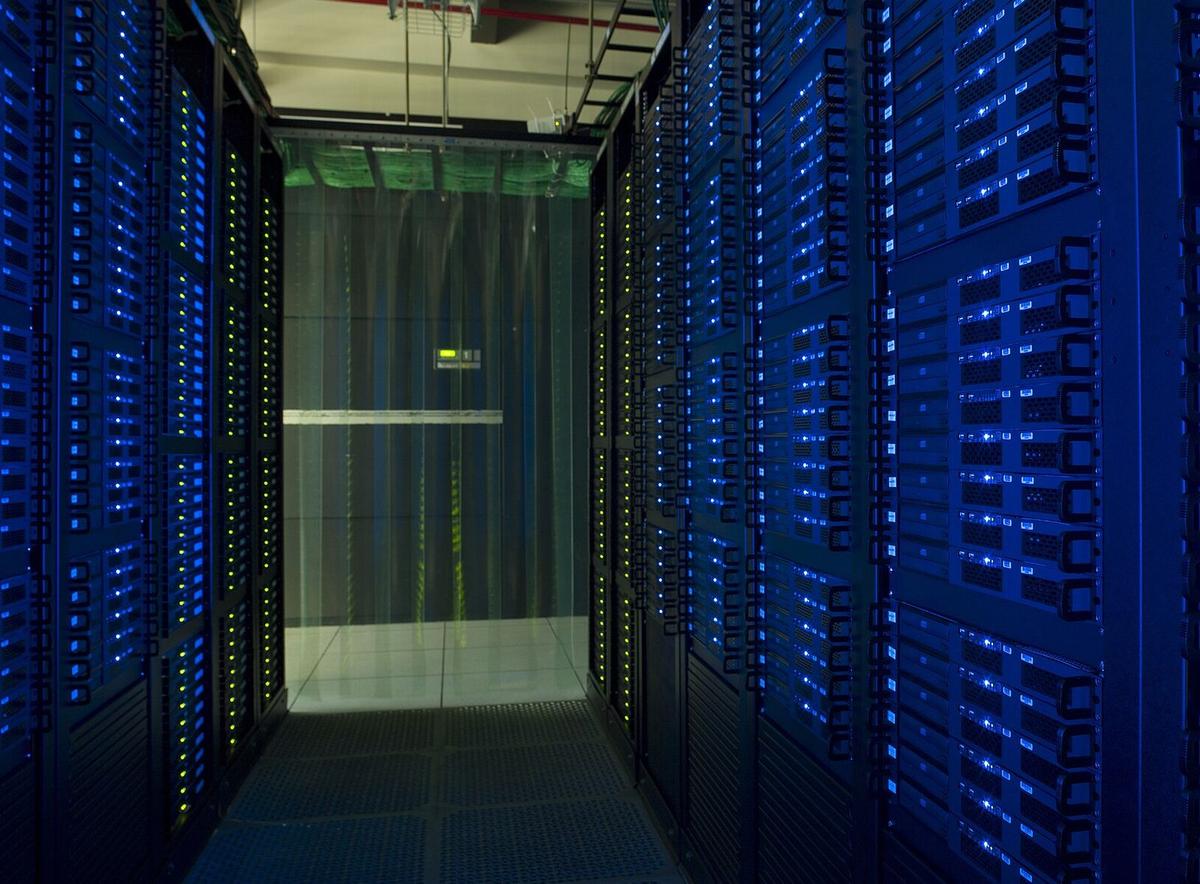 Every machine in a room like this needs its own address, and so does every phone and console that talks to it. Photo by the US Department of Energy, public domain, via Wikimedia Commons.
Why did IPv4 run out?
An IPv4 address is 32 bits long. That allows 2 to the power of 32 addresses, about 4.3 billion, for the whole world. The Internet Assigned Numbers Authority (IANA) passed large blocks to five regional registries, which passed smaller ones to providers and companies. One by one the pools emptied.
| Who | What happened | When |
|---|---|---|
| IANA (the central pool) | Last blocks handed to the regional registries | 3 February 2011 |
| APNIC (Asia Pacific) | Reached its final /8 block | 15 April 2011 |
| RIPE NCC (Europe, Middle East, parts of Central Asia) | Reached its last /8, then ran out | September 2012, then 25 November 2019 |
| LACNIC (Latin America and the Caribbean) | Down to its last /10 block | 10 June 2014 |
| ARIN (American Registry for Internet Numbers) | Free pool reached zero | 24 September 2015 |
| AFRINIC (Africa) | Began exhaustion phase 1, then phase 2 | 31 March 2017, then 13 January 2020 |
The world answered in three ways. Homes and offices put many devices behind one public address with NAT. Providers then did the same thing one level up: carrier-grade NAT (CGNAT) puts many customers behind one public address. An internet standard, RFC 6598 (April 2012), set aside 100.64.0.0/10 for the link between the provider's NAT and your router. And a market formed. Organizations that need IPv4 now join a waiting list or go to what ARIN and RIPE NCC both call the IPv4 transfer market. I found no price published by a registry, so I give none.
What does an IPv6 address look like?
An IPv6 address is 128 bits. That allows about 3.4 x 10^38 addresses. It is written as eight groups of four hexadecimal digits (0 to 9 and a to f) with colons between them:
2001:0db8:00a1:0012:0000:0000:0000:0c1f
This is one address written in full. Two rules, set down in RFC 5952, shorten it:
- Drop the leading zeros in each group.
0db8becomesdb8, and0000becomes0. - Replace the longest run of all-zero groups with
::, once per address. Twice would be ambiguous.
2001:db8:a1:12::c1f
This is the same address after both rules.
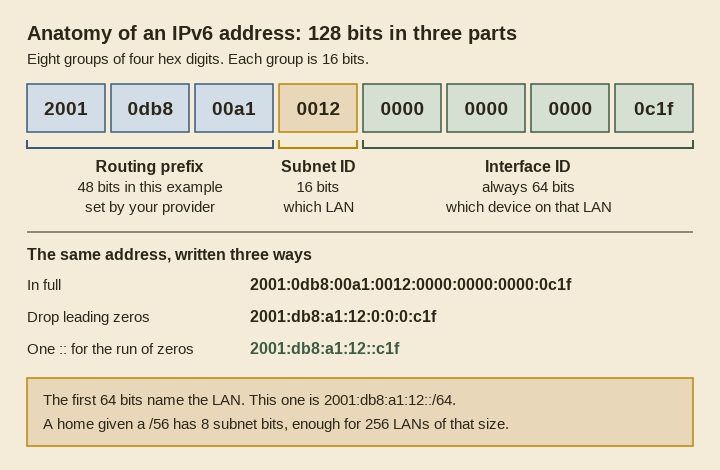 The first half of an IPv6 address says which network, the second half says which device.
| IPv4 | IPv6 | |
|---|---|---|
| Address size | 32 bits | 128 bits |
| Written as | Four decimal numbers: 192.0.2.10 | Eight hex groups: 2001:db8:a1:12::c1f |
| How many | About 4.3 billion | About 3.4 x 10^38 |
| A normal LAN | Often a /24, 254 devices | Always a /64 |
| What a home gets | One public address, or a shared one behind CGNAT | A whole prefix, room for many LANs |
| How a device gets its address | DHCP | SLAAC, DHCPv6, or both |
| Finding a neighbor on the LAN | ARP | Neighbor Discovery |
| Reaching every device at once | Broadcast | No broadcast, multicast instead |
| NAT at home | Nearly always | Not needed |
| Address with a port | 192.0.2.10:443 | [2001:db8::1]:443 |
How is an IPv6 network laid out?
The split is fixed. The first 64 bits name the network and the last 64, the interface ID, name the device. So every LAN is a /64, whether it holds three devices or three thousand. The network sizing taught in "The Magic Number: Subnetting in Your Head" in this set is an IPv4 skill.
Your provider gives your router a prefix shorter than /64 so it can make several LANs, such as a main network and a guest network. RIPE NCC's guidance for providers (RIPE-690, October 2017) suggests a /56 for homes and a /48 for businesses, and warns against handing a customer a single /64. A /56 leaves 8 bits to number LANs, which is 256 of them.
You can tell what kind of address you are looking at from how it starts.
| Type | Prefix | Starts with | What it is for |
|---|---|---|---|
| Global unicast | 2000::/3 | 2 or 3 | Public addresses, reachable across the internet |
| Unique local | fc00::/7 | fd in practice | Private use inside a site, not routed on the internet |
| Link-local | fe80::/10 | fe80 | One LAN only. Every interface has one |
| Multicast | ff00::/8 | ff | One packet to a group of devices |
| Loopback | ::1 | The machine talking to itself | |
| Documentation | 2001:db8::/32 | 2001:db8 | Examples in guides like this one, never assigned |
A device can get its address in two ways. With SLAAC (stateless address autoconfiguration, RFC 4862) the router announces the prefix and the device makes up the rest itself. With DHCPv6 (RFC 8415) a server hands the address out, much as DHCP does in IPv4.
Expect more than one address per device. RFC 8981 describes temporary addresses: the device invents random interface IDs and changes them over time, so one fixed number does not follow you from site to site. The job ARP does in IPv4 belongs to the Neighbor Discovery Protocol (RFC 4861), which also finds routers.
Why does this matter to you?
With no NAT in the way, each device can have an address that is unique in the world. Two players, or a player and a server in someone's house, can connect directly.
Compare that with CGNAT. RFC 6269 (June 2011) lists the problems: a port must also be opened on the provider's NAT, which you do not control, and when one customer gets a shared address blocklisted, everyone behind it is affected. RFC 7021 (September 2013), a report of lab tests, found that peer-to-peer console gaming failed behind the carrier NAT setups it tried. If a console reports a strict NAT type and forwarding ports changes nothing, CGNAT is one possible cause.
Tip
Look at the WAN or Internet address on your router's status page. If it falls between 100.64.0.0 and 100.127.255.255, you are behind carrier-grade NAT, and no port forward on your own router will make you reachable over IPv4. IPv6, if your provider offers it, is one way around that.
Now the security side. NAT hid your devices as a side effect. The real protection is the stateful firewall beside it, which lets in replies to connections you started and drops the rest. RFC 6092 (January 2011) recommends that home routers filter IPv6 that way, refusing connection attempts from outside by default. It also requires an easy switch to a "transparent mode" that forwards everything, and it allows a maker to ship with that mode on. So check yours.
Watch out
A device with both IPv4 and IPv6 has two doors. A firewall rule or port forward written for one does nothing for the other. If you host anything, check both, and remember that an IPv6 rule you open exposes that device to the whole internet directly.
How do you check your own connection?
These commands only read. They change nothing.
On Windows:
ipconfig
This lists the addresses on each network adapter, IPv4 and IPv6 together:
   IPv6 Address. . . . . . . . . . . : 2001:db8:a1:12::c1f
   Temporary IPv6 Address. . . . . . : 2001:db8:a1:12:5c8e:91ff:2b0d:77a4
   Link-local IPv6 Address . . . . . : fe80::1c2d:3e4f:5a6b:7c8d%12
   IPv4 Address. . . . . . . . . . . : 192.168.1.23
On Linux:
ip -6 addr
This shows only the IPv6 addresses on each interface. Each line ends with a scope, global or link:
    inet6 2001:db8:a1:12::c1f/64 scope global dynamic
    inet6 fe80::1c2d:3e4f:5a6b:7c8d/64 scope link
On macOS:
ifconfig en0
This shows one interface. The lines that start with inet6 are its IPv6 addresses.
Read the result with the table above. If the only IPv6 address starts with fe80, the device has IPv6 switched on but no public IPv6 address. One starting with 2 or 3 means your provider is giving you IPv6.
ping -6 example.com
This sends test packets over IPv6 only, on Windows and Linux. On macOS the command is ping6 example.com.
In a browser, test-ipv6.com checks whether you reach the internet over IPv4, IPv6 or both. When you need an IPv6 address with a port, put the address in square brackets, as in https://[2001:db8::1]:443/, so the port's colon is not mistaken for part of the address.
How do the two live side by side?
IPv4 and IPv6 cannot talk to each other directly, so networks use one of three arrangements.
Dual stack gives every device both. When a name has both kinds of address, your device follows a method called Happy Eyeballs (RFC 8305): try IPv6 first, and if it has not connected after a short wait (the document suggests 250 milliseconds), start an IPv4 attempt as well and keep whichever connects.
NAT64 with DNS64 lets a network drop IPv4 altogether and still reach IPv4 sites. The DNS server invents an IPv6 address that stands for the IPv4 one, and a gateway translates between the two.
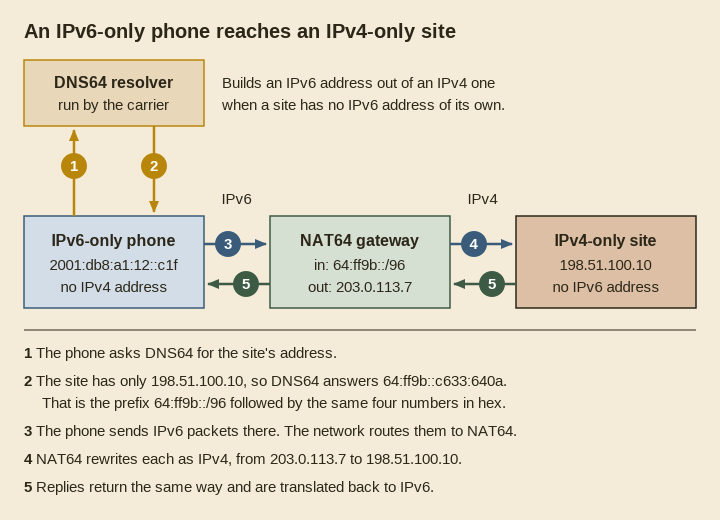 DNS64 hands out a stand-in address and NAT64 translates, so an IPv6-only device can still reach an IPv4-only site.
464XLAT (RFC 6877) adds a small translator on the device itself, for apps that insist on IPv4. Their traffic is turned into IPv6 on the phone and back into IPv4 at the provider.
Where is addressing going?
Start with what is measured. Google's public IPv6 statistics show 47.1% of its users arriving over IPv6 on Thursday 12 November 2026, and 50.8% on Saturday 7 November. APNIC Labs, which measures differently, puts the share of the world's users who can use IPv6 at 44.3% for the 30 days to 12 November 2026. The spread between regions is wide.
| Americas | 52.43% |
|---|---|
| Asia | 50.44% |
| World | 44.31% |
| Oceania | 44.26% |
| Europe | 38.54% |
| Africa | 6.85% |
Source: APNIC Labs, IPv6 Capability Metrics, read 13 November 2026
Then the published plans. In the United States, Office of Management and Budget memorandum M-21-07 (19 November 2020) told federal agencies to plan for at least 20% of the IP-enabled assets on federal networks to run IPv6-only by the end of fiscal year 2023, 50% by the end of 2024 and 80% by the end of 2025. I did not read an official report on whether those targets were met, so I do not say.
The standards describe three designs already in use:
- IPv6-only data centers that translate IPv4 visitors at the edge (RFC 7755, February 2016).
- IPv6-mostly networks (RFC 8925, October 2020), where a device that can live without IPv4 says so with DHCP option 108 and the same network still serves older devices that cannot.
- IPv4 as a service (RFC 8585, May 2019), where the provider's network is IPv6-only and IPv4 is carried over the top of it to your router.
IPv4 is not going away soon. By the same measurements, about half of users still arrive over it. RFC 8585 notes that some devices and apps speak only IPv4, and the federal memo says public services may need IPv4 at their edge for longer. Every design above exists to keep IPv4 reachable while less of the network runs on it.
What to remember
- IPv4 has about 4.3 billion addresses and the central pool was handed out by February 2011. NAT, carrier-grade NAT and a transfer market keep it going.
- An IPv6 address is 128 bits in eight hex groups. Drop leading zeros, and use
::once for the longest run of zero groups. - The first 64 bits are the network and the last 64 are the device.
fe80is link-local,fdis private, and 2 or 3 is public. - Without NAT, the firewall is your protection. Check that your router filters inbound IPv6, and write rules for both protocols.
- A WAN address from
100.64.0.0to100.127.255.255means carrier-grade NAT. - Close to half of measured users are on IPv6, and translation keeps IPv4 reachable.
Run the command for your system tonight and see which kinds of IPv6 address you have. Then find the IPv6 firewall page in your router's settings before you need it. The natural next read is "Firewalls, NAT and Port Forwarding."
Sources (41)
- Number Resource Organization, "Free Pool of IPv4 Address Space Depleted", 3 February 2011
- ARIN, "APNIC Announces its IPv4 Address Pool Reaches Final /8", 15 April 2011
- RIPE NCC, "What is IPv4 Run Out?", read 13 November 2026
- Number Resource Organization, "LACNIC Enters IPv4 Exhaustion Phase", 11 June 2014
- ARIN, "ARIN IPv4 Free Pool Reaches Zero", 24 September 2015
- AFRINIC, "IPv4 Exhaustion", read 13 November 2026
- ARIN, "Transferring IP Addresses & ASNs", read 13 November 2026
- RFC Editor, "RFC 6598: IANA-Reserved IPv4 Prefix for Shared Address Space", April 2012
- RFC Editor, "RFC 6269: Issues with IP Address Sharing", June 2011
- RFC Editor, "RFC 7021: Assessing the Impact of Carrier-Grade NAT on Network Applications", September 2013
- RFC Editor, "RFC 4291: IP Version 6 Addressing Architecture", February 2006
- RFC Editor, "RFC 5952: A Recommendation for IPv6 Address Text Representation", August 2010
- RFC Editor, "RFC 3849: IPv6 Address Prefix Reserved for Documentation", July 2004
- RFC Editor, "RFC 4193: Unique Local IPv6 Unicast Addresses", October 2005
- IANA, "Internet Protocol Version 6 Address Space", last updated 23 October 2025
- RIPE NCC, "RIPE-690: Best Current Operational Practice for Operators: IPv6 prefix assignment for end-users", 16 October 2017
- RFC Editor, "RFC 4862: IPv6 Stateless Address Autoconfiguration", September 2007
- RFC Editor, "RFC 8415: Dynamic Host Configuration Protocol for IPv6 (DHCPv6)", November 2018
- RFC Editor, "RFC 8981: Temporary Address Extensions for Stateless Address Autoconfiguration in IPv6", February 2021
- RFC Editor, "RFC 4861: Neighbor Discovery for IP version 6 (IPv6)", September 2007
- RFC Editor, "RFC 6092: Recommended Simple Security Capabilities in Customer Premises Equipment (CPE) for Providing Residential IPv6 Internet Service", January 2011
- RFC Editor, "RFC 3986: Uniform Resource Identifier (URI): Generic Syntax", January 2005
- RFC Editor, "RFC 8305: Happy Eyeballs Version 2: Better Connectivity Using Concurrency", December 2017
- RFC Editor, "RFC 6146: Stateful NAT64: Network Address and Protocol Translation from IPv6 Clients to IPv4 Servers", April 2011
- RFC Editor, "RFC 6147: DNS64: DNS Extensions for Network Address Translation from IPv6 Clients to IPv4 Servers", April 2011
- RFC Editor, "RFC 6052: IPv6 Addressing of IPv4/IPv6 Translators", October 2010
- RFC Editor, "RFC 6877: 464XLAT: Combination of Stateful and Stateless Translation", April 2013
- RFC Editor, "RFC 7755: SIIT-DC: Stateless IP/ICMP Translation for IPv6 Data Center Environments", February 2016
- RFC Editor, "RFC 8925: IPv6-Only Preferred Option for DHCPv4", October 2020
- RFC Editor, "RFC 8585: Requirements for IPv6 Customer Edge Routers to Support IPv4-as-a-Service", May 2019
- Google, "IPv6 Statistics", data to 12 November 2026
- APNIC Labs, "IPv6 Capability Metrics: Use of IPv6 for World", data to 12 November 2026
- Office of Management and Budget, "M-21-07: Completing the Transition to Internet Protocol Version 6 (IPv6)", 19 November 2020
- Microsoft Learn, "ipconfig", updated 16 February 2026
- Microsoft Learn, "ping", updated 16 February 2026
- Linux man-pages, "ip(8)", read 13 November 2026
- Linux man-pages, "ip-address(8)", read 13 November 2026
- Linux man-pages, "ping(8)", read 13 November 2026
- Apple manual pages as mirrored at keith.github.io, "ping6(8)", read 13 November 2026
- Apple manual pages as mirrored at keith.github.io, "ifconfig(8)", read 13 November 2026
- test-ipv6.com, "Test your IPv6", read 13 November 2026