Articles & BlogBy Trapper W. Brown9 min read
For anyone who has stared at an address like 172.16.45.200/20 and reached for a calculator. By the end you will find the network, the broadcast address and the usable range in your head.
Subnetting has a reputation for being hard because it is usually taught in binary: write out 32 ones and zeros, line up the mask, and compare the columns. That works, and it is worth doing once so you believe it. After that there is a faster way that needs one subtraction and your times tables.
Networking courses call it the magic number. This article shows the method, works three examples, and then collects the other shortcuts that make IPv4 addresses quick to read.
 Every one of these cables ends at a device that needs an address in the right subnet. Photo by Staff Sgt. Nicholas Wilson, U.S. Air Force, public domain, via Wikimedia Commons.
What question are you answering?
Every subnetting problem is the same question. You are given an address and a mask, such as 192.168.1.77/26, and you need three things:
- the network address, the first address in the block, which names the subnet
- the broadcast address, the last address in the block, which reaches every device on it
- the usable range, everything in between, which is what you can give to devices
The article "IP Addresses, Ports and Your Home Router" explains what the mask is and why /24 and 255.255.255.0 mean the same thing. A /24 is easy because the split between network and device lands exactly on a dot. The trouble starts when the split lands inside one of the four numbers. The magic number handles that case.
What is the magic number?
Write the mask in its dotted form and look for the interesting octet. An octet is one of the four numbers in the address. The interesting one is the octet of the mask that is neither 255 nor 0. In 255.255.255.192 it is the fourth. In 255.255.240.0 it is the third.
The magic number is 256 minus the mask's value in that octet.
For 255.255.255.192, that is 256 minus 192, which is 64. The magic number is the block size: subnets in that octet start at every multiple of it. With 64, the blocks start at 0, 64, 128 and 192.
There are only eight values to learn, and they repeat in every octet.
| Bits used in the octet | Mask value | Magic number |
|---|---|---|
| 1 | 128 | 128 |
| 2 | 192 | 64 |
| 3 | 224 | 32 |
| 4 | 240 | 16 |
| 5 | 248 | 8 |
| 6 | 252 | 4 |
| 7 | 254 | 2 |
| 8 | 255 | 1 |
Going from a slash number to the mask takes one more step. Each octet is 8 bits, so the prefix tells you which octet is interesting and how many bits it uses.
| Prefix | Interesting octet | Bits used in it |
|---|---|---|
| /1 to /8 | First | The prefix itself |
| /9 to /16 | Second | Prefix minus 8 |
| /17 to /24 | Third | Prefix minus 16 |
| /25 to /32 | Fourth | Prefix minus 24 |
So /26 is 2 bits into the fourth octet: mask value 192, magic number 64. And /20 is 4 bits into the third octet: mask value 240, magic number 16.
How does it work on 192.168.1.77/26?
Three steps.
- Find the magic number.
/26puts the split in the fourth octet with a mask value of 192. 256 minus 192 is 64. - Find the multiple at or below your number. The address has 77 in the fourth octet. The multiples of 64 are 0, 64, 128 and 192. The one at or below 77 is 64, so the network address is
192.168.1.64. - Go to the next multiple and step back one. The next block starts at 128, so this block ends at 127. The broadcast address is
192.168.1.127.
The usable range is everything between the two: 192.168.1.65 to 192.168.1.126. That is 62 addresses, which is the magic number minus 2.
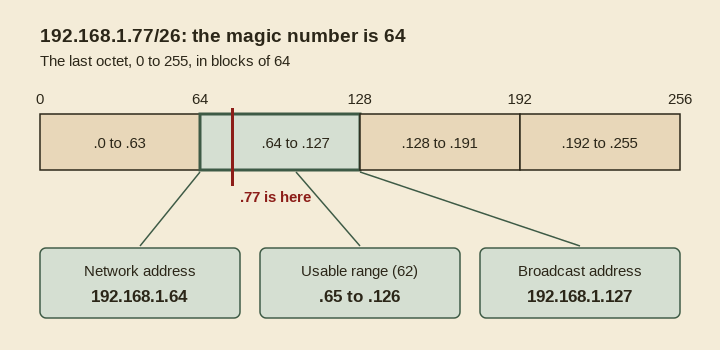 A /26 cuts the last octet into four blocks of 64, and 77 lands in the block that starts at 64.
What if the split is not in the last number?
The method is the same. The only change is that every octet to the right of the interesting one becomes 0 in the network address and 255 in the broadcast address.
Take 172.16.45.200/20. The interesting octet is the third, and the magic number is 16. The address has 45 there. The multiples of 16 around it are 32 and 48, so:
- network address:
172.16.32.0 - next network:
172.16.48.0 - broadcast address:
172.16.47.255, one step back from the next network - usable range:
172.16.32.1to172.16.47.254
One more, further left: 10.130.7.9/11. That is 3 bits into the second octet, so the mask is 255.224.0.0 and the magic number is 32. The multiples of 32 around 130 are 128 and 160. The network is 10.128.0.0 and the broadcast address is 10.159.255.255.
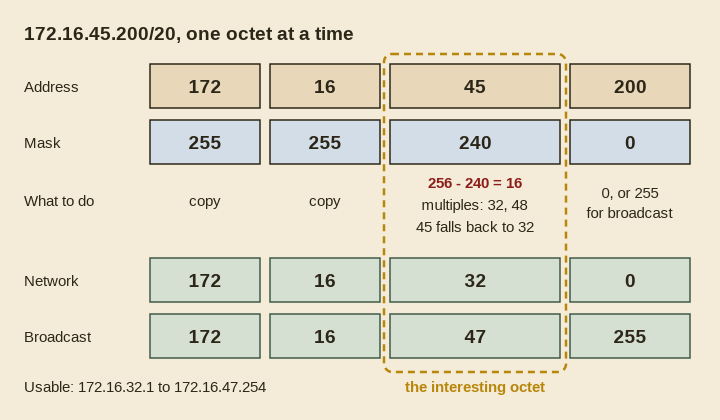 Copy the octets under 255, use the magic number on the interesting one, and zero the rest.
Watch out
The first and last addresses of a block cannot be given to a device. In 192.168.1.64/26, the addresses .64 and .127 look ordinary, but one is the network address and the other is the broadcast address. Assign either to a printer and it will not work, and the reason will not be obvious.
What other shortcuts are worth knowing?
Are two devices on the same subnet? Find the block for each. With a /26 mask, 192.168.1.60 is in the block starting at 0 and 192.168.1.70 is in the block starting at 64. They are ten apart and still on different subnets, so they need a router to talk. A wrong mask on one device causes exactly this kind of fault.
How big a subnet do you need? Add 2 to the number of devices, then round up to a power of two. For 50 devices you need 52 addresses, the next power of two is 64, and a block of 64 is a /26. For 100 devices it is 128, a /25. For 500 it is 512, which is two /24 blocks joined: a /23.
How many usable addresses does a prefix hold? Subtract the prefix from 32, raise 2 to that power, and take away 2. A /20 leaves 12 bits: 4,096 addresses, 4,094 usable. Each bit added to the prefix halves the block.
Check your answer by even and odd. In any subnet from /1 to /30, the network address ends in an even number and the broadcast address ends in an odd one. If yours do not, start again.
The wildcard mask is the mask upside down. Firewall and router rules sometimes ask for it. Subtract each octet of the mask from 255. For 255.255.255.192 that gives 0.0.0.63, and 63 is the magic number minus 1.
The two smallest blocks are special. A /32 is a single address, used to point at exactly one machine. A /31 holds two addresses and no broadcast address, which an internet standard, RFC 3021, allows for a link that joins two routers.
The method explains the odd private range. The private block 172.16.0.0/12 is 4 bits into the second octet, so its magic number is 16. It starts at 16 and ends one short of 32, which is why it runs from 172.16 to 172.31 and not to some rounder number.
Tip
Before you start a problem, write the multiples of the magic number across the top of the page: for 32, that is 0, 32, 64, 96, 128, 160, 192, 224. Every network address in that octet is on the list, and every broadcast address is one less than a number on it.
Which addresses should you know by sight?
Some ranges mean something before you do any arithmetic. Spotting them saves time when you are fixing a network.
| Range | What it tells you |
|---|---|
10.0.0.0/8, 172.16.0.0/12, 192.168.0.0/16 | Private: works only inside a network |
127.0.0.0/8 | Loopback: the machine talking to itself |
169.254.0.0/16 | Link-local: the device asked for an address, got no answer and picked its own |
100.64.0.0/10 | Shared space: your internet provider is translating addresses for many customers at once |
224.0.0.0/4 | Multicast: one sender, many listeners |
192.0.2.0/24, 198.51.100.0/24, 203.0.113.0/24 | Reserved for examples in documents |
A laptop that shows 169.254.x.x is the common one. It means the device never heard back from the DHCP server, so the problem is the cable, the Wi-Fi or the router, and not the laptop's settings.
How do you check your work?
Do the problem in your head first, then let a computer confirm it. Python ships with a module for this, and the command only prints. It changes nothing. On macOS and Linux, type python3 in place of python.
python -c "import ipaddress as i; n = i.ip_interface('172.16.45.200/20').network; print(n, n.broadcast_address, n.num_addresses - 2)"
This prints the network, the broadcast address and the count of usable addresses for the address in quotes:
172.16.32.0/20 172.16.47.255 4094
Change the address and prefix to test yourself on new ones.
What to remember
- The interesting octet is the one where the mask is neither 255 nor 0.
- The magic number is 256 minus the mask's value in that octet. It is the block size.
- The network address is the multiple of the magic number at or below your address. The broadcast address is one less than the next multiple.
- Octets to the right of the interesting one are 0 in the network address and 255 in the broadcast address.
- The first and last addresses in a block are not for devices.
169.254.x.xmeans DHCP did not answer, and100.64.x.xto100.127.x.xmeans your provider is sharing addresses.
Make up five addresses with prefixes between /17 and /30, work them in your head, and check each with the command above. Ten minutes of that and the method sticks. All of this is IPv4. The newer system does away with most of the arithmetic, and "IPv4 vs IPv6: Why It Matters and Where Addressing Is Going" covers how it differs and why it matters.
Sources (8)
- IETF, RFC 4632, "Classless Inter-domain Routing (CIDR): The Internet Address Assignment and Aggregation Plan", August 2006
- IETF, RFC 1918, "Address Allocation for Private Internets", February 1996
- IETF, RFC 3021, "Using 31-Bit Prefixes on IPv4 Point-to-Point Links", December 2000
- IETF, RFC 3927, "Dynamic Configuration of IPv4 Link-Local Addresses", May 2005
- IETF, RFC 6598, "IANA-Reserved IPv4 Prefix for Shared Address Space", April 2012
- IETF, RFC 5737, "IPv4 Address Blocks Reserved for Documentation", January 2010
- IANA, "IPv4 Special-Purpose Address Registry"
- Python Software Foundation, "ipaddress: IPv4/IPv6 manipulation library"