Articles & BlogBy Trapper W. Brown11 min readCurrent to 15 November 2026
For anyone about to buy a computer, or wondering whether the one on the desk is the right kind. This piece takes no side.
Ask three people which computer to buy and you will often get three loyalties instead of three answers. The argument is old and mostly unhelpful, because Mac, PC and Linux are not three versions of one thing. They are three different arrangements between the people who build the machine and the people who write the system that runs it.
That arrangement decides what you pay, what software you can run, who fixes the machine and how many years it stays safe to use. This article asks those questions of all three and gives each about the same space. Dates, prices and figures come from the makers' own pages, read on 15 November 2026. Ubuntu stands in for Linux where a specific distribution is needed, because its maker, Canonical, publishes a dated support table.
 From the side, one laptop looks much like another. What differs is who built it and who writes its system. Photo by NordWood Themes, CC0, via Wikimedia Commons.
What is each one, really?
An operating system is the program that runs the hardware and starts every other program. The three choices differ in who makes that system and who makes the machine under it.
Windows PC. One system on many makers' hardware. Microsoft writes Windows, and many companies build the computers, from budget laptops to gaming desktops. You can also assemble a desktop from parts and install Windows on it.
Mac. One company's hardware and one company's system. Apple designs the computer and writes macOS, and Apple's compatibility list for the current version, macOS 27, names only Apple's own machines.
Linux. A free kernel with many distributions. The kernel is the core of a system, and the Linux kernel is published under the GNU General Public License version 2, which lets anyone use, study and change it. A distribution is a complete system built around that kernel by a company or a volunteer project. Ubuntu, Fedora and Debian are three. "What Is Linux?" explains the kernel and distributions in full.
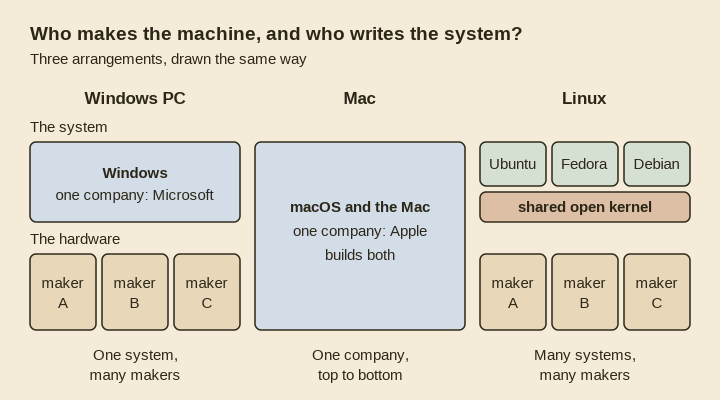 The three differ in who makes the machine and who writes the system, and most other differences follow from that.
What does each one cost?
Windows PC. Most people pay for Windows without seeing the price, because it comes installed on the computer. Bought alone, Windows 11 Home is listed at $139.00 on Microsoft's own store as of 15 November 2026. The hardware is where the range is: with many makers competing, there is a Windows computer at nearly every price.
Mac. macOS comes installed on the Mac, and Apple's update instructions deliver new versions to the models on its compatibility list. The cost is the computer. The range of models and prices is narrower because one company sets it, so the comparison to make is with Windows computers of similar parts, not with the cheapest one on the shelf.
Linux. Ubuntu's own page says it "has always been free to download, use, and share". The cost is the hardware, which can be a computer you already own, and your time, since you are the one installing it. A few makers sell computers with Linux already installed.
What software and games run on each?
This is the question that decides most purchases, and it has a simple test: write down the three programs you cannot do without, then check each maker's page for the systems it supports.
Windows PC. Windows has the most people using it, so software and game makers usually support it. StatCounter, a web analytics company, put Windows at about 77 percent of desktop page views worldwide in October 2026.
Mac. StatCounter's two Apple labels, "OS X" and "macOS", add up to about 16 percent for the same month. Much mainstream software is published for the Mac, and some programs are written only for it. The Steam figures below suggest far fewer people play games on one.
Linux. StatCounter put Linux between 5 and 6 percent, with ChromeOS, a separate system found on Chromebook laptops, at about 2 percent. Most software from open source projects is available, and many commercial programs are not. For games, Valve publishes a tool named Proton that it says "allows games which are exclusive to Windows to run on the Linux operating system". Not every game works.
| Windows | 76.62% |
|---|---|
| Apple (OS X + macOS) | 15.71% |
| Linux | 5.66% |
| ChromeOS | 2.02% |
Source: StatCounter Global Stats, October 2026. Apple is the sum of its OS X and macOS labels.
Read that chart with its method in mind. StatCounter says its tracking code sits on more than 1 million websites and that it counts page views, not people or computers. A machine that never visits one of those sites is not counted at all.
A second source measures a different crowd. Valve's Steam Hardware and Software Survey for October 2026, an optional and anonymous survey of people using the Steam game store, shows Windows at 93.70 percent, Linux at 3.95 percent and the Mac, which the survey labels OSX, at 2.35 percent. Neither figure is a census.
How much hardware choice and repair do you get?
Windows PC. The widest choice: screen sizes, keyboards, ports and prices from many makers. Windows 11 does set a floor. Microsoft's requirements include a compatible 64-bit processor, 4 GB of memory, 64 GB of storage and a security chip called TPM 2.0. Repair depends on the model. A desktop built from standard parts can be opened and upgraded, and a thin laptop may not be.
Mac. A short list of models from one maker, so there is less to compare and less to customize. Apple says owners can get service and parts for a minimum of 5 years after it last sold a product, and up to 7 years where parts are available. It also runs a Self Service Repair program that sells genuine parts, tools and manuals to people with repair experience.
Linux. It installs on a wide range of computers, including many older ones, and Ubuntu's table lists builds for several processor families. The catch is that not every part has a driver, the small program that lets the system talk to a piece of hardware, so a Wi-Fi card or fingerprint reader may not work on a given model. Repair is whatever the hardware under it allows.
How long will each one get updates?
A computer that no longer gets security updates is not safe to keep online, so support lifetime is a cost. The three makers publish it in three different ways.
| Windows 11 Home and Pro | macOS | Ubuntu LTS | |
|---|---|---|---|
| New version | Once a year, in the second half | macOS 27 is current | Every six months, with long-term support (LTS) releases in April 2022, 2024 and 2026 |
| Support for one version | 24 months | No fixed term on the pages read | 5 years of standard security updates |
| Example | Version 26H2: 29 September 2026 to October 2028 | Updates on 9 November 2026 for macOS 27, 26 and 15 | 26.04 LTS: April 2026 to May 2031 |
Windows PC. Microsoft's lifecycle page gives each yearly version of Windows 11 Home and Pro 24 months of support, and security updates arrive on the second Tuesday of each month. Staying supported means taking each yearly update. The harder limit is hardware: Windows 10 support ended on 14 October 2025, and Microsoft's page tells owners of PCs that cannot run Windows 11 to enroll in an extended security update program that runs to 12 October 2027 or to replace the device.
Mac. Apple's security releases page shows what it supports by what it ships. On 9 November 2026 it released updates for macOS 27, macOS 26 and macOS 15 on the same day. The limit is again hardware: macOS 27 is listed for Macs with Apple's own processors, such as MacBook Air models from 2020 and later. Every model on that list uses Apple silicon, so Macs with Intel processors are not on it.
Linux. Canonical's table gives Ubuntu 26.04 LTS standard security maintenance until May 2031 and, with its Ubuntu Pro subscription, until May 2036. Canonical says Ubuntu Pro is free for personal use on up to 5 machines. In-between releases are short-lived: Ubuntu 26.10 is covered only until July 2027. Other distributions set their own terms, so check the one you choose.
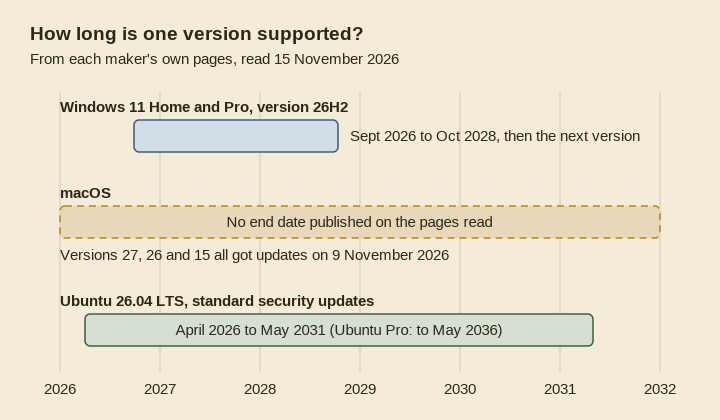 Three makers, three ways of saying how long a version is supported.
Is one of them safer, and what does each send home?
No system here is immune to attack. Each ships its own defenses, each publishes security fixes regularly, and each is only as safe as its last update and the person at the keyboard.
Windows PC. Windows includes the Windows Security app, with Microsoft Defender Antivirus, a firewall and an app-checking feature called Smart App Control. On privacy, Microsoft sorts what Windows reports into required and optional diagnostic data. Required data is the minimum Windows sends. Optional data, which Microsoft says may include websites you browse, is a choice under Settings, Privacy & security, Diagnostics & feedback. Microsoft also says Windows 11 Home needs an internet connection and a Microsoft account during first setup.
Mac. Apple describes three layers: checks that stop known malware from launching (the App Store, Gatekeeper and a scan it calls Notarization), blocking of malware that appears later, and removal by a built-in tool called XProtect. On privacy, sharing Mac analytics is a switch under System Settings, Privacy & Security, Analytics & Improvements that can be turned off at any time, and Apple states that analytics information is sent anonymously.
Linux. Ubuntu says it ships with most network ports closed and a firewall enabled, confines applications with a feature called AppArmor, and can install security fixes automatically. On privacy, Canonical's notice says a new installation offers the option to share system information such as the processor, memory and screen size, and that if you decline, Canonical receives none. Other distributions make their own choices.
The settings that matter most are the same on all three: updates on, a standard account for daily use, an encrypted disk and a backup. "Locking Down a Windows or Mac Computer" walks through them for two of the three.
Who does each one tend to suit?
These are tendencies, not verdicts.
Windows PC. It tends to suit people who play a wide range of games, people whose work or school requires a Windows-only program, and people who want the most hardware choice at a given price.
Mac. It tends to suit people who already use an iPhone or iPad and want the devices to work together, people whose field has settled on Mac software, and people who would trade choice for a short list of models.
Linux. It tends to suit people who want to see and control how their system works, people keeping an older computer in service, and programmers and students headed for servers, where Linux is common.
A paired example shows how the same question lands differently. One person who writes, browses and edits family photos can do all of it on any of the three, so price and comfort decide. A household with a student whose course requires one Windows-only program has had the choice made for it, whatever anyone prefers.
How can you try Linux without giving anything up?
Linux is the one of the three you can try for free on a computer you already own. Ubuntu's documentation describes running it from a USB stick, which it says does not alter the computer's configuration: restart without the stick and the machine is as it was. On Windows, Microsoft's own Windows Subsystem for Linux runs a Linux environment inside Windows with no separate machine. A virtual machine is the third route, and "Virtual Machines and Containers" explains what one is. "What Is Linux?" gives the steps for all three.
Trying the other two takes a store or a friend. An hour with someone else's Mac or Windows laptop, doing your own everyday tasks, is the fair equivalent.
What to remember
- Windows is one system on many makers' hardware, a Mac is one company's hardware and system, and Linux is a free kernel with many distributions.
- Start from the software you must run. Check each program's own page for the systems it supports.
- The system is a small part of the cost. Support lifetime is a large part: read the maker's lifecycle page before buying, new or used.
- No system is immune. All three ship defenses and regular fixes, and all three depend on updates being on.
- Each maker documents what its system reports and where the switch is. Read it and set it.
- Linux can be tried from a USB stick without changing the computer.
The useful answer to "which is best" is another question: best for which programs, on what budget, for how many years? Answer those three and the choice is usually plain.
Sources (24)
- Microsoft Learn, "Windows 11 Home and Pro" lifecycle page
- Microsoft Learn, "Windows 11 release information"
- Microsoft Support, "Windows 10 support has ended on October 14, 2025"
- Microsoft, "Windows 11 specs and system requirements"
- Microsoft Store, "Windows 11 Home", price as shown on 15 November 2026
- Microsoft Support, "Stay protected with the Windows Security app"
- Microsoft Support, "Diagnostics, feedback, and privacy in Windows"
- Microsoft Learn, "What is the Windows Subsystem for Linux?"
- Apple Support, "Apple security releases", as shown on 15 November 2026
- Apple, "macOS" (compatibility list for macOS 27)
- Apple Support, "Obtaining service for your Apple product after an expired warranty"
- Apple Support, "Self Service Repair"
- Apple Platform Security, "Protecting against malware in macOS"
- Apple Support, Mac User Guide, "Share analytics information from your Mac with Apple"
- Canonical, "Ubuntu release cycle"
- Canonical, "Ubuntu Desktop"
- Canonical, "Ubuntu security"
- Canonical, "Product Data Collection and Usage Notice", September 2026
- Canonical, "Try Ubuntu before you install it"
- The Linux Kernel documentation, "Linux kernel licensing rules"
- StatCounter Global Stats, "Desktop Operating System Market Share Worldwide", October 2026
- StatCounter Global Stats, "Frequently Asked Questions" (method)
- Valve, "Steam Hardware & Software Survey: October 2026"
- Valve, "Proton" (project README)