Articles & BlogBy Trapper W. Brown6 min readCurrent to 13 November 2026
 Illustration generated for Warhawk Division.
Microsoft fixed a flaw in Outlook on 10 November 2026 and marked it "Exploitation Detected," meaning attackers were using it before the fix shipped. The same day, the Cybersecurity and Infrastructure Security Agency (CISA) added it to its list of bugs under active attack. If someone gets you to open a booby-trapped file, Outlook can connect to a server the attacker controls without its usual warning and hand over a piece of your Windows login. The fix is the November Office update. Install it.
What did Microsoft announce?
The bug is tracked as CVE-2026-124194. A CVE number is just a public ID that lets everyone talk about the same flaw. Microsoft calls it a "Microsoft Outlook Spoofing Vulnerability." Its one-line description reads: "Product ui does not warn user of unsafe actions in Microsoft Office Outlook allows an unauthorized attacker to perform spoofing over a network."
In plainer words, Outlook does something risky and skips the warning it normally shows you first.
Microsoft's advisory was released on 10 November 2026. It lists two facts that matter more than anything else on the page:
- Exploited: Yes. Microsoft's exploitability field reads "Exploitation Detected."
- Publicly disclosed: No. The details were not published before the fix.
Microsoft rates the severity "Moderate" and gives it a base score of 6.5 out of 10 on the Common Vulnerability Scoring System (CVSS), the industry's standard severity scale. Do not let "Moderate" lull you. A middling score that is being used in real attacks is more urgent than a scary score nobody has used yet. The site's article "How to Read a Security Advisory Without Panicking" walks through why.
How does the attack work?
Microsoft's FAQ for the advisory lays it out in its own words:
"An unauthenticated attacker could send a specially crafted message file and convince a user to open it in an affected version of Microsoft Outlook. Opening the file could cause Outlook to connect to an attacker-controlled network location without displaying the usual external-content warning, potentially disclosing authentication information that could be used to impersonate the user."
Then it says what that "authentication information" is: "This vulnerability discloses a user's NTLMv2 hash to the attacker who could use this to authenticate as the user."
NTLM is an older Windows sign-in method that is still common on company networks. When your computer connects to a Windows file server, it can prove who you are by sending a scrambled response built from your password. That response is the "hash." It is not your password in plain text. Microsoft's own wording is that the attacker "could use this to authenticate as the user," and that is the part to take seriously.
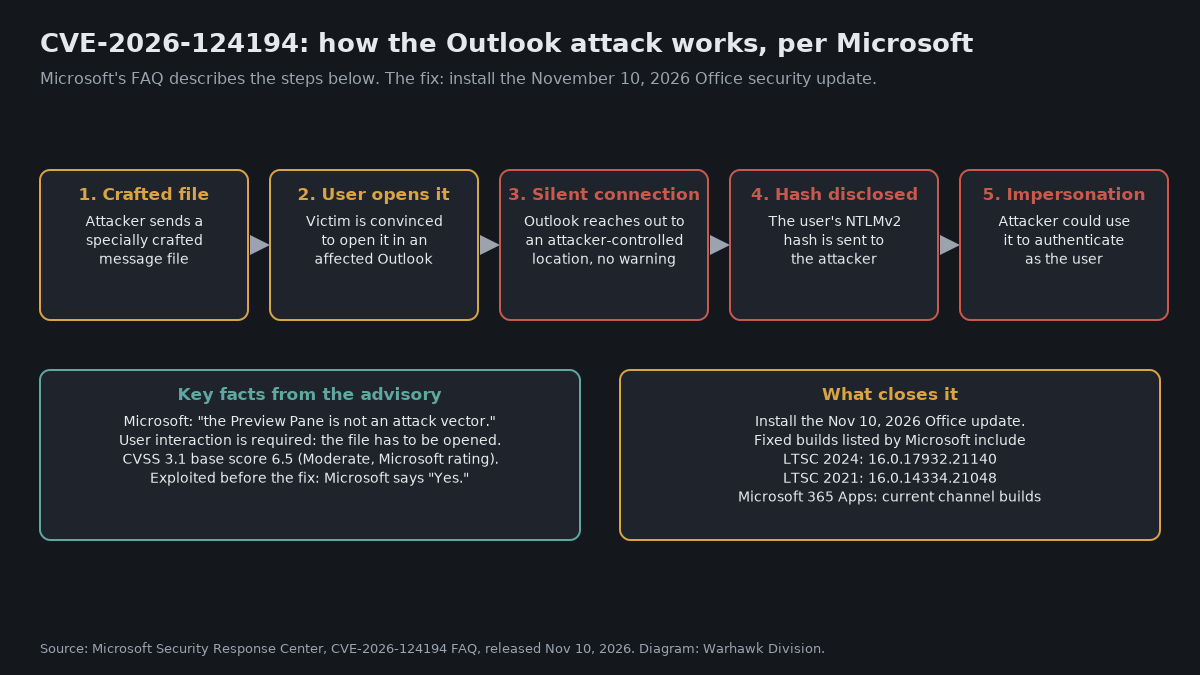 The attack chain as Microsoft's FAQ describes it. Data: Microsoft Security Response Center, CVE-2026-124194, 10 November 2026. Diagram by Warhawk Division.
Can it happen just by previewing an email?
No. Microsoft answers that question directly: "No, the Preview Pane is not an attack vector."
The score tells the same story. The CVSS entry says user interaction is required, and Microsoft spells out what that interaction is: "An attacker must send a user a malicious Office file and convince them to open it."
So the attack depends on persuasion. Someone has to get you to open a file. That is the same job a phishing email does every day, and the defense starts in the same place. The site's article "Phishing: How to Read an Email Before You Click" covers the habits that stop most of these.
 Nearly every attack of this kind starts with a person opening a file. Photo by Simon Hattinga Verschure, CC0, via Wikimedia Commons.
Who is affected?
Microsoft's advisory lists six affected products, all marked "fixed":
- Microsoft 365 Apps for Enterprise, 32-bit and 64-bit
- Microsoft Office LTSC 2024, 32-bit and 64-bit
- Microsoft Office LTSC 2021, 32-bit and 64-bit
LTSC stands for Long-Term Servicing Channel, the version of Office that businesses buy once and keep for years. The National Vulnerability Database entry for this CVE lists the fixed builds as 16.0.17932.21140 for LTSC 2024 and 16.0.14334.21048 for LTSC 2021. Microsoft's security update notes for 10 November 2026 list the same LTSC builds. For Microsoft 365 Apps, the fixed build depends on your update channel, and Microsoft points to its Office security release notes for the exact number.
That is the full list in the advisory. I am not going to guess about versions it does not name.
What did CISA do?
On 10 November 2026 CISA announced it had added six vulnerabilities to its Known Exploited Vulnerabilities (KEV) Catalog "based on evidence of active exploitation." This Outlook bug is one of them. CISA lists it as "Microsoft Office Outlook Missing User Interaction for Potentially Unsafe Action Vulnerability."
The KEV Catalog is CISA's running list of flaws that attackers are known to be using. Federal civilian agencies have to fix what is on it by a deadline. For this one, the catalog's due date is 24 November 2026. The catalog's entry lists "Known Ransomware Campaign Use" as "Unknown."
CISA's alert adds a line worth repeating to anyone outside government: "CISA encourages all organizations to adopt risk-based vulnerability management and prioritize remediation of KEV Catalog vulnerabilities."
Who is behind the attacks?
Neither Microsoft's advisory nor CISA's alert names an attacker, a target or a count of victims. I will not fill that gap. If either one publishes more, the advisory's revision history is where it will show up. As of 13 November 2026, Microsoft's page shows one revision, "Information published," dated 10 November 2026.
What to do
- Update Office now. In any Office app, go to File, then Account, then Update Options, then Update Now. Businesses should push the 10 November 2026 security update through their normal patch tools.
- Check the build number. For LTSC 2024 you want 16.0.17932.21140 or later, and for LTSC 2021 you want 16.0.14334.21048 or later. Microsoft 365 Apps users can match their channel against Microsoft's security update notes.
- Treat unexpected attachments as suspicious, especially message files and Office documents you did not ask for. If one arrives from a known contact, confirm it with that person through a different channel before you open it.
- IT teams: put this ahead of its "Moderate" label. It is on CISA's exploited list, and that should outweigh the severity rating.
- IT teams: review outbound connections. As a general hardening step, ask whether office computers can reach file-sharing servers on the open internet at all. This is my suggestion, not a step Microsoft lists for this CVE.
Where I land
- Microsoft says this was exploited before the fix. That makes it a patch-this-week item.
- It needs you to open a file. The Preview Pane alone does not trigger it.
- What leaks is a piece of your Windows sign-in that, in Microsoft's words, could be used "to authenticate as the user."
- The official record names no attacker or victims, and neither will I.
The score says "Moderate." The exploitation field says "Yes." When those two disagree, I go with the one describing what is already happening.
Sources (6)
- Microsoft Security Response Center, CVE-2026-124194, released 10 November 2026: https://msrc.microsoft.com/update-guide/vulnerability/CVE-2026-124194
- CISA, "CISA Adds Six Known Exploited Vulnerabilities to Catalog," 10 November 2026: https://www.cisa.gov/news-events/alerts/2026/11/10/cisa-adds-six-known-exploited-vulnerabilities-catalog
- CISA, Known Exploited Vulnerabilities Catalog: https://www.cisa.gov/known-exploited-vulnerabilities-catalog
- NIST National Vulnerability Database, CVE-2026-124194: https://nvd.nist.gov/vuln/detail/CVE-2026-124194
- Microsoft, Release notes for Microsoft Office security updates: https://learn.microsoft.com/en-us/officeupdates/microsoft365-apps-security-updates
- MITRE, CWE-356: Product UI does not Warn User of Unsafe Actions: https://cwe.mitre.org/data/definitions/356.html