Articles & BlogBy Trapper W. Brown11 min readCurrent to 15 November 2026
For anyone weighing a paid backup program, or who has heard the name Arq and wants to know what it does. This is a description drawn from the maker's own pages, not a review and not a recommendation.
Arq is backup software for Mac and Windows computers. Its central idea is a separation: the program is one purchase, and the place the backups are stored is a separate choice that you make and control. You can point it at an external drive, a storage box on your home network, or an account you already hold with a cloud storage company.
Choosing a backup tool is really choosing who holds your files and who can read them. Arq makes a useful case study because its maker publishes how the program stores and encrypts data. Everything below comes from arqbackup.com and its documentation as read on 15 November 2026, including every price.
 A network administrator inserts a hard drive into a server at Altus Air Force Base, Oklahoma. A backup is only as good as the storage it lands on. Photo by Senior Airman Franklin R. Ramos, U.S. Air Force, public domain, via Wikimedia Commons.
What is Arq?
Arq is made by a small company that, by its own account, has sold the program since 2009 and funds itself from sales. The current product is Arq 7. On the day this was written, the maker's site listed version 7.51 for both macOS and Windows, released 5 November 2026.
There are three ways to buy it, and the names are easy to mix up.
- Arq 7 is the app alone. You supply the storage.
- Arq Premium is a subscription that bundles the same app with cloud storage run by the maker and web access to your backed-up files.
- Arq Pro is a separate offering for organizations that manage many computers from one web console.
The download page lists Windows 8 or later (or Windows Server 2012 or later) and macOS 10.13 or later. The site describes Arq as software for Mac and Windows, and the pages read for this article list no Linux version.
What does it back up, and where do the copies go?
Arq is a file backup program. When you create what it calls a backup plan, the documentation offers three starting points: back up all drives with standard exclusions, back up the user data on the internal drive, or choose folders yourself. "All drives" includes external drives connected at backup time, and a plan can also include folders on a network drive. Exclusion rules skip what you do not want copied.
The destination is called a storage location. The documentation's list, as of today, covers external disks, network volumes, SFTP servers (a common way to move files to a remote computer securely) and a range of commercial cloud storage services, including several that speak the widely used S3 storage interface. The maker says Arq can back up to more than one destination, for example a drive at home and a cloud account.
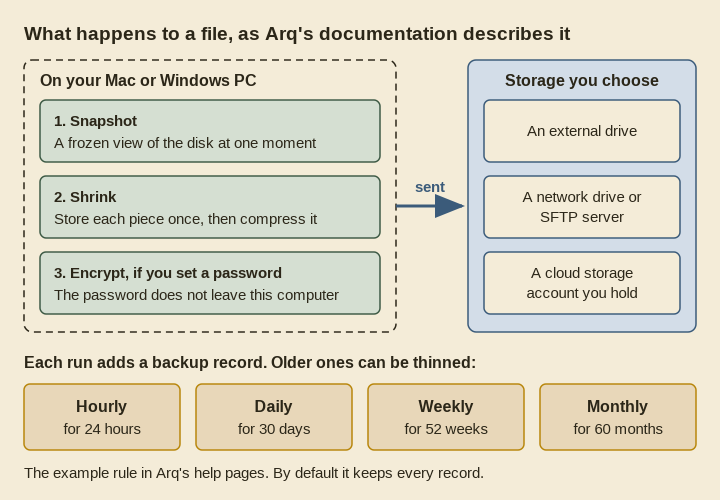 Snapshot, shrink and encrypt happen on your computer before anything is sent to storage.
"Backing Up Your Computer and Reimaging It: The Deep Guide" explains the difference between a file backup and a disk image. Before reading your files, Arq by default asks the operating system for a snapshot: a frozen, read-only view of the disk at one instant. On a Mac that is an APFS snapshot, and on Windows a VSS shadow copy. The documentation's reason is consistency: files are copied as they stood at one moment, even if they change during the backup.
The stored data is, in the documentation's words, de-duplicated and compressed. De-duplication means a piece of data that appears in many files or many backups is stored once. Together with what the maker calls block-level incremental backup, it means a later run sends only what changed.
How does it keep versions?
Each run produces a backup record, which is the state of your files at that date and time. The maker's site says a plan can run hourly or daily. Because unchanged data is not stored twice, keeping many records costs far less space than keeping many full copies.
By default, the documentation says, Arq keeps every backup record. Two settings change that.
- Thinning keeps fewer records as they age. The documentation's example keeps hourly records for 24 hours, daily records for 30 days, weekly records for 52 weeks and monthly records for 60 months.
- A budget caps the total storage used. Arq deletes the oldest records until the total is under your figure, though it always keeps the latest record even if that one exceeds the cap.
There is also a setting for what the documentation calls immutable backup records. With cloud storage that supports a feature named object lock, Arq can mark the latest record so that it cannot be deleted for a number of days you choose, even by someone who has stolen the storage account's access keys. The documentation is plain about two edges of this. A lock cannot be undone before it expires, so the number of days deserves thought. And object lock does not stop an attacker who takes over the whole cloud account from deleting the account itself.
How does its encryption work?
Encryption in Arq is a choice you make when creating a plan. The documentation says that if you set a password, Arq encrypts backup data before sending it, and that the password never leaves your computer. For a cloud storage location, the maker says it strongly recommends doing so.
The maker publishes the storage format. According to that document:
- Each stored object is encrypted with AES, a standard cipher, using a randomly generated 256-bit key.
- Each object carries an HMAC-SHA256 value, a kind of tamper seal that is checked before decryption.
- The master keys sit in a small file that is itself encrypted with a key derived from your password using PBKDF2-SHA256 with 200,000 rounds, a deliberately slow calculation meant to make password guessing expensive.
"Encryption and Hashing in Plain Terms" explains those terms. The practical meaning is that the storage provider holds data it cannot read, and that the password is the only way back in. The pages read for this article describe no way for the maker to recover a forgotten password, which is what you would expect of a design where the password never leaves the computer. Write it down and keep it somewhere other than the computer being backed up.
The maker also publishes an open source command line program for macOS, arq_restore, that can read the format and restore files without the app. Its stated purpose is transparency: the maker's page makes the point that data outlasts the apps that wrote it.
What does it cost?
These are the prices on the maker's pricing page and pricing FAQ on 15 November 2026. Prices change, so check the page.
| Arq 7 | Arq Premium | |
|---|---|---|
| Price | $59.99 per computer, paid once | $69.99 per year |
| Computers | One per license | Up to 5 |
| Storage | Not included: you supply it | 1 TB included, then $0.00699 per GB per month |
| Updates | One year included, then $25 per computer per year if you want more | Included while subscribed |
| Free trial | 30 days | Offered on the pricing page |
The FAQ says an Arq 7 license lets you keep the version you bought for good, that further years of updates are optional, and that most purchases can be refunded within 90 days. Arq Pro is listed at $250 per month for up to 100 managed computers.
A worked example shows how the two models differ. Take one person with one computer. Arq 7 costs $59.99 in the first year. With two more years of updates at $25 each, three years come to $109.99, plus whatever the chosen storage costs: nothing extra for a drive already owned, or a monthly bill from a cloud provider. Now take a household with four computers and 1.5 TB of files. Arq Premium is $69.99 a year, and the extra 500 GB at $0.00699 per GB adds about $3.50 a month, for roughly $112 a year. Neither figure is a recommendation. The answer depends on how many computers you have and where you would store the data anyway.
What does the documentation say about restores and limits?
Restoring is done from the app: you open a storage location, pick a backup record by date, and choose files or folders to bring back, either to a place you pick or by dragging them out of the window. A search box finds a file by name across records. The maker says the app can always restore without a license, in a "restore-only mode", so an expired trial or lapsed subscription does not lock you out of your own backups.
The documentation also states limits and cautions. These are the ones a household would meet.
- It restores files and folders. The pages read describe file backup and file restore. They do not describe starting a dead computer from an Arq backup, so reinstalling the system is a separate job.
- Cold storage is slow to restore. If the data sits in the Glacier storage class at Amazon, the documentation says objects must first be made downloadable, which can take 3 to 5 hours or more.
- Checking a backup can cost money. The "Back up and Validate" feature downloads stored data to verify it. The documentation warns that this can incur transfer fees from a storage provider and count against an internet data cap.
- Cloud-only files need you signed in. Files that a sync service keeps online with only a placeholder on your disk can be backed up only while that user is logged in, because the sync service must download them first. A plan can skip them, flag them as errors, or download and back them up.
- Backups do not cross between Mac and Windows as a continuing set. When moving to a new computer you can "adopt" the old backup set, but the documentation says adopting a Windows set on a Mac, or the reverse, is not supported.
How do you judge any backup program?
The same questions apply to Arq, to the tools built into Windows and macOS, and to anything else. Ask them of the maker's documentation, not of an advertisement.
- What does it copy? Files only, or the whole disk? What does it skip by default?
- Where can the copies live? One company's servers, or storage you choose?
- Who can read the backup? Is it encrypted before it leaves the computer? Who holds the key, and what happens if you forget the password?
- How far back can you go? How often does it run, and how long are versions kept?
- How do you restore? One file? Everything? Onto a new computer? Without a paid license?
- Can you check the backup? Is there a verify function, and what does it cost in time and data?
- What happens if the company stops? Is the storage format documented? Is there another tool that can read it?
- What does it cost over three years? Add the license, the updates and the storage.
- What does the maker say it cannot do? Read the limits before the day you need a restore.
Then run the test that no page can answer for you: restore some files and open them.
What are the open source alternatives?
Several free, open source programs follow the same broad design of de-duplicated, encrypted backups sent to storage you choose, and others handle whole-disk imaging, which Arq's documentation does not cover. "Backing Up Your Computer and Reimaging It: The Deep Guide" describes nine of them from their own project pages, with each one's license and whether it runs from a command line or a window. "Backups That Work: The 3-2-1 Rule" covers how many copies to keep and where.
What to remember
- Arq is a paid file backup app for Mac and Windows. The app and the storage are separate choices, unless you take the bundled Premium plan.
- It keeps dated backup records, stores unchanged data once, and can thin old records or cap storage.
- Encryption is set with a password that the documentation says never leaves your computer. Lose it and, on the pages read, there is no stated way back.
- As of 15 November 2026 the maker lists Arq 7 at $59.99 per computer and Arq Premium at $69.99 per year for up to five computers with 1 TB.
- Its documentation states its limits: file restores only, slow restores from cold storage, and no continuing backup set across Mac and Windows.
- Judge any backup program by what it copies, who can read it, how far back it goes and how a restore works.
The maker offers a free trial, and a trial of any backup program is worth spending on one thing: backing up a folder, deleting a test file, and getting it back.
Sources (17)
- Arq, "Arq backs up your files. You control your data.", read 15 November 2026
- Arq, "Pricing", read 15 November 2026
- Arq 7 Help, "Arq 7 Pricing FAQ", read 15 November 2026
- Arq, "Download", read 15 November 2026
- Arq, "Arq Pro", read 15 November 2026
- Arq 7 Help, "Arq 7 vs Arq Premium", read 15 November 2026
- Arq 7 Help, "Creating a Backup Plan", read 15 November 2026
- Arq 7 Help, "Storage Locations", read 15 November 2026
- Arq 7 Help, "Data Format", read 15 November 2026
- Arq 7 Help, "Immutable Backup Records", read 15 November 2026
- Arq 7 Help, "Restoring Files", read 15 November 2026
- Arq 7 Help, "Back up and Validate", read 15 November 2026
- Arq 7 Help, "Backing Up Dataless Files", read 15 November 2026
- Arq 7 Help, "Moving To a New Computer", read 15 November 2026
- Arq 7 Help, "Arq Permission Requirements on macOS", read 15 November 2026
- Arq, "arq_restore", read 15 November 2026
- Arq, "Release Notes for Arq Backup Version 7.51", 5 November 2026