Articles & BlogBy Trapper W. Brown10 min read
Fiber optic internet carries your data as flashes of light through a thread of glass, where older connections carry it as electricity through copper. The glass is 125 micrometers across, an eighth of a millimeter, and the part in the middle that carries the light is far thinner still. A laser at one end blinks billions of times a second. A sensor at the other end reads the blinks as ones and zeros.
Why should you care what is inside the cable? Because it decides three things you will feel: how fast you can send files as well as receive them, how well the connection holds up over distance, and how much room there is to grow. It also helps to know the real thing when you see it, because the word "fiber" appears in a lot of advertising for connections that finish their trip on copper.
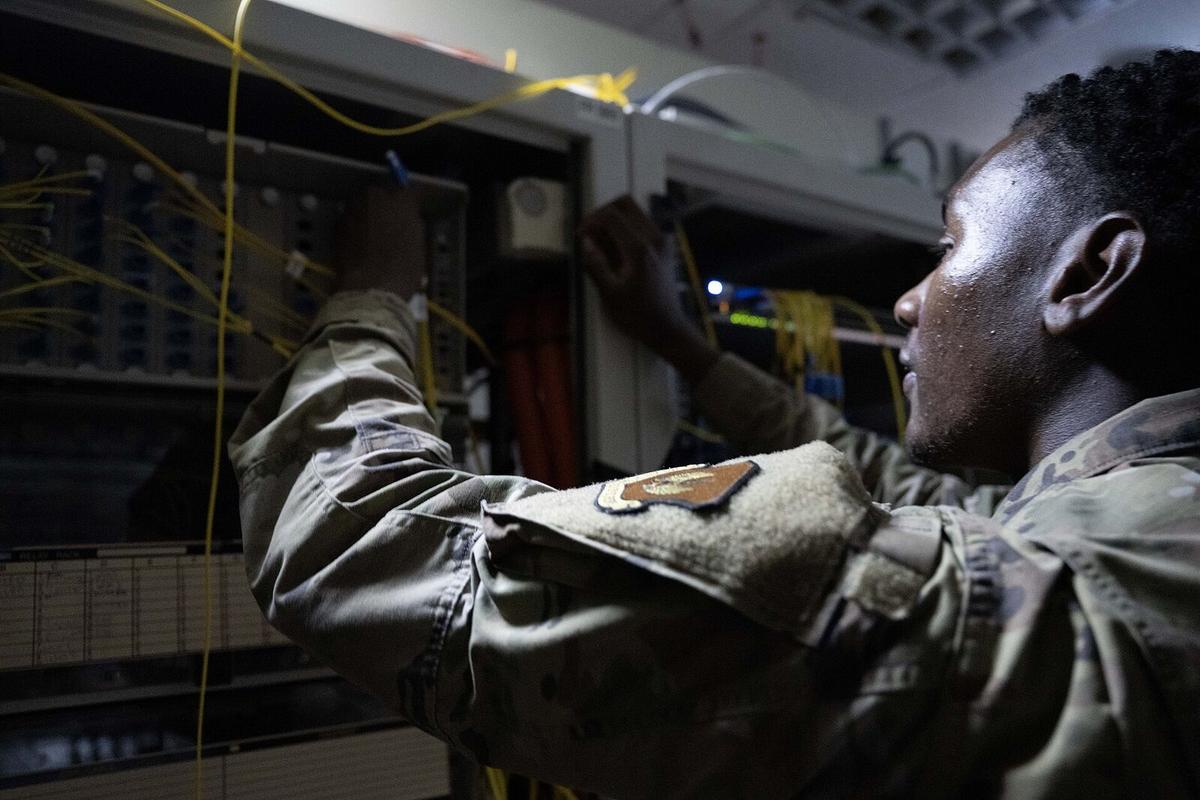 Each thin yellow cable in this cabinet carries data as light through a strand of glass. Photo by Senior Airman Greydon Furstenau, U.S. Air Force, public domain, via Wikimedia Commons.
How does light stay inside a strand of glass?
If you have ever looked up from the bottom of a swimming pool, you have seen the trick. Straight above you, the surface is a window. Look toward the far end of the pool and the surface turns into a mirror. Light traveling through a dense clear material, and hitting the boundary with a less dense one at a shallow angle, does not escape. All of it bounces back. The name for this is total internal reflection.
A fiber is built to make that happen on every bounce. It has two layers of glass. The center, called the core, carries the light. Around it is the cladding, glass made to a slightly different recipe so that it bends light a little less than the core does. Light sent down the core at a shallow angle hits the cladding, reflects, crosses the core, reflects again, and keeps going for miles.
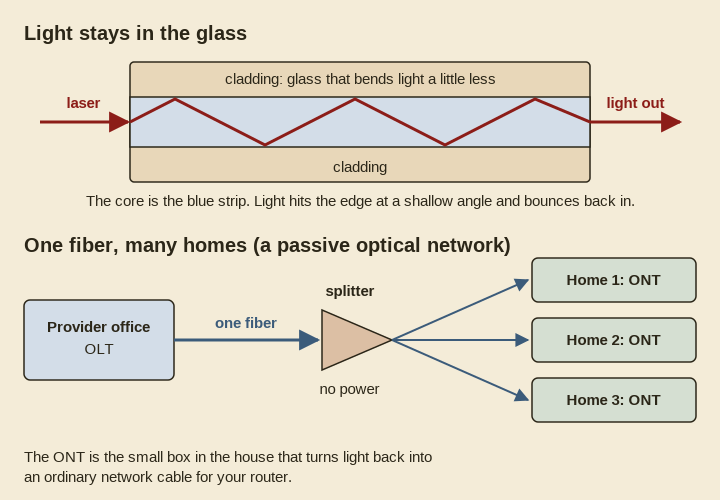 Top: light bounces along the core and cannot leak out. Bottom: one fiber from the provider is split to serve many homes.
The glass is also astonishingly clear. The international standard for the common type of fiber, ITU-T Recommendation G.652 (current edition August 2024), allows a loss of at most 0.4 decibels per kilometer in cabled fiber across its main working range of infrared light. Decibels are a way of counting loss in which every 3 decibels cuts the power in half. So over 20 kilometers (about 12 miles), the worst case is 20 × 0.4 = 8 decibels, which leaves roughly 16 percent of the light. That sounds like a lot to lose, but a sensor can read it easily, with no powered equipment anywhere along those 12 miles.
Single-mode and multimode: what is the difference?
There are two families of fiber, and the difference is the width of the core.
| Single-mode | Multimode | |
|---|---|---|
| Light-carrying core | About 9 micrometers | 50 micrometers |
| Outer glass (cladding) | 125 micrometers | 125 micrometers |
| Light used | Infrared, around 1310 and 1550 nanometers | Near infrared, usually 850 nanometers |
| What happens inside | Light takes one path | Light takes many paths at once |
| Typical use | Between buildings, across cities, to homes | Inside a building or data center |
| Standard | ITU-T G.652 | ITU-T G.651.1 |
In a wide core, light can take many routes: straight down the middle, or bouncing at different angles. Each route is called a mode. The routes are slightly different lengths, so a sharp pulse of light arrives a little smeared. Over a short run that does not matter. Over a long one, the pulses blur into each other. The multimode standard, G.651.1, describes its fiber as supporting 1 gigabit per second Ethernet over links of up to 550 meters.
In a core only about 9 micrometers wide, there is room for one path. Pulses stay sharp for miles. That is why the fiber that comes to a house from a provider is single-mode.
Watch out
Never look into the end of a fiber or into an open fiber port. The light used for internet service is infrared, so you cannot see it, and you will not blink.
Why does fiber beat copper and cable?
Speed. The limit on a fiber link is set mostly by the equipment at the two ends, and the glass has room to spare. The same strand that carried one generation of service can carry the next when the boxes are replaced. Copper has to fight for every gain.
Distance. Electrical signals in copper fade quickly and pick up noise along the way. That is why service over old telephone wire slows down the farther you live from the provider's cabinet, and why cable TV networks need powered amplifiers along the route. A fiber network of the kind used for homes is specified to reach 20 kilometers with nothing powered in between.
Upload. Cable networks were built to deliver television to houses, so they have always given most of their capacity to the downhill direction. Fiber networks are increasingly built with equal capacity both ways.
Here is what the published specifications allow. These are ceilings for the whole shared line, set by the standards. They are not what any one plan sells.
| Technology | Medium | Down, up to | Up, up to | Source |
|---|---|---|---|---|
| GPON | Fiber | 2.4 Gbit/s | 1.2 Gbit/s | ITU-T G.984.1 |
| XGS-PON | Fiber | 10 Gbit/s | 10 Gbit/s | ITU-T G.9807.1 |
| DOCSIS 3.1 | Cable (coax) | 10 Gbit/s | 1 to 2 Gbit/s | CableLabs |
| DOCSIS 4.0 | Cable (coax) | 10 Gbit/s | 6 Gbit/s | CableLabs |
To be fair to cable: the newest cable standard closes much of the gap on paper, and CableLabs, the industry's research body, notes that its numbers are based on specifications and that performance on deployed networks varies. Its page also gives two different figures for DOCSIS 3.1, and the table uses the specification row. What matters to you is what is built on your street and what the plan promises.
Interference. Glass does not conduct electricity. A fiber does not pick up noise from power lines, motors or radio transmitters, and it does not radiate any signal of its own.
One common belief needs correcting. Fiber is not faster because light is quick. Signals in copper also travel at a large fraction of the speed of light. Fiber wins because it can carry far more data at once and lose far less of it along the way.
How does fiber reach a house?
The setup to look for is called FTTH, fiber to the home (some providers say FTTP, fiber to the premises). The glass runs all the way to a box on or in your house. The other arrangements, such as fiber to the node or fiber to the curb, stop the glass at a cabinet somewhere in the neighborhood and finish the trip on telephone wire or coaxial cable. They are often advertised with the word "fiber" too.
Most home fiber is a passive optical network, or PON. "Passive" means nothing between the provider's building and your house needs electricity. It works like this:
- In the provider's building sits an optical line terminal, the OLT. One port on it feeds one strand of fiber.
- Somewhere in the neighborhood, that strand enters a splitter: a small piece of glass that divides the light among many strands. The GPON standard calls a split of up to 64 homes realistic.
- One of those strands runs to your house and ends at the optical network terminal, the ONT. This small box turns light back into an ordinary network signal and hands it to your router through a regular Ethernet cable.
Downstream, every ONT on the splitter receives the same light and keeps only the data addressed to it. Upstream, the ONTs take turns, each sending in the slice of time the OLT assigns it.
That means the line is shared, and a little arithmetic is worth doing. If 32 homes share a GPON line with 2.4 gigabits per second coming down, and every one of them pulled as hard as possible at the same instant, each would get 2,400 ÷ 32 = 75 megabits per second. On XGS-PON the same sum gives about 312. In practice the neighbors are almost never all at full pull together, which is how a provider can sell each of them a much faster plan and usually deliver it.
What does "symmetrical" mean?
A symmetrical plan gives you the same speed in both directions: 500 megabits per second down and 500 up, for example. Most cable plans are asymmetrical, with upload at a small fraction of download.
Download is what you feel when you stream and browse. Upload is what you feel on video calls, cloud backups, sending large files and hosting a game.
Take a household that wants to back up 50 gigabytes of family photos and video to a cloud service. Fifty gigabytes is 400,000 megabits. At an upload speed of 20 megabits per second, that is 20,000 seconds: about five and a half hours, during which every video call in the house suffers. At 1,000 megabits per second it is 400 seconds, under seven minutes.
Now take a design studio of eight people that sends a 200 gigabyte project to a client. At 35 megabits per second up, the transfer runs for nearly 13 hours. At 1,000, it takes about 27 minutes. These sums assume the line runs at full speed the whole time and that the far end can keep up, which is the best case, but the ratio is the lesson.
What should you ask a provider?
- Is it fiber all the way to my home? Ask for the words "fiber to the home" or "fiber to the premises."
- What is the upload speed? If the sales page only shows one number, it is the download.
- Which technology is it, GPON or XGS-PON? It tells you how much room there is above the plan you are buying.
- Who supplies the ONT and the router, and can I use my own router?
- Where will the fiber enter the house, and where will the ONT go? It needs a power outlet, and you want it near where your router will sit.
- What happens when the power goes out? The ONT needs electricity. If your home phone runs through it, ask about a backup battery.
- What is the price after the introductory period, and is there a data cap or a contract?
- Do I get my own public IP address? This matters if you host games or reach devices at home from outside. "Firewalls, NAT and Port Forwarding" explains why.
What are the limits?
Fiber is the best wire there is, and it is still only the wire.
- Availability. Someone has to dig a trench or string a cable to every house. Where that has not been done, no plan can fix it.
- Your Wi-Fi. A multi-gigabit line feeding an old router in a closet will feel like the old router. "Home Wi-Fi: The Six Router Settings That Matter" covers the part of the path you control.
- Your devices. Many computers and consoles have network ports that top out at 1 gigabit per second.
- The far end. A download can go no faster than the server sending it.
- Sharing. Your line is split with neighbors, as the arithmetic above shows.
- Bends and breaks. Glass that is kinked or bent too tightly leaks light at the bend, the same physics that keeps the light in working in reverse. A cut fiber cannot be twisted back together. It has to be spliced with a special tool.
- Power. The network between you and the provider is passive, but the boxes at both ends are not.
What to remember
- Fiber carries data as light in glass. Total internal reflection keeps the light bouncing along the core.
- Single-mode fiber has a tiny core, one light path and long reach. It is what runs to homes. Multimode has a wider core and is for short runs inside buildings.
- Fiber wins on capacity, distance, upload and immunity to electrical noise. The speed of light is not the reason.
- A home connection is usually a PON: one fiber from the provider, split without power among many homes, ending at an ONT box in yours.
- Symmetrical means upload equals download. Uploads are where the difference from cable is easiest to feel.
- Ask whether the glass comes all the way to the house, and ask for the upload number.
Before you sign up, find the upload speed on the plan's fine print and run the backup arithmetic for your own household. Then read "Home Wi-Fi: The Six Router Settings That Matter," because the last 30 feet of the trip are yours to get right.