Articles & BlogBy Trapper W. Brown12 min readCurrent to 15 November 2026
For anyone with a folder of home videos, photos and music spread over three computers and a drawer of old drives, who wants one tidy library that plays on the television.
A media server is a computer in your house that keeps your video, music and photo files in one place and hands them to whatever screen asks for them. Plex is one well-known program for the job. Its maker describes the idea in two halves: you run Plex Media Server on a computer where the files live, and you install a Plex app on each phone, tablet, television or game console that will play them.
It is worth understanding before you install it. A server left running all day needs the same care as a router, and the part most people want, watching from outside the house, means making a machine at home reachable from the internet. This guide puts that risk ahead of the steps. Everything about Plex below comes from Plex's own support and plans pages as read on 15 November 2026.
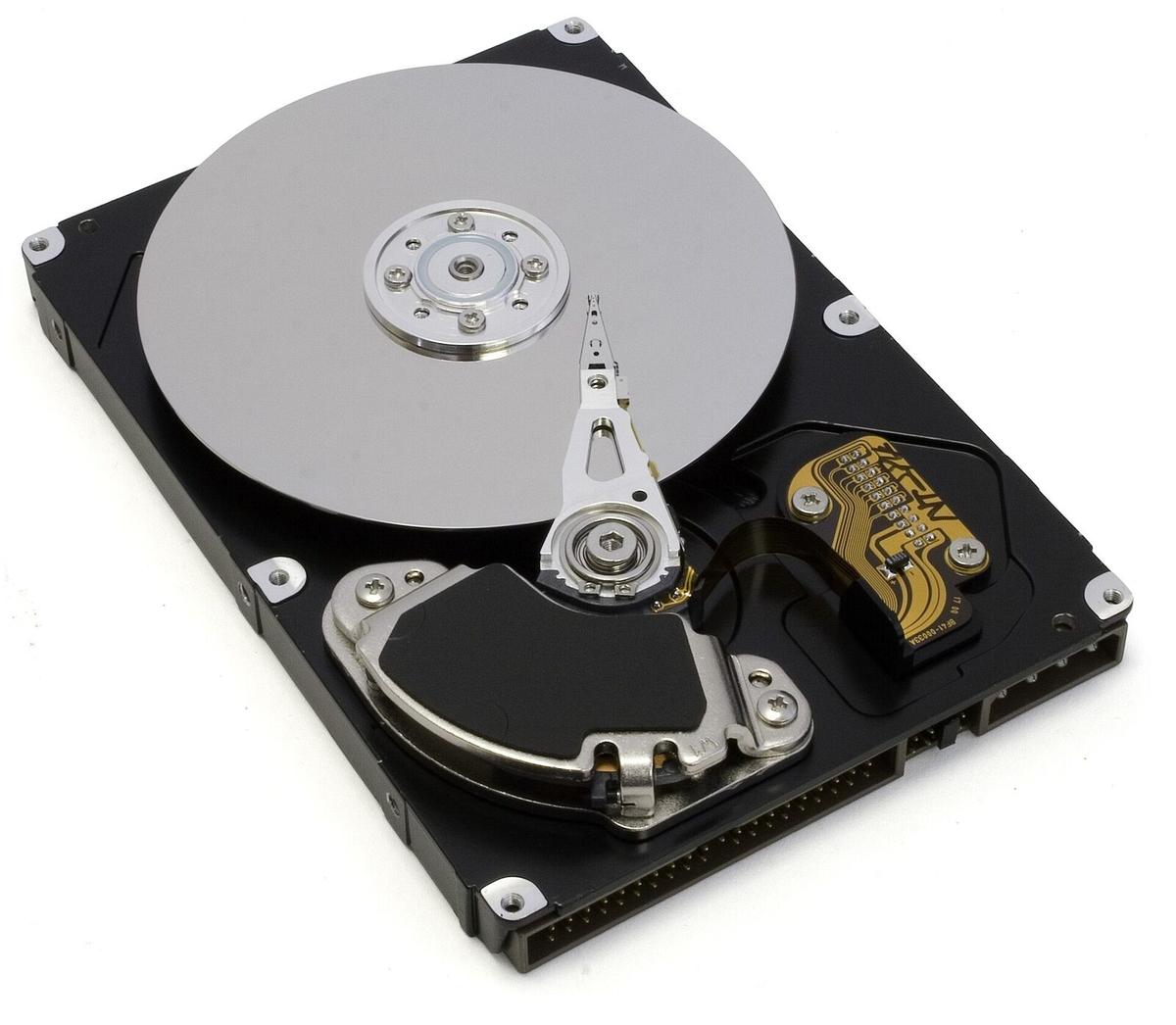 A media server is mostly storage: every video, song and photo in the library is a file on a drive like this one. Photo by Zzubnik, public domain, via Wikimedia Commons.
What do the server and the apps do?
The server does the filing. You point it at folders, one library per kind of content (movies, television, music, photos, home videos), and it catalogs what it finds and adds artwork and descriptions. Plex's quick-start guide notes that the server has no window of its own. You manage it from a web page.
The apps do the playing. Plex lists apps for web browsers, Android and iOS phones and tablets, Windows, macOS and Linux computers, several brands of smart television, common streaming boxes and PlayStation and Xbox game consoles. An app signs in to your Plex account, finds your server and shows the library.
The server software itself runs on Windows, macOS, Linux and many network attached storage boxes (a NAS is a small computer built to hold several drives). Plex's requirements page lists Windows 10 version 1607 or newer, macOS 10.13 or newer, and several Linux distributions.
What hardware does it need?
Less than you might think, until the server has to convert video. Plex's stated minimum is an Intel Core i3 or an equivalent processor, and it says 4 GB of memory is typically more than enough. Storage is whatever your library needs.
A NAS is a popular home for a server because the drives and the server live in one box. Plex's own page is frank about the limit: most consumer NAS devices have weak processors, and some ARM models cannot convert video at all.
How much processor you need depends on one question: will the server send files as they are, or will it have to convert them on the way out?
What is transcoding, and why does direct play matter?
Every video file is a container (the wrapper, such as MP4 or MKV) holding video and audio encoded in particular formats. A playing device can handle some combinations and not others. When an app connects, it tells the server what it can play, and the server picks one of three paths.
| Path | What the server does | Work for the server |
|---|---|---|
| Direct play | Sends the file exactly as stored | Almost none |
| Direct stream | Copies the video and audio into a wrapper the device accepts | A little |
| Transcode | Converts the video, the audio or both into a format or size the device can play | A lot |
Plex names the common triggers for a transcode: a device that cannot play the file's format, a slow connection that needs a smaller picture, and subtitles that have to be drawn into the video.
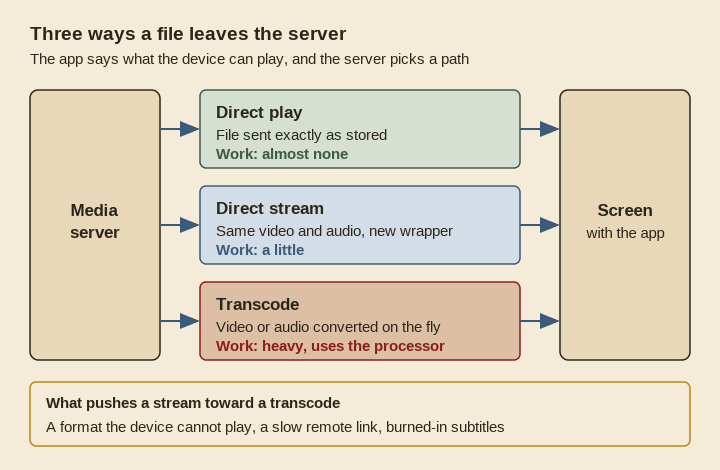 The same file can leave the server three ways, and only the third one is hard work.
Plex gives rough numbers. As bare minimums it suggests a 3.0 GHz Core i5 for one 1080p transcode and a 3.2 GHz Core i7 for one 4K transcode. It also gives a rule of thumb using PassMark, a public processor benchmark score: about 2,000 points for one 1080p file at 10 megabits per second, and about 17,000 for one 4K high dynamic range file.
Here is the worked example. Plex says two transcodes need about twice the power of one. So a household where three people watch different 1080p files that all need converting should plan for about 3 times 2,000, or 6,000 points. One person watching on a living room box that direct plays everything needs almost none of that. Files and devices that match, so nothing needs converting, can do more than a faster server.
Plex also offers hardware-accelerated streaming, which hands the conversion to the video chip in the processor. Its page says this is a paid feature that is faster but can look slightly softer.
How should the files be stored and named?
Plex identifies a film or a show from its folder and file name, so tidy names are what make the library work. Its naming guides ask for three things.
- Keep each kind of content in its own top folder. Plex warns that mixing movies and television in one path leads to wrong matches and ignored files.
- Put each movie in its own folder, named with the title and the release year in parentheses.
- For television, use a folder for the show, a folder named with the English word "Season" and a number, and the season and episode in each file name.
The pattern from Plex's guides looks like this, with placeholder names:
/Media
   /Movies
      /Movie Name (2019)
         Movie Name (2019).mp4
   /TV Shows
      /Show Name (2021)
         /Season 01
            Show Name (2021) - s01e01 - Episode Title.mkv
   /Home Videos
   /Music
The server's drive can fail like any other, and a wedding video has no second copy unless you make one. "Backups That Work: The 3-2-1 Rule" covers how.
What is free and what needs a paid plan?
Plex's plans page says the basic arrangement "starts free": adding your media and streaming it to devices on your home network needs no subscription. Two paid plans sit on top. These are the United States prices shown on that page on 15 November 2026, and they can change.
| Plan | What it adds | Price shown, 15 November 2026 |
|---|---|---|
| Free | Libraries, apps, playback on your home network, sharing libraries with other accounts | $0 |
| Remote Watch Pass | Lets one account watch video remotely from servers it has access to, and nothing else | $2.99 a month or $29.99 a year |
| Plex Pass | Remote video for everyone the server is shared with, hardware transcoding, downloads, skipping intros and credits, recording broadcast television with a tuner and antenna, and more | $6.99 a month, $69.99 a year, $249.99 for 5 years or $749.99 once for a lifetime pass |
The line between free and paid moved in 2025. Plex's support page says that since 29 April 2025, playing personal video from outside the home network requires one of three things: a Plex Pass on the server owner's account, a Plex Pass on the viewer's account, or a Remote Watch Pass on the viewer's account. Music and photos are not affected and still stream remotely for free.
Plex is proprietary software from one company. It is not the only media server. Jellyfin describes itself as free software under the GNU General Public License, and says the project began in 2018 and descends from an earlier release of another server, Emby. Kodi, also under the GNU General Public License, describes itself as a media player and entertainment hub, which is a player for the device it runs on more than a server for a household. I list them so you know they exist, not to rank them.
How does remote access work, and what does it open?
Start with the risk. A home network is normally closed to the internet: the router lets replies in and turns strangers away. Remote access makes one exception, a path from the whole internet to one program on one machine in your house. From then on that program is exposed to anyone who goes looking, and a flaw in it, or a weak account password, is a way in. "Firewalls, NAT and Port Forwarding" explains what a forwarded port is and why it should be the only one.
Now the mechanics. Plex Media Server listens on TCP port 32400. Under Settings, Server, Remote Access in the web app, a button asks the server to configure the path. Plex says it first tries to do this automatically with UPnP or NAT-PMP, two methods that let a program ask the router to open a port for it. If that fails, you can forward a port by hand on the router to port 32400 on the server and tick "Manually specify public port".
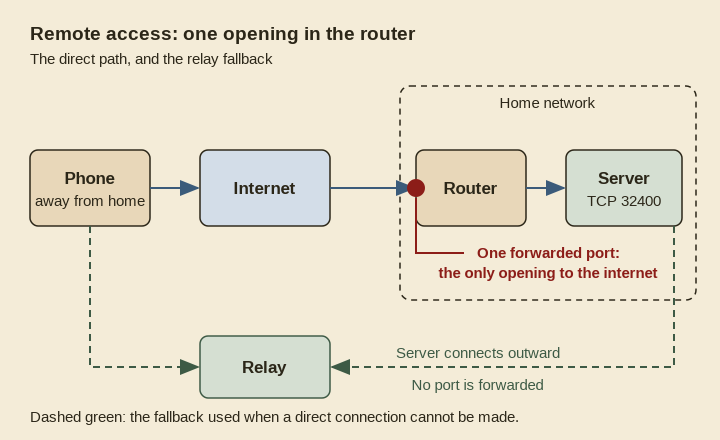 Remote access is one deliberate opening in the router, and it should stay the only one.
UPnP is convenient because it needs no setup. The Cybersecurity and Infrastructure Security Agency (CISA), the federal agency for cyber defense, advises home users to turn UPnP off unless they have a specific need for it, because malware inside a network can use it to open the firewall. A manual forward takes ten minutes and lets you leave UPnP off. "Home Wi-Fi: The Six Router Settings That Matter" covers that router setting.
Plex also runs a fallback called Relay. When an app cannot reach your server directly, the server and the app each connect outward to a Plex relay server, and the stream is tunneled between them. Plex says Relay is on by default and can be switched off in the server's Network settings.
Watch out
Plex's port list names several other ports the server uses inside the home for discovery. Plex's own warning is not to forward those on a router. If you forward anything, forward one port, to 32400, and nothing else.
How do you keep the server and the account safe?
Three habits cover most of it.
Keep the server updated. A program that faces the internet has to be patched. Plex's General settings page says the server checks for a new version whenever you open its settings, and that Windows and macOS installs can apply updates automatically during scheduled maintenance. Linux and NAS installs are updated by hand or through the system's own tools. Keep the computer's operating system updated too.
Limit what is exposed. If nobody watches from outside the house, leave Remote Access disabled and nothing is opened. If you do enable it, open the one port. Leave the Secure Connections setting where Plex ships it, on Preferred, or set it to Required. Plex issues each server a certificate so streams are encrypted in transit.
Lock the account. Your Plex account is the key to the server from anywhere, so it deserves a long unique password and two-factor authentication. Plex's page describes the setup: turn it on from your Account page, scan a code with any standard authenticator app, and store the 10 single-use recovery codes somewhere you can reach without your phone.
Sharing needs the same thought. Under Manage Library Access you invite another Plex account and choose which libraries it sees. Plex says sharing is intended for family and close personal friends. Plex Home is a separate feature for people who live together, with up to 15 members. Plex warns that members of a Home can switch to each other's profiles without a second sign-in check.
What media is this guide for?
This guide is for media you own or have the right to use: home movies, your own photos and recordings, and files whose seller or creator has licensed you to keep and play them. Plex's requirements page says the software is licensed for personal use.
Copyright law is narrower than many people assume. The U.S. Copyright Office's page on digital files says the law's permission to make a backup copy "extends only to computer programs and not to other types of works", and that no other provision of the Copyright Act specifically authorizes backup copies of other works, even ones sold as digital files. The same page says that uploading or downloading protected works without the owner's authority is infringement, with statutory damages of up to $30,000 per work and up to $150,000 where the infringement is willful.
This article gives no instructions for obtaining or copying protected media, and it is not legal advice. If you are unsure whether you may copy something, the Copyright Office page and the license you bought it under are the places to look.
What to remember
- Direct play costs the server almost nothing. Transcoding is where the processor goes, and two transcodes cost about twice one.
- Name folders and files the way Plex's guides ask, with each kind of content in its own top folder.
- As of 15 November 2026, playback at home is free and remote video needs a Plex Pass or a Remote Watch Pass.
- Remote access opens one path into your home network. Forward one port, to 32400, keep the server patched and put two-factor authentication on the account.
- Serve only media you own or have the right to use.
A reasonable start is small: install the server on a computer you already have, add one library of home videos, and watch it over the home network. Remote access can wait until the account is locked down.
Sources (26)
- Plex Support, "What is Plex?", last modified January 7, 2025
- Plex Support, "Plex Media Server Requirements", last modified October 17, 2023
- Plex Support, "Quick-Start & Step by Step Guides for Plex Media Server", last modified February 4, 2026
- Plex Support, "Direct Play, Direct Stream, Transcoding Overview", last modified July 4, 2021
- Plex Support, "Streaming Media: Direct Play and Direct Stream", last modified March 27, 2019
- Plex Support, "What kind of CPU do I need for my Server?", last modified June 18, 2019
- Plex Support, "Using Hardware-Accelerated Streaming", last modified October 27, 2026
- Plex Support, "Naming and organizing your Movie files", last modified May 22, 2026
- Plex Support, "Naming and Organizing Your TV Show Files", last modified September 28, 2026
- Plex, "Plans", prices as shown on 15 November 2026
- Plex Support, "Requirements for Remote Playback of Personal Media", last modified April 10, 2026
- Plex Support, "Remote Watch Pass Overview", last modified December 1, 2025
- Plex Support, "Remote Streaming (Setting Up Remote Access)", last modified September 8, 2026
- Plex Support, "What network ports do I need to allow through my firewall?", last modified February 5, 2021
- Plex Support, "Accessing a Server through Relay", last modified October 23, 2026
- Plex Support, "How to Use Secure Server Connections", last modified July 24, 2025
- Plex Support, "General" (server settings), last modified May 11, 2020
- Plex Support, "Secure Your Account with Two-Factor Authentication", last modified February 28, 2025
- Plex Support, "Managing Library Access", last modified February 28, 2025
- Plex Support, "What is Plex Home?", last modified January 18, 2022
- Plex, "Terms of Service"
- CISA, "Home Network Security"
- U.S. Copyright Office, "Copyright and Digital Files (FAQ)"
- Jellyfin, "The Free Software Media System"
- Jellyfin, "About Jellyfin"
- Kodi, "About Kodi"