Articles & BlogBy Trapper W. Brown10 min read
For anyone who has seen the word VLAN in a router menu and closed the page. By the end you will know what a tag and a trunk are, how to sketch a split for your own house, and what a VLAN does not protect.
A network switch is the box with a row of sockets that joins wired devices together. Out of the box, every socket is on the same network: anything plugged into one can talk to anything plugged into another. If you wanted two separate networks, say one for the office computers and one for visitors, the old answer was two switches and two sets of cable.
A VLAN, short for virtual local area network, gets the same result with one switch. You tell the switch which sockets belong to which network, and it keeps them apart as if they were on different boxes. It is how an office puts phones, printers and guests on separate networks without tripling the wiring, and it is within reach of a careful home user.
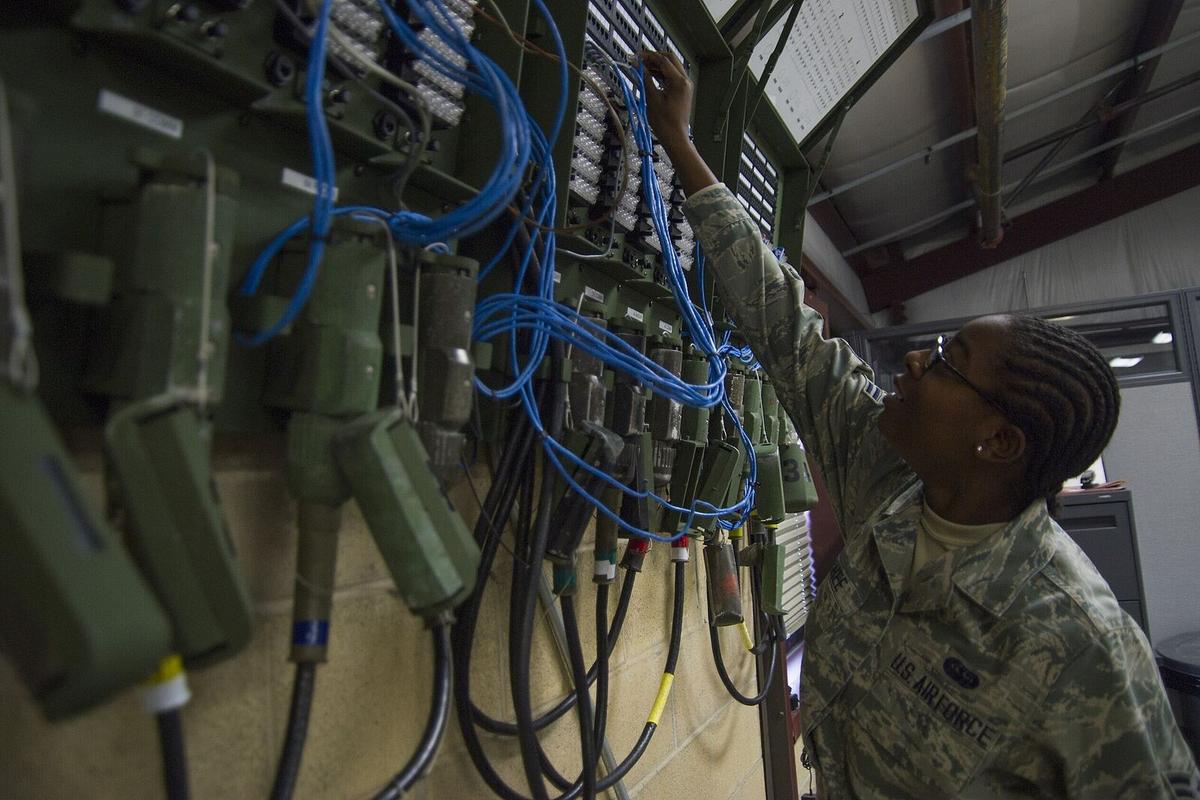 Every blue cable here ends at a socket, and a VLAN decides which network that socket belongs to. Photo by Staff Sgt. Renae Pittman, U.S. Air Force, public domain, via Wikimedia Commons.
What is a VLAN?
Start with what a switch does all day. Most traffic goes from one device to one other device, and the switch delivers it to the right socket. Some traffic is a broadcast: a message addressed to everyone, such as a new laptop asking for an address. The set of devices that hear each other's broadcasts is called a broadcast domain. For practical purposes, one broadcast domain is one local network.
A VLAN cuts one switch into several broadcast domains. The U.S. National Institute of Standards and Technology gives the plainest example in its guide to operational technology security: an 8-port switch set up as two VLANs, one for ports 1 to 4 and one for ports 5 to 8. All eight ports are on one device, but each port is only logically connected to the other ports in its own VLAN.
Nothing about the cable or the laptop changes. The laptop in port 2 has no idea it is in a VLAN. It only notices that it cannot see the device in port 6.
Each VLAN is identified by a number. You pick the numbers, and the names people give them ("VLAN 20, guests") are labels for humans.
How does a tag work?
One switch is easy: it knows which port is in which VLAN. The harder case is two switches, or a switch and a router, joined by a single cable that has to carry several VLANs at once. The receiving end needs to know which VLAN each piece of traffic belongs to.
The answer is a tag. Data crosses a wired network in units called frames, and each frame starts with a destination address, a source address and a type field. The standard that defines VLANs, IEEE 802.1Q, inserts 4 extra bytes after the source address. Its current edition, IEEE Std 802.1Q-2022, was published in December 2022.
The tag has two halves:
- The first 16 bits hold the value
0x8100. The IEEE's registry of these type values lists it as the customer VLAN tag defined in IEEE Std 802.1Q. It tells the receiver, "this frame is tagged, keep reading." - The second 16 bits hold a 3-bit priority, a 1-bit flag and a 12-bit VLAN ID.
Twelve bits can count from 0 to 4,095, which is 4,096 values. Two are reserved: 0 means no VLAN is specified, and 4,095 may not be used. That leaves VLAN numbers 1 through 4,094, which is the range switch makers document.
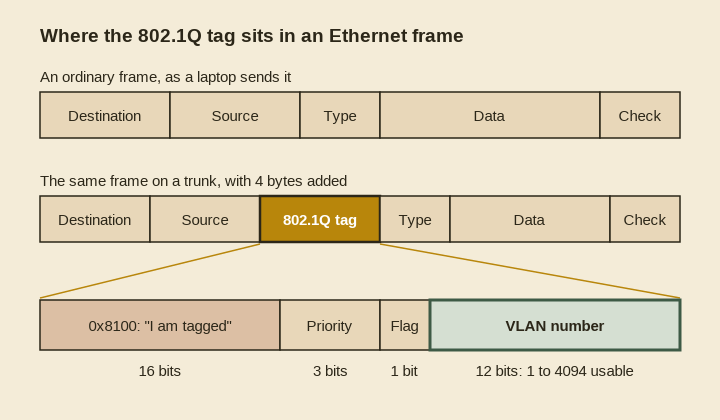 The tag is four bytes slipped into the frame, and twelve of its bits carry the VLAN number.
What are access ports and trunks?
Switch ports come in two kinds, and almost every VLAN mistake comes from mixing them up.
| Port kind | Carries | Frames on the wire | Plug in |
|---|---|---|---|
| Access | One VLAN | Untagged, ordinary frames | A laptop, printer, camera or phone |
| Trunk | Several VLANs | Tagged with the VLAN number | Another switch, a router, a Wi-Fi access point |
An access port belongs to one VLAN. A frame that arrives from the laptop has no tag. The switch notes which VLAN the port is in and treats the frame as part of it. When a frame leaves through an access port, it goes out as an ordinary frame.
A trunk port carries many VLANs over one cable. Frames cross it with their tags on, and the switch at the far end reads each tag to sort the frame into the right VLAN.
One wrinkle is the native VLAN. A trunk can be told that frames arriving with no tag belong to one particular VLAN. It is handy for older gear. It is also a place where traffic can land in a VLAN you did not intend, so write down which VLAN is native on each trunk and make sure both ends agree.
Watch out
A port left in trunk mode will accept frames for every VLAN it carries. If a wall socket in a hallway is a trunk, whoever plugs in there is offered all of your networks. Set every port that faces a person or a single device to access mode, in one VLAN.
How do two VLANs talk to each other?
They do not, unless something routes between them. Two VLANs are two networks, and traffic between networks goes through a router, exactly as traffic between your house and the internet does.
That has three consequences.
Each VLAN needs its own block of addresses. For example, VLAN 10 uses 192.168.10.0/24, VLAN 20 uses 192.168.20.0/24 and VLAN 30 uses 192.168.30.0/24. Matching the third number to the VLAN number is only a habit, but it saves a lot of squinting later. "The Magic Number: Subnetting in Your Head" shows how to read those blocks.
Each VLAN needs its own address service. A device asks for an address by broadcast, and broadcasts stay inside the VLAN. The router has to run a separate pool for each one. "DHCP: How Your Device Gets Its Address" explains the exchange.
The router decides what crosses. This is the part that matters for security, and a later section returns to it.
Many switches can also do the routing themselves. Makers call these layer 3 switches, after the layer of the network model that handles addresses and routes. "The OSI Model: Seven Layers, One Web Page" explains the layers.
What would a guest and a camera network look like at home?
Most home routers already offer a simple version of this idea. The guest network in "Home Wi-Fi: The Six Router Settings That Matter" is a second network that the router keeps away from the first, and for many households it is enough. "Smart Home Devices: Cameras, Doorbells and What They Leak" explains why cameras and gadgets belong away from your laptops.
VLANs are the next step up, for when you want more than two groups, or wired devices in the mix. You need three things that support them: a router, a managed switch (one with a settings page, as opposed to a plain one that only passes traffic), and Wi-Fi access points that can attach each Wi-Fi name to a VLAN. Check the maker's manual for each before you buy or change anything. Not every home device can do this.
Here is a plan for one house.
| VLAN | Name | Addresses | Who goes here | Allowed to reach |
|---|---|---|---|---|
| 10 | Home | 192.168.10.0/24 | Laptops, phones, the printer | Internet, and the camera recorder |
| 20 | Guests | 192.168.20.0/24 | Visitors' devices | Internet only |
| 30 | Cameras | 192.168.30.0/24 | Cameras, doorbell, smart plugs | Only what each device needs |
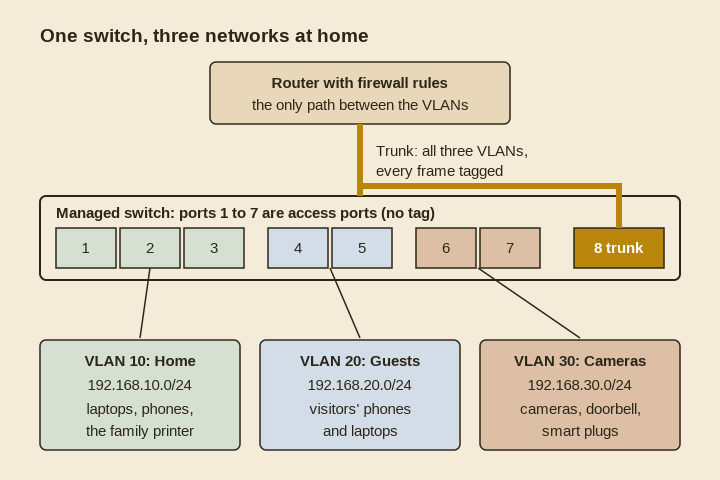 Seven access ports in three colors and one trunk to the router: three networks on one switch.
The order of work matters more than the menus, which differ on every product:
- Write the table first, on paper. Numbers, names, address blocks, who goes where.
- Create the VLANs on the router, each with its own address block and its own address pool.
- Make the port between router and switch a trunk on both ends.
- Set each remaining switch port to access mode in the VLAN for the device that plugs in there.
- Attach each Wi-Fi name to its VLAN.
- Write the rules for what may cross, then test them.
A company does the same thing with more rows. A 300-person office might have VLANs for staff computers, desk phones, printers, guest Wi-Fi, building cameras and the equipment that runs the network itself. The idea does not change with size. Only the table gets longer.
Tip
Test from the inside. Join the guest network and try to open the printer's page or the camera recorder. If it loads, the split is not doing its job yet.
Why is a VLAN alone not a firewall?
A VLAN separates. It does not inspect, and it does not decide. NIST draws the same line in its guidance: segmentation organizes devices into groups, and then separate isolation devices such as firewalls are configured to permit only the communication that has been explicitly authorized between those groups.
Three things follow from that.
Routing can undo the split. The moment a router joins your VLANs, it will pass traffic between them unless a rule says otherwise. What a given router does before you write any rules is up to its maker, so do not assume. A camera VLAN that can freely reach the home VLAN is a second address range and nothing more. The rules are the work, and "Firewalls, NAT and Port Forwarding" explains how such rules are written and read.
The separation is only as good as the configuration. A trunk where an access port should be, a forgotten native VLAN, or a switch reset to factory settings can quietly merge networks you thought were apart. CISA, the U.S. cybersecurity agency, recommends access control lists on VLANs, which are filters written to stop packets passing from one VLAN to another. Its one-page guide to segmentation draws firewalls between the segments and adds that segmentation is not the only tool for securing a network.
It is one switch. Every VLAN shares the same hardware, the same software and the same settings page. Whoever gets into that settings page controls all of them, so the switch's own password and updates count. For the same reason, NIST suggests that organizations consider physically separate switches, not VLANs, for their most critical devices, such as safety systems.
None of this is a reason to skip VLANs. A VLAN is the wall, and a wall is where you hang the door. It also shrinks each network so that a noisy or infected gadget has fewer neighbors to bother.
What to remember
- A VLAN makes one switch act like several separate networks. Devices in different VLANs cannot hear each other's broadcasts.
- The 802.1Q tag is 4 bytes added to a frame. Twelve of its bits are the VLAN number, from 1 to 4,094.
- Access ports carry one VLAN with no tag and face devices. Trunk ports carry several with tags and face other network gear.
- Each VLAN needs its own address block and its own address pool, and traffic between VLANs passes through a router.
- A VLAN separates but does not filter. The firewall rules on the router decide what may cross, and they need testing.
If your router's guest network already does what you need, use it and stop there. If you have outgrown it, draw the table before you touch a setting.
Sources (9)
- IEEE Standards Association, "IEEE 802.1Q-2022: IEEE Standard for Local and Metropolitan Area Networks, Bridges and Bridged Networks", published 22 December 2022
- IEEE 802.1 Working Group, "802.1Q-2022-Revision: Bridges and Bridged Networks"
- IEEE Registration Authority, "EtherType" public listing
- IETF, RFC 6325, "Routing Bridges (RBridges): Base Protocol Specification", section 4.1.1, July 2011
- IETF, RFC 7348, "Virtual eXtensible Local Area Network (VXLAN): A Framework for Overlaying Virtualized Layer 2 Networks over Layer 3 Networks", August 2014
- NIST, SP 800-82 Rev. 3, "Guide to Operational Technology (OT) Security", September 2023
- CISA, "Securing Network Infrastructure Devices"
- CISA, "Layering Network Security Through Segmentation", January 2022
- Juniper Networks, "Bridging and VLANs", Junos OS documentation